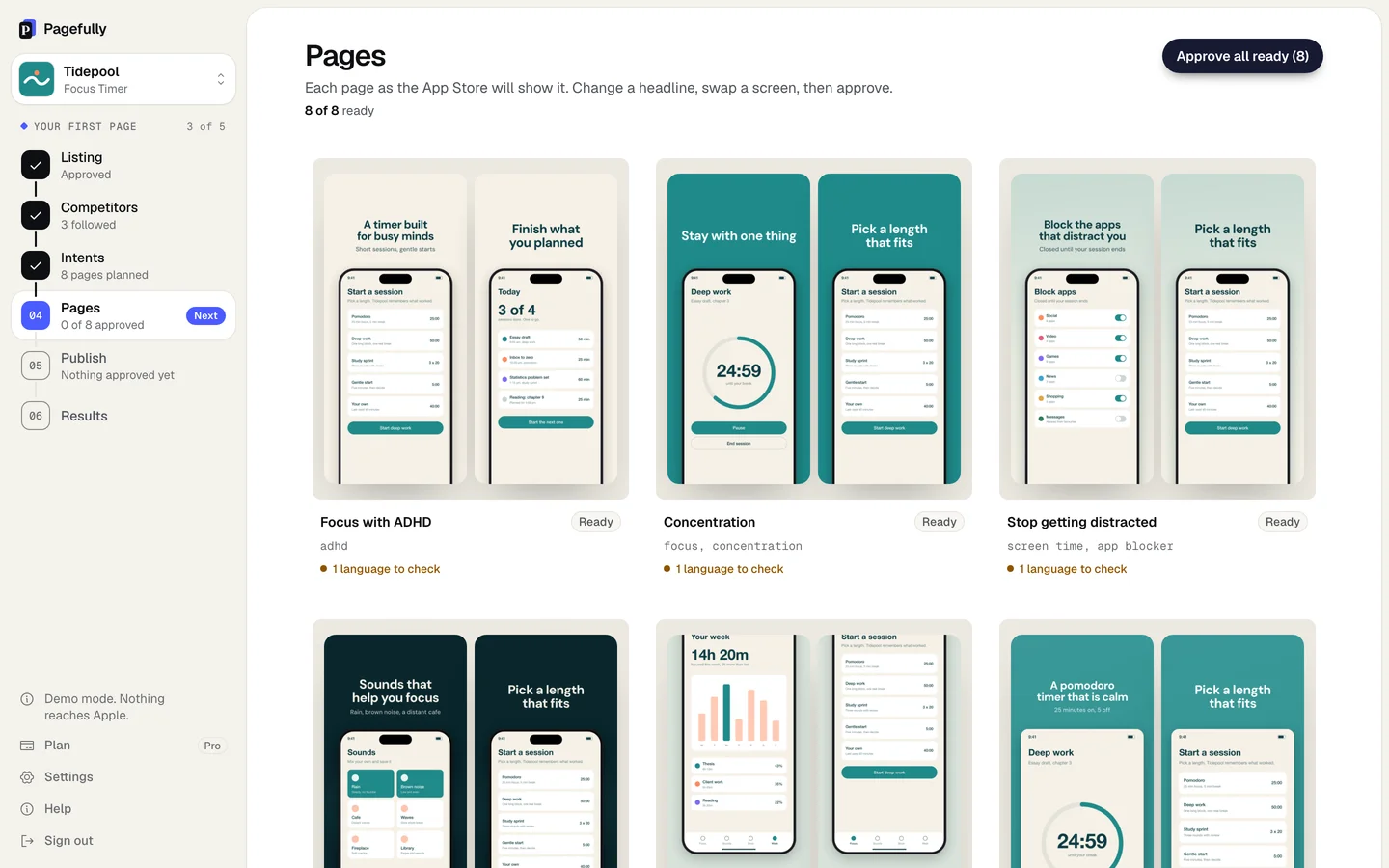
Have the right App Store screenshots for every search.
Pagefully creates a different version of your App Store listing for each search people find you by, with screenshots written for that search. You approve each one, and we send it to Apple.Pagefully creates custom App Store listings for each of your keywords and sends them to Apple when you approve.
See it for your app
AYour AppYour subtitleGet
Fall asleep faster
Now playing
Rain on a tent
Ocean at night
Box fan
Stay asleep all night
Timer
8:00
Fade out gently
Then stop
Box fan
Night forest
120 sounds for sleep
Sounds
Rain on a tent
Ocean at night
Box fan
Night forest
Distant thunder
Slow river
Sounds your baby knows
Sounds
Shushing
Heartbeat
Hair dryer
Car ride
Womb sounds
Soft static
Start it with one tap
Now playing
Shushing
Heartbeat
Hair dryer
A timer that fades out
Timer
45m
Fade out gently
Then stop
Hair dryer
Car ride
Sound to focus by
Now playing
Brown noise
Café murmur
Steady rain
Rain, café, brown noise
Sounds
Brown noise
Café murmur
Steady rain
Library
Train carriage
Deep hum
Work in timed sessions
Timer
25:00
Fade out gently
Then stop
Steady rain
Library
How it works
Effortlessly set up custom App Store listings for all your keywords.
Your keywords
sleep soundsPagewhite noise for babiesPagefocus soundsPagerain soundsPagesleep timerPage
01
We find the right pages
We analyze your listing, reviews and competitors to identify the right set of pages to build.
Default listing
Over 120 sounds
Sounds
Rain
Ocean
White noise
Forest
Fan
Fireplace
focus sounds
Sound to focus by
Now playing
Brown noise
Café murmur
Steady rain
02
We create the screenshots
Screenshots tailored to each search keyword, made to match your existing App Store listing.
Approved by youSent to App Store ConnectIn review with ApplePublished on the App Store
03
You review and approve
Look over each custom page and make edits if you need to. Approve it, and we send it to Apple to create custom listings for your keywords.
Two ways to work
Use the application, or your coding agent.
Whether you use the application or have your coding agent do it, your custom pages are ready in minutes.
pagefully.com
In your browser
Review and edit every page
See each page as the App Store will show it. Change a headline, swap a screenshot, then approve.
claude mcp add --transport http pagefully https://pagefully.com/api/mcp> Make App Store pages for my app with Pagefully✓ analyze_app read your listing✓ propose_plan planned a page for each search✓ generate_pages made your first page pagefully.com/apps/your-app/pagesHave a look. Nothing is sent to Apple until you approve.
From your coding agent
Or just ask your agent
Pagefully has an MCP server. Add it once, then ask for your pages in plain words.
Guaranteed to raise your conversion rate, or your money back.
Since Apple introduced , they have been one of the most effective but most underused tactics in App Store optimization. Others have had success, and we know you will too.
+2.5 pts1Average conversion gainApple’s own figure for people sent to a custom product page.
+8.6%2More installsOne page for one kind of search, in organic search.
+20%4Higher conversionA seasonal page for visitors arriving from a website.
+33%4Higher conversionA page made for one audience, in a campaign aimed at them.
+83%3More installsAn ad led by one feature the default page does not lead with.
−39%5Cost per installAds that led with a real difference from a competitor.
Our guarantee. Keep the pages we built live for two months. If they convert lower than your default page, we refund your Pack or your latest month.
Another version of your app’s own App Store page, focused on one feature or audience. It is not a website: it lives in the App Store, under your app, with its own screenshots, promotional text and link. Your default page stays as it is.
What do I get when I look up my app?
A preview from your public listing, before you sign up: your app as people find it today, three pages planned for it with a reason for each, and one of them designed on your own screenshots. Sign up and that page is yours to edit. Connect App Store Connect when you want your real keywords and to send a page to Apple.
Do I need to run ads?
No. A page can be shown in search for keywords from your latest approved version, and every page has its own link to share anywhere. Apple Ads is one more place to use it, not a requirement.
Will this get me more visibility?
Not by itself. A page doesn’t add keywords or improve your rankings: it gives the people who already find you a more relevant first look. Apple shows a search page only once it is approved and visible.
Find your first page.
Search for your app and see the pages we would make for it. No account needed.