Business app screenshots with press logos
A publication’s name or logo. A publication’s name lends its reputation to the app.
From the top 100 free Business apps on the US App Store, read on October 9, 2026. Screenshots are the developers’ own, shown from Apple’s servers with a link to each app.
The numbers
3 of the 554 Business screenshots read (1%) do this, across 3 of the top 100 apps (3%). 0 of the top ten do it (0%), against 3 of the other 90 (3%): the top ten do it about as often as the rest. Of the 23 categories read so far, Business is 7th for this. It is most common in News (12% of apps) and least common in Photo & Video (0%).
All 3 examples from the chart.
Every one of the Business app screenshots with press logos on the chart, the highest app first.

“Best payroll for hourly teams”

“The #1 Digital Business Card App”
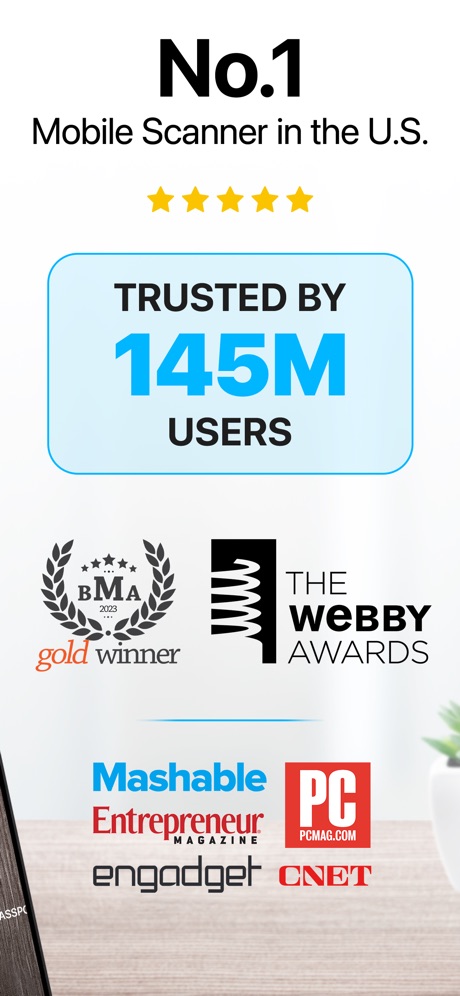
“No.1”
Real headline examples, word for word.
The words on all 3 that carry any, as each app wrote them.
“Best payroll for hourly teams”
Best payroll for small businessHomebase: Employee Scheduling · #49 · screenshot 2“The #1 Digital Business Card App”
Blinq: Digital Business Card · #61 · screenshot 1“No.1”
Mobile Scanner in the U.S.iScanner: PDF Document Scanner · #66 · screenshot 2
Top ten Business apps that do it.
None of the top ten do. The highest app on the chart that does is Homebase: Employee Scheduling, at #49.
The same tactic in other categories.
| Category | Apps that do it | Screenshots | Top ten |
|---|---|---|---|
| News | 12% 12 of 98 | 3% 17 of 517 | 2 of 10 |
| Finance | 9% 9 of 100 | 2% 11 of 581 | 0 of 10 |
| Health & Fitness | 8% 8 of 100 | 2% 9 of 574 | 0 of 10 |
| Productivity | 7% 7 of 99 | 1% 7 of 551 | 0 of 10 |
| Education | 7% 7 of 100 | 1% 8 of 555 | 0 of 10 |
| Social Networking | 7% 7 of 100 | 2% 11 of 554 | 0 of 10 |
| Business | 3% 3 of 100 | 1% 3 of 554 | 0 of 10 |
| Entertainment | 3% 3 of 100 | 1% 3 of 544 | 0 of 10 |
| Lifestyle | 3% 3 of 100 | 1% 3 of 556 | 0 of 10 |
| Medical | 3% 3 of 100 | 1% 4 of 548 | 0 of 10 |
| Shopping | 3% 3 of 100 | 1% 3 of 562 | 0 of 10 |
| Travel | 3% 3 of 100 | 1% 3 of 561 | 0 of 10 |
| Graphics & Design | 2% 2 of 99 | under 1% 2 of 564 | 0 of 10 |
| Navigation | 2% 2 of 99 | under 1% 2 of 566 | 0 of 10 |
| Reference | 2% 2 of 100 | under 1% 2 of 566 | 1 of 10 |
| Utilities | 2% 2 of 100 | under 1% 2 of 549 | 0 of 10 |
| Weather | 2% 2 of 100 | 1% 3 of 555 | 1 of 10 |
| Developer Tools | 1% 1 of 100 | under 1% 2 of 507 | 0 of 10 |
| Music | 1% 1 of 100 | under 1% 1 of 550 | 0 of 10 |
| Sports | 1% 1 of 100 | under 1% 1 of 558 | 0 of 10 |
| Food & Drink | 0% 0 of 100 | 0% 0 of 540 | 0 of 10 |
| Games | 0% 0 of 100 | 0% 0 of 567 | 0 of 10 |
| Photo & Video | 0% 0 of 100 | 0% 0 of 566 | 0 of 10 |
Related tactics.
Often on the same screenshot
- Ranking claim100% of these screenshots, against 3% of all Business screenshots
- Star rating shown100% of these screenshots, against 4% of all Business screenshots
- Phone cut off at the foot100% of these screenshots, against 21% of all Business screenshots
- Headline readable at thumbnail size100% of these screenshots, against 29% of all Business screenshots
- Light100% of these screenshots, against 71% of all Business screenshots
- Plain tone100% of these screenshots, against 80% of all Business screenshots
More in proof
Questions, answered from the chart.
How many top Business apps have App Store screenshots with press logos?
Which Business apps have App Store screenshots with press logos?
Should my Business app have App Store screenshots with press logos?
See your own app against this.
Pagefully reads your screenshots the same way, and makes a custom product page for each search people type, from your real screens.
Preview your pages