Best custom product page tools (2026)
Disclosure: we make Pagefully, one of the tools listed here.
There are four ways to create App Store custom product pages: by hand in App Store Connect, with a dedicated tool like Pagefully, with a screenshot design tool, or with scripts on the App Store Connect API. The right one depends on how many pages you need and how often your app changes. Two or three pages that rarely change are fine by hand; ten or more, or pages that must track every app update, need a tool or a script.
How do the options compare?
The table lists each option with what it does, what it costs as of October 2026 (read from each tool’s own pricing page, linked in the sources), and who it suits. Apple sets the frame for all of them: up to 70 custom product pages per app, each with its own screenshots, app previews and promotional text, each reviewed before it goes live.1
| Option | What it does | Cost (as of October 2026) | Best for |
|---|---|---|---|
| App Store Connect (by hand) | Create each page in the browser, upload screenshots you designed elsewhere, assign keywords, submit for review | Free | 1 to 3 pages you rarely change |
| Pagefully | Plans pages from your listing, designs each page’s screenshots from your real screens in every size, sends the page to App Store Connect when you approve it, refreshes pages when your app changes | Free for 1 page; Pack $49 once for 10 pages; Pro from $29/month billed yearly ($59 monthly) for up to 70. Per app. | Several pages, or pages that must stay current |
| AppScreens | Screenshot design editor with templates, localization, and one-click upload of screenshot sets to App Store Connect, including custom product page variants | Free tier; Pro $99/year ($8.25/month); Scale $180/year | Designing your own screenshots and uploading them without leaving the editor |
| AppDrift | Screenshot editor with AI backgrounds and translation, keyword tracking, and screenshot upload to App Store Connect on paid plans | Free tier; Basic $9.99/month or $99/year; Pro $19.99/month; Studio $39.99/month | Indie developers who want a screenshot editor and light ASO tracking in one |
| AppMockUp Studio | Free browser editor with 600+ templates; exports image files in store sizes | Free | Designing screenshots at no cost, then uploading by hand |
| AppTweak | ASO suite: keyword tracking, and a CPP explorer that shows which custom product pages competitors run in search and in Apple Ads | Essential $79/month ($949/year); Grow $299/month; Grow Plus $549/month; Enterprise by contact. CPP explorer and CPP keywords on its higher tiers | Growth teams that research competitors’ pages before making their own |
| SplitMetrics Acquire | Apple Ads management with a CPP dashboard and bulk ad creation using your existing custom product pages | Starter free up to $25,000 monthly ad spend; Enterprise by contact | Teams running Apple Ads who want to assign and compare pages per campaign |
| App Store Connect API (scripts) | Create pages, upload screenshots, assign keywords and submit for review with your own code | Free, plus your engineering time | Teams with many apps and engineers to spare |
When is App Store Connect by hand the right choice?
When you need two or three pages and do not expect to change them often. It is free, it is Apple’s own tool, and nothing gives you more control over a single page. You create a page under your app’s App Store tab, upload screenshots and app previews for each device size, write up to 170 characters of promotional text, choose keywords from your latest approved version, and submit the page for review.2 The complete guide walks through each screen.
Where it stops: App Store Connect stores what you upload, and that is all. You design the screenshots elsewhere, in every size, for every page and language. Past a handful of pages the uploads become the job, every app update that changes a screen means redoing each page, and nothing helps you choose which pages to make, which is the decision that matters most.
When is Pagefully the right choice?
When you want several pages without designing and uploading each one yourself, or when your pages need to keep up with your app. Paste your App Store link and Pagefully plans three pages with a reason for each, then designs one from your real screens in every size Apple needs, before you sign up. You edit it, approve it, and Pagefully sends it to App Store Connect through your App Manager key. On Pro, pages are redrawn when your app changes, with recommendations on what to fix or add, alerts when up to five competitors change their pages, and localization. How it works shows each step.
Pricing is per app: one page free, the Pack at $49 once for 10 live pages with two revisions each and a competitor snapshot, or Pro at $29 a month billed yearly ($59 monthly) for up to 70 pages. Pages stay live if you stop paying. Details on pricing.
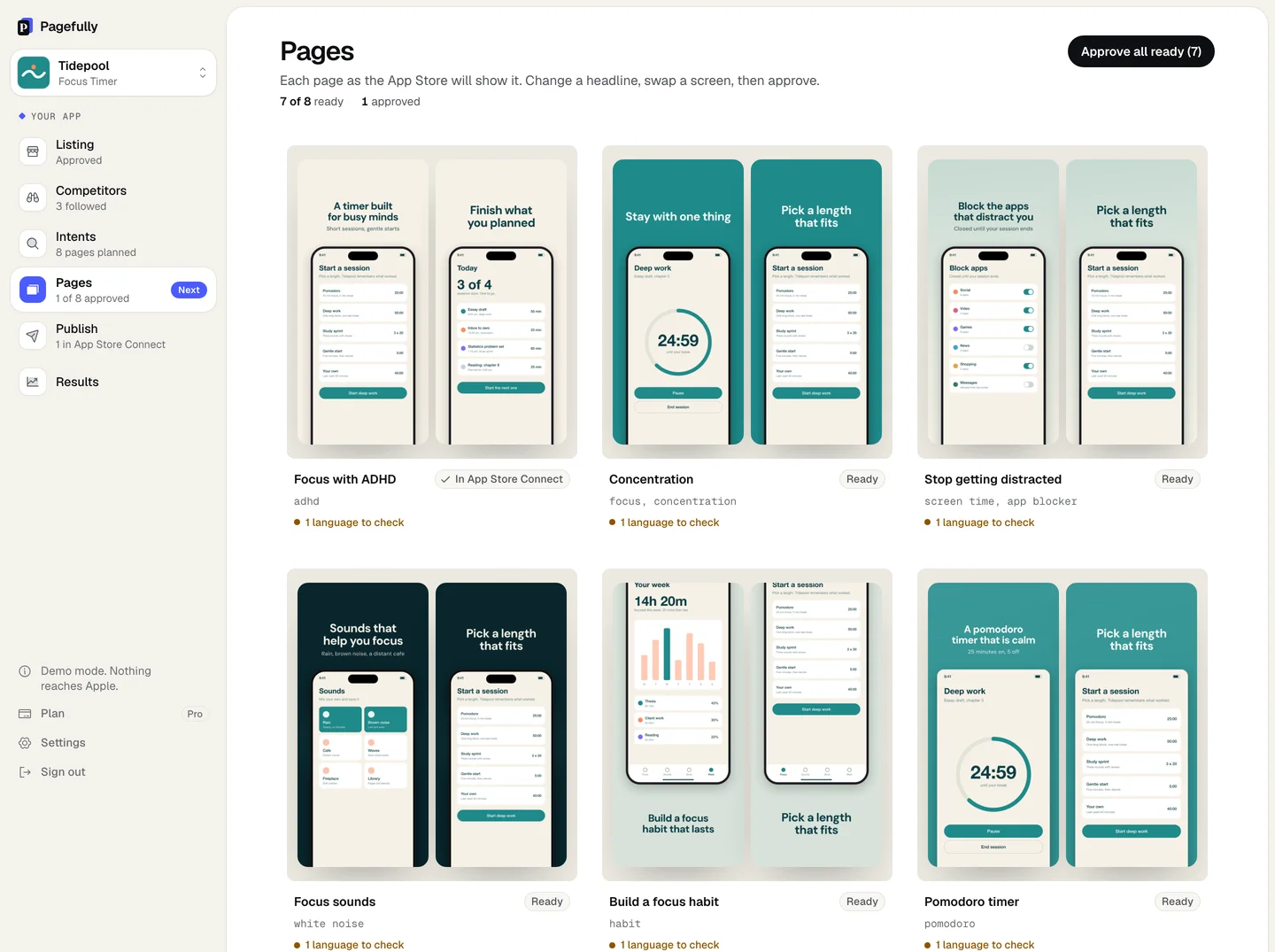
Where it stops: Pagefully makes pages from the screens your app already has, so it is not a tool for new artwork or illustration. It does not run Apple Ads, and it does not read each page’s results from Apple: App Store Connect’s App Analytics reports a page’s views and downloads. For pixel-level control of one page, a screenshot editor gives you more.
When is a screenshot design tool the right choice?
When the screenshots are the part you want to do yourself. These editors give you device frames, templates, text and backgrounds, and export every size the App Store needs. They are good at design and localization; most do not know what a custom product page is, so you still create the page and upload the files in App Store Connect.
AppScreens is the closest to a custom product page workflow. Its paid plans upload screenshot sets to App Store Connect in one click, and it says the same flow covers custom product page and product page optimization variants. Free to try with watermarks; Pro is $99 a year and Scale $180 a year.3 AppDrift pairs a free editor, with AI backgrounds and translation, with keyword tracking; App Store Connect upload starts on its Basic plan at $9.99 a month or $99 a year.4 AppMockUp Studio is free, needs no account, and exports files you upload yourself.5 Also worth knowing: Screenshots.pro, free with paid plans at $19 and $49 a month;6 Previewed for 3D mockups and video, free at 720p, $9.99 once or $19 a month;7 and Appure, which translates captions into 26 languages, free for one app or $9 a month for ten.8
Where they stop: each page is a manual project. You decide what the page is for, design its set, export, upload and submit, then repeat for the next page and after every app update that changes a screen.
When is an ASO suite the right choice?
When you want to see what competitors do with custom product pages, or run Apple Ads against your own pages. These suites do not make pages. They report on them.
AppTweak’s CPP explorer shows which custom product pages competitors run as Apple Ads variations and which keywords show their pages in search, with a timeline of changes. Plans start at $79 a month, with the CPP explorer and CPP keyword features on its higher tiers and Enterprise by contact.9 SplitMetrics Acquire manages Apple Ads campaigns with a CPP dashboard that compares each page against the default across campaigns and creates ads in bulk from your existing pages. Starter is free up to $25,000 of monthly ad spend; Enterprise, which adds CPP experiments, is by contact.10 MobileAction’s ASO Intelligence plans run from $15 a month, with its custom product page explorer and organic CPP keyword research on the Pro plan at $239 a month; its separate CPP Intelligence product is by contact.11
Where they stop: you still need the pages. An ASO suite tells you a competitor has a page for “sleep sounds” and how your ad group converts; something else has to design, upload and submit the page.
When are scripts on the App Store Connect API the right choice?
When you have many apps, an engineer, and a pipeline that already produces screenshots. The App Store Connect API has endpoints for the page, its versions and localizations, the screenshot and preview uploads, the keyword assignments, and the review submission.12 A script can make 20 pages in the time App Store Connect takes for one, and rerun after every release.
Where it stops: the API uploads what you give it. You still need designed screenshots in every size, a decision about which pages to make, and someone to maintain the script when Apple changes the API, as it did by deprecating the screenshot set endpoints in favour of its asset library in version 4.5.1. The order of calls, the gotchas and a code sample are in how to automate custom product pages.
How do you choose?
Count the pages, then count the app updates. Four questions settle it.
- How many pages do you need this year?One to three: App Store Connect by hand, with a free screenshot editor if you need one. Four to ten: Pagefully’s Pack, or a screenshot tool that uploads. More, across several apps: Pagefully Pro per app, or scripts on the API.
- How often does your app’s UI change?If a release changes screens every month, every page needs redrawing every month. Pagefully Pro refreshes pages; by hand or with an editor you redo each page; with scripts you rerun the pipeline.
- Do you run Apple Ads?If yes, add SplitMetrics Acquire or an ASO suite to assign pages to ad groups and compare them. If no, you do not need one to start: pages work in search and from links too.
- Who does the work?A designer: a screenshot editor. An engineer: the API. Nobody with time: Pagefully, which starts from your real screens.
Whichever you pick, the requirements and screenshot sizes are the same, and Apple reviews every page before it goes live.2
Sources
- 1Apple, Custom product pages
- 2Apple, Configure multiple product page versions
- 3AppScreens, pricing
- 4AppDrift, pricing
- 5AppMockUp Studio
- 6Screenshots.pro, pricing
- 7Previewed, pricing
- 8Appure, pricing
- 9AppTweak, pricing
- 10SplitMetrics, pricing
- 11MobileAction, pricing
- 12Apple, App Store Connect API: custom product pages
Questions people ask
Is there a free way to make custom product pages?
Do I need an ASO suite to use custom product pages?
Can a screenshot design tool send pages to App Store Connect?
What does Pagefully do that App Store Connect does not?
How many custom product pages can an app have?
See your first page.
Look up your app. In about a minute you see three pages planned for it and one designed on your own screenshots, before you sign up.