Medical app screenshots with a dark background
A dark picture overall. The App Store follows the device’s light or dark appearance, so a dark screenshot stands out in one and blends into the other.
From the top 100 free Medical apps on the US App Store, read on October 9, 2026. Screenshots are the developers’ own, shown from Apple’s servers with a link to each app.
The numbers
48 of the 548 Medical screenshots read (9%) do this, across 21 of the top 100 apps (21%). 2 of the top ten do it (20%), against 19 of the other 90 (21%): the top ten do it about as often as the rest. Of the 23 categories read so far, Medical is 21st for this. It is most common in Entertainment (79% of apps) and least common in Food & Drink (14%).
12 examples from the chart.
12 of the 48 Medical app screenshots with a dark background, one from each app, the highest on the chart first.

“Easily access your health information”

“Track your sleep therapy with your Resmed AirSense™ or AirCurve™ machine”

“Connect anytime, anywhere”

“Healthcare designed for you”

“Discover More About Your Dental Care.”

“The #1 pregnancy & baby app”

“Stay informed of local emergency activity in real time, sourced directly from 911 dispatch.”

“Your personalized dashboard”

“Manage your medication. Anytime. Anywhere.”

“Medical Images in the Palm of Your Hand”

“You're following”
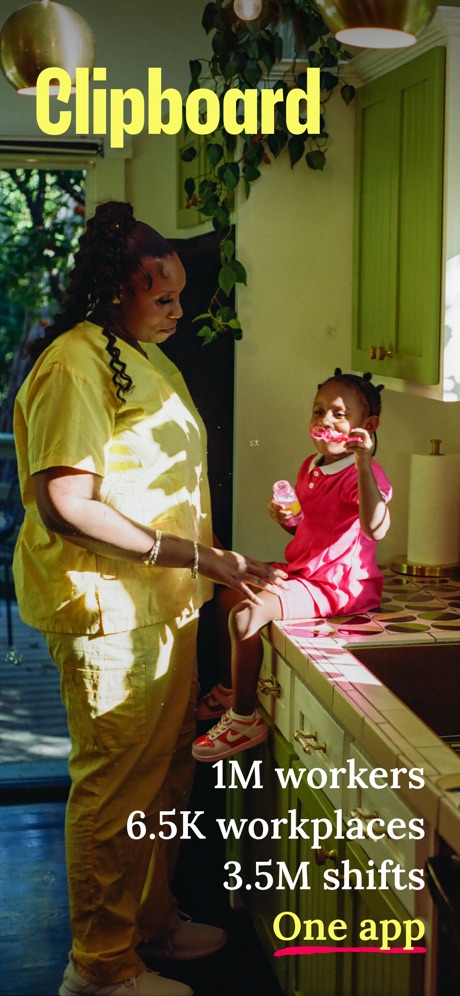
“Clipboard”
What these screenshots say, word for word.
The words on all 39 that carry any, as each app wrote them.
“Easily access your health information”
UnitedHealthcare · #4 · screenshot 1“Track your sleep therapy with your Resmed AirSense™ or AirCurve™ machine”
myAir™ by Resmed · #8 · screenshot 1“Connect anytime, anywhere”
Telehealth by SimplePractice · #12 · screenshot 3“Healthcare designed for you”
Hers: Women’s Healthcare · #31 · screenshot 1“Discover More About Your Dental Care.”
Aspen Dental Patient · #32 · screenshot 1“The #1 pregnancy & baby app”
BabyCenter Pregnancy Tracker · #41 · screenshot 1“Stay informed of local emergency activity in real time, sourced directly from 911 dispatch.”
PulsePoint Respond · #44 · screenshot 1“Your personalized dashboard”
Lilly Health™ · #50 · screenshot 2- Express Scripts® Pharmacy Benefit Services
“Manage your medication. Anytime. Anywhere.”
Express Scripts · #51 · screenshot 1 “Medical Images in the Palm of Your Hand”
Ambra · #53 · screenshot 1“You're following”
Dexcom Follow · #57 · screenshot 3“Clipboard”
1M workers 6.5K workplaces 3.5M shifts One appClipboard - Workers · #58 · screenshot 1“Anatomy 3D Atlas”
Anatomy 3D Atlas · #60 · screenshot 1“Get Virtual Care”
AdventHealth · #61 · screenshot 4“Unlock access to your pharmacy benefits.”
mobile appCVS Caremark · #68 · screenshot 1“Guided setup”
NightOwl Companion · #75 · screenshot 3“SECTIONAL and RADIOLOGICAL Anatomy”
Anatomy Learning - 3D Atlas · #76 · screenshot 3“World's #1 Snoring App”
15M+ Downloads App of the DaySnoreLab : Record Your Snoring · #78 · screenshot 1“GainwellGo™”
GainwellGo™ · #92 · screenshot 1“Bluetooth Connection”
Celeste+ · #96 · screenshot 1“Browse thousands anatomy illustrations”
Easy Anatomy 3D with Voice AI · #98 · screenshot 2“On-the-go resources to check coverage and manage care”
UnitedHealthcare · #4 · screenshot 3“Start your video call in one tap”
Telehealth by SimplePractice · #12 · screenshot 5“Convenient,”
discreet experienceHers: Women’s Healthcare · #31 · screenshot 2“Precise location of every AED”
plus colocated bleeding control kits, epinephrine and naloxone.PulsePoint Respond · #44 · screenshot 5“Find tips, healthy recipes and guided workouts in our content library”
Lilly Health™ · #50 · screenshot 6“Supports All Modalities and Imaging Types”
Ambra · #53 · screenshot 4“Scan a prescription for refill.”
CVS Caremark · #68 · screenshot 3“Capture your sleep”
NightOwl Companion · #75 · screenshot 5“TRACK YOUR”
• Snoring • Breathing • SleepSnoreLab : Record Your Snoring · #78 · screenshot 2“Sleep Tracking”
Celeste+ · #96 · screenshot 2“Clear, holistic health snapshot”
Hers: Women’s Healthcare · #31 · screenshot 4“Supplemental messages, images, and links to provide ongoing information and context.”
PulsePoint Respond · #44 · screenshot 6“Listen to Recordings”
SnoreLab : Record Your Snoring · #78 · screenshot 3“Cloud Analysis”
Celeste+ · #96 · screenshot 3“Doctor-developed Action Plan”
Hers: Women’s Healthcare · #31 · screenshot 6“Explore Remedies”
SnoreLab : Record Your Snoring · #78 · screenshot 4“Discover Your BreathFlow”
SnoreLab : Record Your Snoring · #78 · screenshot 5“Review Your Progress”
SnoreLab : Record Your Snoring · #78 · screenshot 6
Top ten Medical apps that do it.
- #4UnitedHealthcare2 of its 6 screenshots
- #8myAir™ by Resmed1 of its 6 screenshots
The same tactic in other categories.
| Category | Apps that do it | Screenshots | Top ten |
|---|---|---|---|
| Entertainment | 79% 79 of 100 | 69% 376 of 544 | 10 of 10 |
| Music | 71% 71 of 100 | 57% 311 of 550 | 10 of 10 |
| Weather | 70% 70 of 100 | 48% 266 of 555 | 7 of 10 |
| Sports | 67% 67 of 100 | 52% 288 of 558 | 10 of 10 |
| Developer Tools | 55% 55 of 100 | 41% 208 of 507 | 4 of 10 |
| Photo & Video | 55% 55 of 100 | 41% 232 of 566 | 5 of 10 |
| Graphics & Design | 54% 53 of 99 | 39% 220 of 564 | 6 of 10 |
| News | 50% 49 of 98 | 34% 177 of 517 | 5 of 10 |
| Navigation | 48% 48 of 99 | 26% 146 of 566 | 3 of 10 |
| Social Networking | 45% 45 of 100 | 28% 157 of 554 | 3 of 10 |
| Games | 44% 44 of 100 | 26% 147 of 567 | 5 of 10 |
| Utilities | 44% 44 of 100 | 29% 157 of 549 | 3 of 10 |
| Reference | 41% 41 of 100 | 24% 138 of 566 | 4 of 10 |
| Travel | 38% 38 of 100 | 16% 87 of 561 | 5 of 10 |
| Health & Fitness | 36% 36 of 100 | 23% 134 of 574 | 6 of 10 |
| Finance | 34% 34 of 100 | 15% 89 of 581 | 4 of 10 |
| Productivity | 33% 33 of 99 | 16% 87 of 551 | 2 of 10 |
| Lifestyle | 33% 33 of 100 | 18% 98 of 556 | 3 of 10 |
| Education | 29% 29 of 100 | 13% 73 of 555 | 0 of 10 |
| Shopping | 22% 22 of 100 | 9% 50 of 562 | 1 of 10 |
| Business | 21% 21 of 100 | 6% 32 of 554 | 2 of 10 |
| Medical | 21% 21 of 100 | 9% 48 of 548 | 2 of 10 |
| Food & Drink | 14% 14 of 100 | 6% 35 of 540 | 1 of 10 |
Related tactics.
Often on the same screenshot
- Headline under five words50% of these screenshots, against 35% of all Medical screenshots
- Teal33% of these screenshots, against 18% of all Medical screenshots
- Red19% of these screenshots, against 4% of all Medical screenshots
- A photograph44% of these screenshots, against 31% of all Medical screenshots
- Background is the icon’s colour58% of these screenshots, against 46% of all Medical screenshots
- Gradient background46% of these screenshots, against 33% of all Medical screenshots
More in look
- Light85%
- Background is the icon’s colour68%
- Solid background68%
- Gradient background54%
- Black, white or grey46%
- Low contrast words41%
- Blue40%
- A word in a different colour31%
- Teal30%
- Orange27%
- High contrast words20%
- Pattern or texture19%
- Rounded headline type15%
- The app itself is the background15%
- Serif headline12%
- Photo background11%
- Pink11%
- Red11%
- Green10%
- Purple9%
- Yellow6%
- Condensed or display type3%
Questions, answered from the chart.
How many top Medical apps have App Store screenshots with a dark background?
Which Medical apps have App Store screenshots with a dark background?
Should my Medical app have App Store screenshots with a dark background?
See your own app against this.
Pagefully reads your screenshots the same way, and makes a custom product page for each search people type, from your real screens.
Preview your pages