Music app screenshots with an angled phone
The device is tilted or in perspective. A tilted device adds depth to the picture.
From the top 100 free Music apps on the US App Store, read on October 9, 2026. Screenshots are the developers’ own, shown from Apple’s servers with a link to each app.
The numbers
33 of the 550 Music screenshots read (6%) do this, across 26 of the top 100 apps (26%). 0 of the top ten do it (0%), against 26 of the other 90 (29%): the top ten do it less than the rest. Of the 23 categories read so far, Music is 2nd for this. It is most common in Food & Drink (30% of apps) and least common in Games (5%).
12 examples from the chart.
12 of the 33 Music app screenshots with an angled phone, one from each app, the highest on the chart first.

“Play Music”

“LISTEN”

“Connect to two devices”

“Immersive Music Listening”

“Piano made simple”

“Import from Video or Recorded Sound”


“Trusted by millions of DJs”
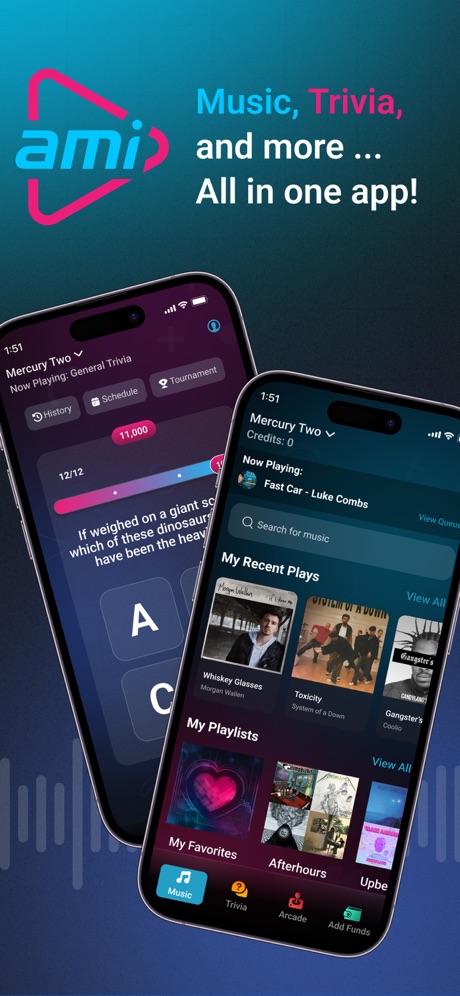
“Music, Trivia,”

“Play Songs You Love”


“RINGTONE ANY SONG”
What these screenshots say, word for word.
The words on all 30 that carry any, as each app wrote them.
“Play Music”
All your songs in one placeMusic : Cloud Music Streaming · #12 · screenshot 1“LISTEN”
Personalized listening.Pandora: Music & Podcasts · #15 · screenshot 1“Connect to two devices”
Shokz · #17 · screenshot 3“Immersive Music Listening”
Tunecho Music-Play Offline · #18 · screenshot 3“Piano made simple”
Play. Learn. Now. Anywhere.Piano: Keyboard Lessons & Game · #24 · screenshot 1“Import from Video or Recorded Sound”
Musiboot: Get Lossless Music · #27 · screenshot 1“Trusted by millions of DJs”
“Best DJ software ever”djay - DJ App & AI Mixer · #36 · screenshot 3“Music, Trivia,”
and more ...AMI Play · #37 · screenshot 1“Play Songs You Love”
Piano ٞ · #42 · screenshot 2“RINGTONE ANY SONG”
Ringtones for iphone: Ringtune · #44 · screenshot 1“Play along in”
real timeStrum - Play Guitar · #47 · screenshot 1“It works!”
Tried so many steps but its not working then I found this app! Its working again and I can recharge my phone again“Tried so many steps but its not working then I found this app! Its working again and I can recharge my phone again”Clear Wave · #52 · screenshot 2“Discover new music genres and more”
MusiPlayer - Music X Streaming · #55 · screenshot 4“Let curiosity no longer wait Find that song immediately”
Music Recognition- Song Finder · #57 · screenshot 1“Eject Water”
Speaker Cleaner: Eject Water · #61 · screenshot 2“Discover new music”
Musicana - Organizer & Player · #62 · screenshot 1“Music, news, talk & sports.”
Simple Radio - FM AM Stations · #64 · screenshot 1“MUSIC NEWS TALK & SPORTS”
Radio App - FM Radio Stations · #69 · screenshot 1“Sort Search Download”
Melodista Music Offline Player · #86 · screenshot 2“The Coolest Ringtones”
Ringtones: for iPhone · #88 · screenshot 1“Take Full Control From Any Mobile Device”
KaraFun: Karaoke, Battle, Quiz · #89 · screenshot 5“CarPlay Lyrics”
Lyrix: Dynamic Lyricsㅤ · #90 · screenshot 2“BOOST”
DJ SOUNDJBL PartyBox · #93 · screenshot 4“PERSONALIZATION”
We personalize what plays next, just for you.Pandora: Music & Podcasts · #15 · screenshot 3“Play AMI Trivia for FREE!”
AMI Play · #37 · screenshot 3“CLEAN YOUR SPEAKERS WITH ONE TAP!”
Clear Wave · #52 · screenshot 3“Search and play your favorites”
Musicana - Organizer & Player · #62 · screenshot 3“Simple Radio”
as simple as it getsSimple Radio - FM AM Stations · #64 · screenshot 2“500,000+”
Satisfied Users!Ringtones: for iPhone · #88 · screenshot 2“Discover more than 90,000 stations”
Simple Radio - FM AM Stations · #64 · screenshot 3
Top ten Music apps that do it.
None of the top ten do. The highest app on the chart that does is Music : Cloud Music Streaming, at #12.
The same tactic in other categories.
| Category | Apps that do it | Screenshots | Top ten |
|---|---|---|---|
| Food & Drink | 30% 30 of 100 | 10% 54 of 540 | 1 of 10 |
| Music | 26% 26 of 100 | 6% 33 of 550 | 0 of 10 |
| Finance | 24% 24 of 100 | 5% 30 of 581 | 1 of 10 |
| Social Networking | 23% 23 of 100 | 7% 41 of 554 | 2 of 10 |
| Business | 21% 21 of 100 | 5% 29 of 554 | 1 of 10 |
| Travel | 21% 21 of 100 | 5% 29 of 561 | 2 of 10 |
| Medical | 20% 20 of 100 | 6% 31 of 548 | 4 of 10 |
| Sports | 20% 20 of 100 | 5% 28 of 558 | 2 of 10 |
| Navigation | 19% 19 of 99 | 5% 28 of 566 | 1 of 10 |
| Entertainment | 19% 19 of 100 | 6% 30 of 544 | 0 of 10 |
| Utilities | 19% 19 of 100 | 5% 27 of 549 | 2 of 10 |
| Shopping | 18% 18 of 100 | 5% 29 of 562 | 3 of 10 |
| Graphics & Design | 17% 17 of 99 | 4% 24 of 564 | 2 of 10 |
| Lifestyle | 16% 16 of 100 | 4% 21 of 556 | 0 of 10 |
| Reference | 14% 14 of 100 | 3% 19 of 566 | 2 of 10 |
| News | 13% 13 of 98 | 3% 18 of 517 | 1 of 10 |
| Education | 13% 13 of 100 | 4% 21 of 555 | 2 of 10 |
| Productivity | 11% 11 of 99 | 3% 18 of 551 | 1 of 10 |
| Health & Fitness | 11% 11 of 100 | 3% 15 of 574 | 0 of 10 |
| Weather | 11% 11 of 100 | 4% 22 of 555 | 2 of 10 |
| Developer Tools | 9% 9 of 100 | 2% 10 of 507 | 1 of 10 |
| Photo & Video | 6% 6 of 100 | 1% 7 of 566 | 0 of 10 |
| Games | 5% 5 of 100 | 1% 6 of 567 | 0 of 10 |
Related tactics.
Often on the same screenshot
- Words aligned left30% of these screenshots, against 12% of all Music screenshots
- Two or more screens24% of these screenshots, against 7% of all Music screenshots
- Phone drawn100% of these screenshots, against 87% of all Music screenshots
- Headline under five words64% of these screenshots, against 51% of all Music screenshots
- Light36% of these screenshots, against 24% of all Music screenshots
- Has a subline30% of these screenshots, against 18% of all Music screenshots
More in layout
- Screen fills the picture98%
- Phone drawn95%
- Words at the top93%
- Whole phone shown87%
- A photograph86%
- Headline readable at thumbnail size72%
- Illustration or mascot71%
- A person in the picture59%
- Phone cut off at the foot44%
- Headline too small to read42%
- Arrows or callouts38%
- App icon shown37%
- Words aligned left31%
- No phone, bare screen27%
- Two or more screens26%
- Phone cut off at the head25%
- A hand holds the phone23%
- Zoomed detail of the UI22%
- Watch, iPad or Mac beside it21%
- Screen is small17%
- Words at the bottom17%
- No app screen at all16%
- Words over the screen6%
- Continues into the next screenshot1%
Questions, answered from the chart.
How many top Music apps have App Store screenshots with an angled phone?
Which Music apps have App Store screenshots with an angled phone?
Should my Music app have App Store screenshots with an angled phone?
See your own app against this.
Pagefully reads your screenshots the same way, and makes a custom product page for each search people type, from your real screens.
Preview your pages