Productivity app screenshots with an angled phone
The device is tilted or in perspective. A tilted device adds depth to the picture.
From the top 99 free Productivity apps on the US App Store, read on October 9, 2026. Screenshots are the developers’ own, shown from Apple’s servers with a link to each app.
The numbers
18 of the 551 Productivity screenshots read (3%) do this, across 11 of the top 99 apps (11%). 1 of the top ten do it (10%), against 10 of the other 89 (11%): the top ten do it about as often as the rest. Of the 23 categories read so far, Productivity is 18th for this. It is most common in Food & Drink (30% of apps) and least common in Games (5%).
12 examples from the chart.
12 of the 18 Productivity app screenshots with an angled phone, one from each app, the highest on the chart first.

“Greater security across your accounts”

“Get insights on your data”

“Enhance your storytelling”

“App Blocking”

“SocialLite”

“Confidently remember and organize your ideas”
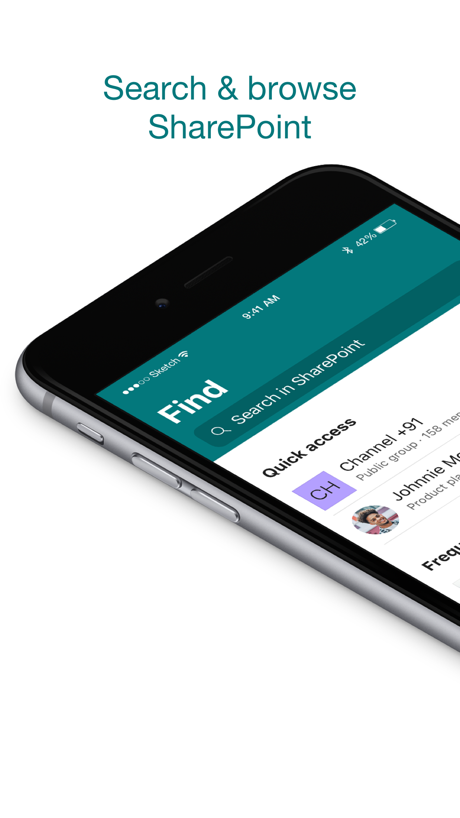
“Search & browse SharePoint”

“The power of privacy in your pocket”

“With WasteConnect+, never miss your collection day again!”

“Access websites and apps more privately”


“Instagram without Reels”
What these screenshots say, word for word.
The words on all 16 that carry any, as each app wrote them.
“Greater security across your accounts”
Microsoft Authenticator · #6 · screenshot 1“Get insights on your data”
Microsoft Excel · #19 · screenshot 1“Enhance your storytelling”
Microsoft PowerPoint · #27 · screenshot 1- BETTER
“App Blocking”
BePresent: Screen Time Control · #33 · screenshot 2 “SocialLite”
Trusted by 1M+ peopleSocialLite-Block Reels&Shorts · #50 · screenshot 1“Confidently remember and organize your ideas”
Microsoft OneNote · #67 · screenshot 1“Search & browse SharePoint”
Microsoft SharePoint · #84 · screenshot 1“The power of privacy in your pocket”
MEGA: Encrypted Cloud Storage · #87 · screenshot 1“With WasteConnect+, never miss your collection day again!”
View Schedule Pay Your Bill WasteWise Disposal GuideWasteConnect+ · #93 · screenshot 1“Access websites and apps more privately”
VPN Proxy Master - Super VPN · #94 · screenshot 3“Instagram without Reels”
SocialLite-Block Reels&Shorts · #50 · screenshot 2“Your sites, people, files, and more”
Microsoft SharePoint · #84 · screenshot 2“End-to-end encrypted cloud solutions”
MEGA: Encrypted Cloud Storage · #87 · screenshot 2“Choose between calendar and list view for collection schedules.”
WasteConnect+ · #93 · screenshot 2“Intelligent search results”
Microsoft SharePoint · #84 · screenshot 3“Stay updated”
Microsoft SharePoint · #84 · screenshot 5
Top ten Productivity apps that do it.
- #6Microsoft Authenticator1 of its 6 screenshots
The same tactic in other categories.
| Category | Apps that do it | Screenshots | Top ten |
|---|---|---|---|
| Food & Drink | 30% 30 of 100 | 10% 54 of 540 | 1 of 10 |
| Music | 26% 26 of 100 | 6% 33 of 550 | 0 of 10 |
| Finance | 24% 24 of 100 | 5% 30 of 581 | 1 of 10 |
| Social Networking | 23% 23 of 100 | 7% 41 of 554 | 2 of 10 |
| Business | 21% 21 of 100 | 5% 29 of 554 | 1 of 10 |
| Travel | 21% 21 of 100 | 5% 29 of 561 | 2 of 10 |
| Medical | 20% 20 of 100 | 6% 31 of 548 | 4 of 10 |
| Sports | 20% 20 of 100 | 5% 28 of 558 | 2 of 10 |
| Navigation | 19% 19 of 99 | 5% 28 of 566 | 1 of 10 |
| Entertainment | 19% 19 of 100 | 6% 30 of 544 | 0 of 10 |
| Utilities | 19% 19 of 100 | 5% 27 of 549 | 2 of 10 |
| Shopping | 18% 18 of 100 | 5% 29 of 562 | 3 of 10 |
| Graphics & Design | 17% 17 of 99 | 4% 24 of 564 | 2 of 10 |
| Lifestyle | 16% 16 of 100 | 4% 21 of 556 | 0 of 10 |
| Reference | 14% 14 of 100 | 3% 19 of 566 | 2 of 10 |
| News | 13% 13 of 98 | 3% 18 of 517 | 1 of 10 |
| Education | 13% 13 of 100 | 4% 21 of 555 | 2 of 10 |
| Productivity | 11% 11 of 99 | 3% 18 of 551 | 1 of 10 |
| Health & Fitness | 11% 11 of 100 | 3% 15 of 574 | 0 of 10 |
| Weather | 11% 11 of 100 | 4% 22 of 555 | 2 of 10 |
| Developer Tools | 9% 9 of 100 | 2% 10 of 507 | 1 of 10 |
| Photo & Video | 6% 6 of 100 | 1% 7 of 566 | 0 of 10 |
| Games | 5% 5 of 100 | 1% 6 of 567 | 0 of 10 |
Related tactics.
Often on the same screenshot
- Photo background28% of these screenshots, against 8% of all Productivity screenshots
- Screen is small22% of these screenshots, against 3% of all Productivity screenshots
- Leads with trust22% of these screenshots, against 6% of all Productivity screenshots
- Words aligned left28% of these screenshots, against 13% of all Productivity screenshots
- Red17% of these screenshots, against 3% of all Productivity screenshots
- Illustration or mascot44% of these screenshots, against 32% of all Productivity screenshots
More in layout
- Screen fills the picture100%
- Phone drawn99%
- Words at the top98%
- Whole phone shown91%
- A photograph76%
- Illustration or mascot73%
- Headline readable at thumbnail size72%
- A person in the picture63%
- Headline too small to read59%
- Phone cut off at the foot53%
- App icon shown52%
- Arrows or callouts45%
- Words aligned left26%
- No app screen at all23%
- No phone, bare screen20%
- Two or more screens20%
- Phone cut off at the head19%
- Zoomed detail of the UI17%
- Screen is small15%
- Watch, iPad or Mac beside it13%
- A hand holds the phone12%
- Words at the bottom12%
- Words over the screen7%
Questions, answered from the chart.
How many top Productivity apps have App Store screenshots with an angled phone?
Which Productivity apps have App Store screenshots with an angled phone?
Should my Productivity app have App Store screenshots with an angled phone?
See your own app against this.
Pagefully reads your screenshots the same way, and makes a custom product page for each search people type, from your real screens.
Preview your pages