Productivity app screenshots with large headlines
The headline is at least a twelfth of the picture’s height. Screenshots are shown small in search results, where only large type can be read.
From the top 99 free Productivity apps on the US App Store, read on October 9, 2026. Screenshots are the developers’ own, shown from Apple’s servers with a link to each app.
The numbers
155 of the 551 Productivity screenshots read (28%) do this, across 71 of the top 99 apps (72%). 4 of the top ten do it (40%), against 67 of the other 89 (75%): the top ten do it less than the rest. Of the 23 categories read so far, Productivity is 8th for this. It is most common in Food & Drink (84% of apps) and least common in Weather (48%).
12 examples from the chart.
12 of the 155 Productivity app screenshots with large headlines, one from each app, the highest on the chart first.
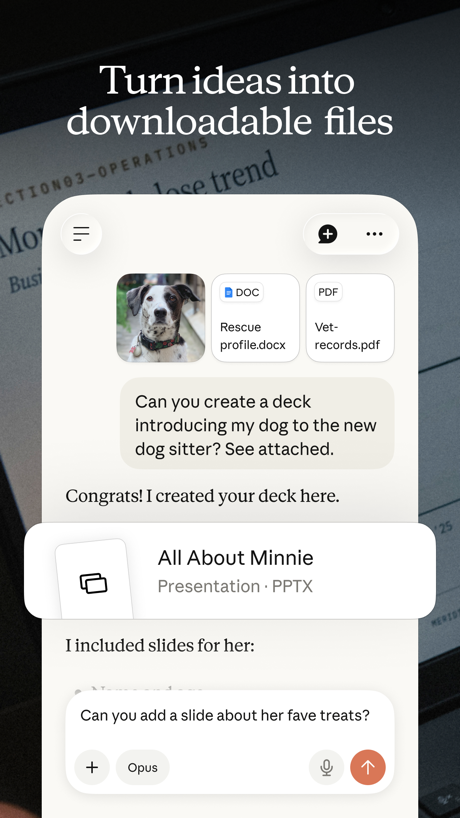
“Turn ideas into downloadable files”

“Get the best of Gmail on iPhone”

“Greater security across your accounts”

“Quickly find files and information”

“Comes back finished”

“One tap connect to secure your privacy”

“Take and make the call”

“Get insights on your data”

“Create and review presentations, now also in dark mode”

“Designed to simplify your life”

“Get set up in minutes”

“A new home for photos”
What these screenshots say, word for word.
The words on 40 of the 155 that carry any, as each app wrote them.
“Turn ideas into downloadable files”
Claude by Anthropic · #4 · screenshot 5“Get the best of Gmail on iPhone”
Gmail - Email by Google · #5 · screenshot 1“Greater security across your accounts”
Microsoft Authenticator · #6 · screenshot 1“Quickly find files and information”
Microsoft Copilot · #7 · screenshot 6“Comes back finished”
Grok Bot · #12 · screenshot 5“One tap connect to secure your privacy”
VPN - Super Unlimited Proxy · #15 · screenshot 3“Take and make the call”
Link to Windows · #18 · screenshot 1“Get insights on your data”
Microsoft Excel · #19 · screenshot 1“Create and review presentations, now also in dark mode”
Google Slides · #20 · screenshot 4“Designed to simplify your life”
Yahoo Mail: Your Email & Inbox · #21 · screenshot 1“Get set up in minutes”
HP · #22 · screenshot 2“A new home for photos”
Microsoft OneDrive · #23 · screenshot 1“EFFORTLESSLY MANAGE YOUR NETWORK”
Smart Home Manager · #24 · screenshot 2“One Tap”
Secure Your PrivacyVPN - Fast & Secure VPN ™ · #26 · screenshot 1- Dropbox
“Save and organize your files securely”
Dropbox: Cloud Storage Backup · #28 · screenshot 1 “Search like never before”
Perplexity - AI Search & Chat · #31 · screenshot 1“Add accounts in seconds”
ID.me Authenticator · #32 · screenshot 3- BETTER
“App Blocking”
BePresent: Screen Time Control · #33 · screenshot 2 “Create podcast-style overviews with your AI research assistant 🤖”
The new app is hereGemini Notebook · #34 · screenshot 1“Tap to Record Get Instant Summaries”
Summary - AI Note Taker · #35 · screenshot 2“YOUR AI ASSISTANT”
INTO THE UNKNOWNDeepSeek - AI Assistant · #36 · screenshot 1- customize your
“Home Screen”
Widgetsmith · #38 · screenshot 1 “Choose from 200+ Voices”
Speechify – Text to Speech PDF · #39 · screenshot 2“Trusted by 40 million people every day”
Grammarly: AI Keyboard & Voice · #40 · screenshot 1“No-Logs Policy Verified”
Assessed by one of the Big Four audit firmsX-VPN: VPN Fast & Secure · #41 · screenshot 1“See who's selling your data.”
We scan broker sites for your home address, SSN and other personal information.Cloaked: Protect your privacy · #42 · screenshot 2“1024GB of Available Storage Space”
TeraBox: 1TB Cloud & AI Space · #45 · screenshot 1“All AI Assistants in one app”
Chatbot AI Assistant - Genie · #47 · screenshot 1“Your life, beautifully organized.”
Notion: Notes, Tasks, AI · #48 · screenshot 1“Voice Translate Speak Naturally, Translate Instantly”
TranslateAll: Live Translator · #49 · screenshot 3“SocialLite”
Trusted by 1M+ peopleSocialLite-Block Reels&Shorts · #50 · screenshot 1“SMART PRINTER APP”
App Store App of the DaySmart Printer App℠ for HP · · #51 · screenshot 1“Back up the important things on your phone.”
Google One · #52 · screenshot 1“View and climb The Leaderboard”
Double Good · #53 · screenshot 5“RECOVER Deleted Photos”
Photo Recovery: Deleted Files · #54 · screenshot 1“Quick access to your Google Forms”
Forms for Google Docs · #55 · screenshot 1“View Schedule By Week”
Workcloud Shift · #56 · screenshot 2“Dictation without the mistakes”
Wispr Flow: AI Voice Keyboard · #58 · screenshot 1“Choose Your Country”
Surfshark VPN: Fast & Secure · #60 · screenshot 1“Fun & Reliable”
Charge Win: Win Rewards · #61 · screenshot 1
Top ten Productivity apps that do it.
- #4Claude by Anthropic1 of its 6 screenshots
- #5Gmail - Email by Google3 of its 6 screenshots
- #6Microsoft Authenticator1 of its 6 screenshots
- #7Microsoft Copilot1 of its 6 screenshots
The same tactic in other categories.
| Category | Apps that do it | Screenshots | Top ten |
|---|---|---|---|
| Food & Drink | 84% 84 of 100 | 41% 224 of 540 | 9 of 10 |
| Finance | 81% 81 of 100 | 40% 230 of 581 | 8 of 10 |
| Travel | 79% 79 of 100 | 37% 208 of 561 | 8 of 10 |
| Reference | 78% 78 of 100 | 39% 218 of 566 | 7 of 10 |
| Utilities | 78% 78 of 100 | 36% 200 of 549 | 9 of 10 |
| Shopping | 75% 75 of 100 | 42% 238 of 562 | 6 of 10 |
| Music | 72% 72 of 100 | 30% 164 of 550 | 6 of 10 |
| Productivity | 72% 71 of 99 | 28% 155 of 551 | 4 of 10 |
| Health & Fitness | 71% 71 of 100 | 27% 156 of 574 | 8 of 10 |
| Sports | 71% 71 of 100 | 34% 192 of 558 | 7 of 10 |
| Education | 70% 70 of 100 | 29% 163 of 555 | 8 of 10 |
| Games | 70% 70 of 100 | 44% 251 of 567 | 8 of 10 |
| Graphics & Design | 69% 68 of 99 | 29% 166 of 564 | 6 of 10 |
| Entertainment | 67% 67 of 100 | 27% 148 of 544 | 7 of 10 |
| Social Networking | 67% 67 of 100 | 29% 162 of 554 | 5 of 10 |
| Lifestyle | 66% 66 of 100 | 30% 166 of 556 | 9 of 10 |
| Photo & Video | 64% 64 of 100 | 23% 129 of 566 | 6 of 10 |
| News | 61% 60 of 98 | 27% 139 of 517 | 7 of 10 |
| Business | 61% 61 of 100 | 29% 159 of 554 | 6 of 10 |
| Medical | 58% 58 of 100 | 22% 119 of 548 | 5 of 10 |
| Navigation | 58% 57 of 99 | 24% 135 of 566 | 3 of 10 |
| Developer Tools | 55% 55 of 100 | 28% 143 of 507 | 3 of 10 |
| Weather | 48% 48 of 100 | 23% 129 of 555 | 6 of 10 |
Related tactics.
Often on the same screenshot
- Has a subline34% of these screenshots, against 20% of all Productivity screenshots
- Phone cut off at the foot35% of these screenshots, against 22% of all Productivity screenshots
- Headline under five words61% of these screenshots, against 49% of all Productivity screenshots
- Dark27% of these screenshots, against 16% of all Productivity screenshots
- Headline in Title Case28% of these screenshots, against 19% of all Productivity screenshots
- High contrast words29% of these screenshots, against 20% of all Productivity screenshots
More in layout
- Screen fills the picture100%
- Phone drawn99%
- Words at the top98%
- Whole phone shown91%
- A photograph76%
- Illustration or mascot73%
- A person in the picture63%
- Headline too small to read59%
- Phone cut off at the foot53%
- App icon shown52%
- Arrows or callouts45%
- Words aligned left26%
- No app screen at all23%
- No phone, bare screen20%
- Two or more screens20%
- Phone cut off at the head19%
- Zoomed detail of the UI17%
- Screen is small15%
- Watch, iPad or Mac beside it13%
- A hand holds the phone12%
- Words at the bottom12%
- Phone at an angle11%
- Words over the screen7%
Questions, answered from the chart.
How many top Productivity apps have App Store screenshots with large headlines?
Which Productivity apps have App Store screenshots with large headlines?
Should my Productivity app have App Store screenshots with large headlines?
See your own app against this.
Pagefully reads your screenshots the same way, and makes a custom product page for each search people type, from your real screens.
Preview your pages