Productivity app screenshots with text at the bottom
The headline sits below the screen. The screen comes first, and the words read as its caption.
From the top 99 free Productivity apps on the US App Store, read on October 9, 2026. Screenshots are the developers’ own, shown from Apple’s servers with a link to each app.
The numbers
23 of the 551 Productivity screenshots read (4%) do this, across 12 of the top 99 apps (12%). 1 of the top ten do it (10%), against 11 of the other 89 (12%): the top ten do it about as often as the rest. Of the 23 categories read so far, Productivity is 17th for this. It is most common in Games (52% of apps) and least common in Graphics & Design (5%).
12 examples from the chart.
12 of the 23 Productivity app screenshots with text at the bottom, one from each app, the highest on the chart first.
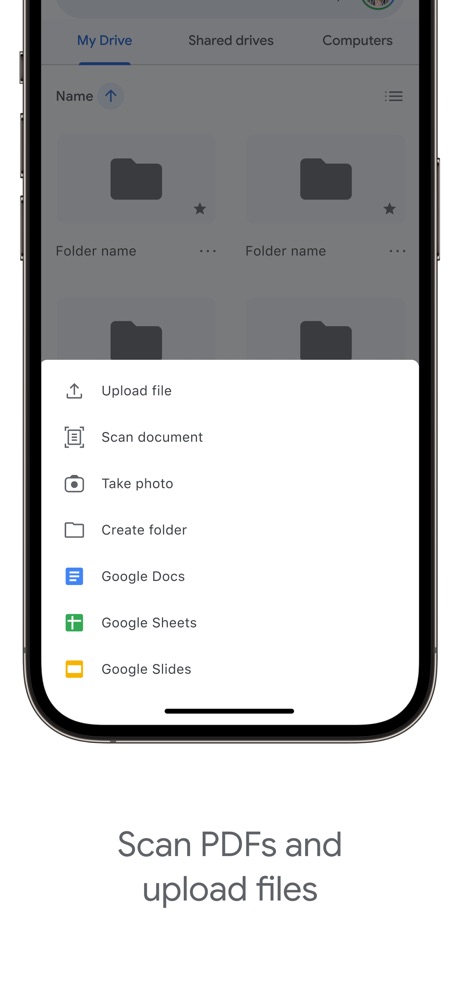
“Scan PDFs and upload files”

“Text Translate”
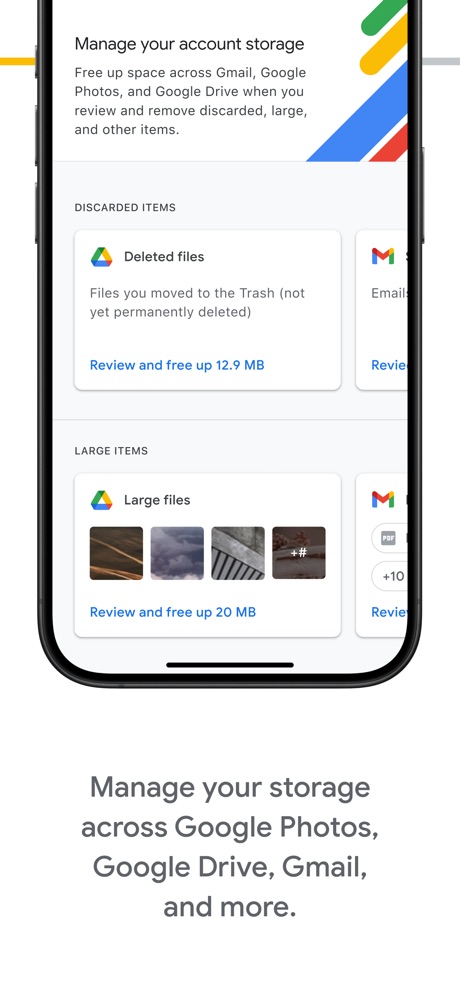
“Manage your storage across Google Photos, Google Drive, Gmail, and more.”

“Get notified”

“Unlock VPN”

“Check upload status of your latest transfer from the lock screen with our Live Activity”

“Remote Lock & Unlock”

“Protect your privacy just one-touch”

“Global VPN Servers”

“Fast and secure servers”

“stories for every mood”

“access everywhere”
What these screenshots say, word for word.
The words on all 23 that carry any, as each app wrote them.
“Scan PDFs and upload files”
Google Drive · #10 · screenshot 2“Text Translate”
Instantly Understand Any TextTranslateAll: Live Translator · #49 · screenshot 2“Manage your storage across Google Photos, Google Drive, Gmail, and more.”
Google One · #52 · screenshot 2“Get notified”
whenever you have a visitor or deliveryButterflyMX · #57 · screenshot 2“Unlock VPN”
Unlimited Browsing with high-speedSurfshark VPN: Fast & Secure · #60 · screenshot 4“Check upload status of your latest transfer from the lock screen with our Live Activity”
WeTransfer: Transfer Files · #62 · screenshot 2“Remote Lock & Unlock”
Kia Access · #79 · screenshot 2“Protect your privacy just one-touch”
VPN - FREE VPN Fast Ⓡ · #82 · screenshot 1“Global VPN Servers”
Turbo VPN Private Browser · #88 · screenshot 2“Fast and secure servers”
VPN Proxy Master - Super VPN · #94 · screenshot 2“stories for every mood”
Pick from 30+ genresElevenReader: Read Books Aloud · #96 · screenshot 4“access everywhere”
Structured: Daily Planner Todo · #98 · screenshot 6“Get extra member benefits like access to Gemini Pro and more.”
Benefits may vary and are not guaranteedGoogle One · #52 · screenshot 4“Create your own door and gate access PIN and customize other access settings”
ButterflyMX · #57 · screenshot 4“Get notified when you receive a transfer”
WeTransfer: Transfer Files · #62 · screenshot 4“Remote Climate Control”
Kia Access · #79 · screenshot 3“Unlimited bandwidth”
VPN - FREE VPN Fast Ⓡ · #82 · screenshot 3“Fast Private Browsers”
Turbo VPN Private Browser · #88 · screenshot 4- Turn your
“PDFs into audio”
ElevenReader: Read Books Aloud · #96 · screenshot 6 “My Locations & POIs”
Kia Access · #79 · screenshot 4“Entertain Your Digital Life Securely”
Turbo VPN Private Browser · #88 · screenshot 6“Maintenance Milestones”
Kia Access · #79 · screenshot 5“Finance Information”
Kia Access · #79 · screenshot 6
Top ten Productivity apps that do it.
- #10Google Drive1 of its 5 screenshots
The same tactic in other categories.
| Category | Apps that do it | Screenshots | Top ten |
|---|---|---|---|
| Games | 52% 52 of 100 | 47% 264 of 567 | 6 of 10 |
| Food & Drink | 43% 43 of 100 | 17% 93 of 540 | 6 of 10 |
| Travel | 22% 22 of 100 | 6% 33 of 561 | 4 of 10 |
| Shopping | 19% 19 of 100 | 7% 42 of 562 | 2 of 10 |
| Sports | 19% 19 of 100 | 5% 29 of 558 | 2 of 10 |
| Navigation | 18% 18 of 99 | 6% 33 of 566 | 0 of 10 |
| Finance | 18% 18 of 100 | 5% 31 of 581 | 3 of 10 |
| Lifestyle | 18% 18 of 100 | 6% 32 of 556 | 2 of 10 |
| Social Networking | 18% 18 of 100 | 6% 33 of 554 | 1 of 10 |
| Music | 17% 17 of 100 | 5% 30 of 550 | 3 of 10 |
| Utilities | 17% 17 of 100 | 6% 33 of 549 | 0 of 10 |
| Business | 16% 16 of 100 | 5% 25 of 554 | 1 of 10 |
| Health & Fitness | 15% 15 of 100 | 4% 25 of 574 | 1 of 10 |
| Education | 13% 13 of 100 | 4% 20 of 555 | 2 of 10 |
| Reference | 13% 13 of 100 | 5% 27 of 566 | 0 of 10 |
| Weather | 13% 13 of 100 | 4% 24 of 555 | 2 of 10 |
| Productivity | 12% 12 of 99 | 4% 23 of 551 | 1 of 10 |
| Entertainment | 12% 12 of 100 | 4% 20 of 544 | 0 of 10 |
| News | 11% 11 of 98 | 4% 19 of 517 | 1 of 10 |
| Medical | 11% 11 of 100 | 4% 22 of 548 | 2 of 10 |
| Developer Tools | 9% 9 of 100 | 4% 18 of 507 | 1 of 10 |
| Photo & Video | 8% 8 of 100 | 2% 10 of 566 | 0 of 10 |
| Graphics & Design | 5% 5 of 99 | 1% 6 of 564 | 1 of 10 |
Related tactics.
Often on the same screenshot
- High contrast words48% of these screenshots, against 20% of all Productivity screenshots
- Dark39% of these screenshots, against 16% of all Productivity screenshots
- Whole phone shown78% of these screenshots, against 59% of all Productivity screenshots
- Leads with a feature83% of these screenshots, against 63% of all Productivity screenshots
- Headline under five words65% of these screenshots, against 49% of all Productivity screenshots
- Gradient background65% of these screenshots, against 49% of all Productivity screenshots
More in layout
- Screen fills the picture100%
- Phone drawn99%
- Words at the top98%
- Whole phone shown91%
- A photograph76%
- Illustration or mascot73%
- Headline readable at thumbnail size72%
- A person in the picture63%
- Headline too small to read59%
- Phone cut off at the foot53%
- App icon shown52%
- Arrows or callouts45%
- Words aligned left26%
- No app screen at all23%
- No phone, bare screen20%
- Two or more screens20%
- Phone cut off at the head19%
- Zoomed detail of the UI17%
- Screen is small15%
- Watch, iPad or Mac beside it13%
- A hand holds the phone12%
- Phone at an angle11%
- Words over the screen7%
Questions, answered from the chart.
How many top Productivity apps have App Store screenshots with text at the bottom?
Which Productivity apps have App Store screenshots with text at the bottom?
Should my Productivity app have App Store screenshots with text at the bottom?
See your own app against this.
Pagefully reads your screenshots the same way, and makes a custom product page for each search people type, from your real screens.
Preview your pages