Explanatory Graphics & Design app screenshot subheadlines
The second line says how. The headline makes the promise and the smaller line says how the app keeps it.
From the top 99 free Graphics & Design apps on the US App Store, read on October 9, 2026. Screenshots are the developers’ own, shown from Apple’s servers with a link to each app.
The numbers
81 of the 564 Graphics & Design screenshots read (14%) do this, across 34 of the top 99 apps (34%). 5 of the top ten do it (50%), against 29 of the other 89 (33%): the top ten do it more than the rest. Of the 23 categories read so far, Graphics & Design is 14th for this. It is most common in Finance (56% of apps) and least common in Games (9%).
12 examples from the chart.
12 of the 81 explanatory Graphics & Design app screenshot subheadlines, one from each app, the highest on the chart first.

“DANCE”

“Kling VIDEO 3.0”

“Co-Star with Friends”

“Use a camera”

“Vector Layer Feature”

“OS 27 Ready”

“Turn Photos Into Cinematic✨ Videos”

“Home Designs”
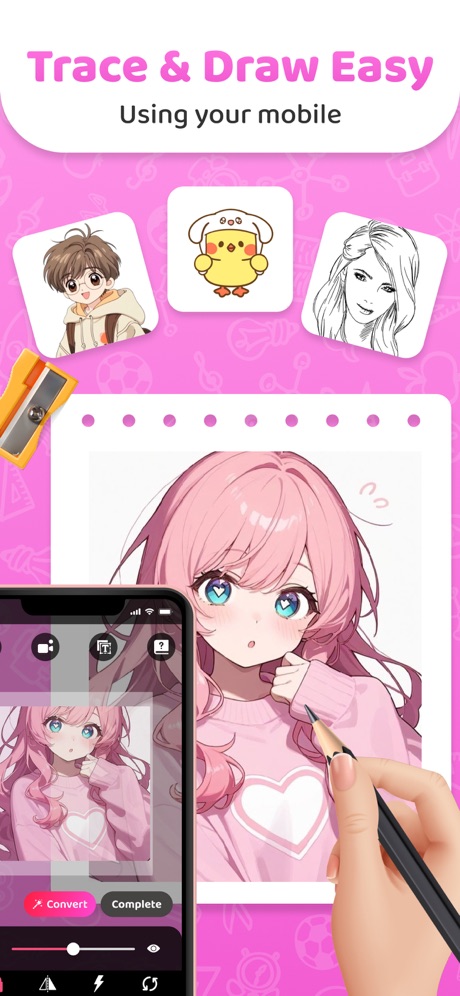
“Trace & Draw Easy”

“500+ Layouts”

“Face Swap”
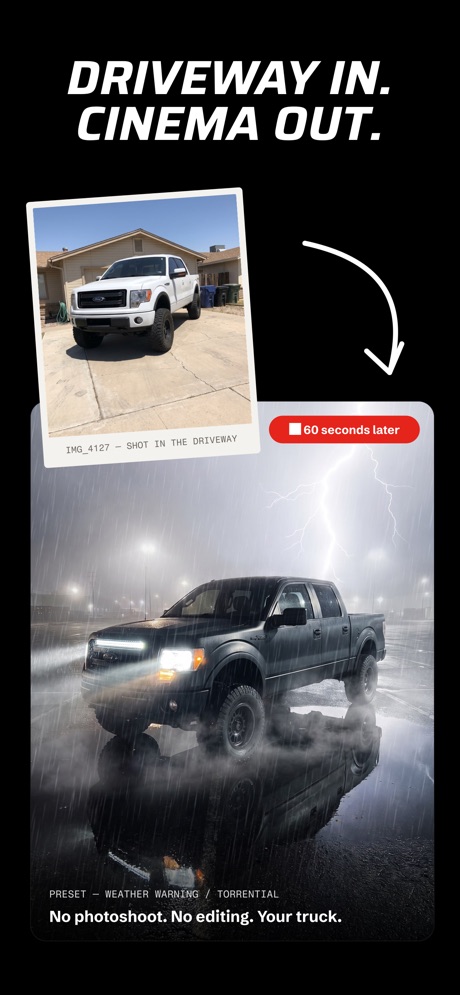
“DRIVEWAY IN. CINEMA OUT.”
Real headline examples, word for word.
The words on 40 of the 81 that carry any, as each app wrote them.
- AI VIDEO
“DANCE”
GENERATORAI Maker: Photo Video Filters · #1 · screenshot 2 “Kling VIDEO 3.0”
Multi-Shot: One-Click Cinematic OutputKling AI: AI Image&Video Maker · #2 · screenshot 3“Co-Star with Friends”
Invite friends and jump into AI adventuresDreamina AI: Image&Video Maker · #5 · screenshot 2“Use a camera”
to drawAR Drawing: Sketch & Paint · #6 · screenshot 1“Vector Layer Feature”
Perfect for Line Artibis Paint X · #7 · screenshot 5“OS 27 Ready”
Customize Lock & Home Screen.“Featured by Apple”iScreen - Widgets & Wallpaper · #11 · screenshot 1“Turn Photos Into Cinematic✨ Videos”
Create stunning motion with one tapAI Video Generator - Vidmor · #15 · screenshot 1- Generate
“Home Designs”
in Seconds with AIAI Home Design: Interior DecAI · #17 · screenshot 1 “Trace & Draw Easy”
Using your mobileArtrace: AR Drawing & Sketch · #18 · screenshot 1“500+ Layouts”
for InstagramLayout - Photo Collage Maker · #23 · screenshot 1“Face Swap”
Change faces on photos & videos. Snap, swap, and shareReface: AI Face Swap & Editor · #31 · screenshot 1“DRIVEWAY IN. CINEMA OUT.”
No photoshoot. No editing. Your truck.RevReel: AI Car Edits · #34 · screenshot 5“SKETCHIFY”
AR DRAWING APPAR Drawing App - Sketchify · #49 · screenshot 1“REDESIGN”
Your Home with AIHome Style AI: Interior Design · #50 · screenshot 1“LEARN ANIMATION”
fast!FlipaClip: Draw 2D Animation · #52 · screenshot 1“AI Emojis”
Generate new EmojisGenmoji: AI Emoji Maker - Mix · #61 · screenshot 1“Upload”
Custom Image3DMockups – Clothes Designer · #62 · screenshot 2“App Icon Changer”
Change icons at once No more Shortcut appWidgetClub:Widget, Theme, Icon · #63 · screenshot 3- DA VINCI EYE
“AR Art Projector”
Trace Pictures Onto AnythingDa Vinci Eye: AR Trace & Draw · #66 · screenshot 1 “Movie Studio Agent”
From idea to movieFilmit : AI Cinematic Video · #67 · screenshot 3“All-In-One Label Printing Hub”
Templates for Home, Business & MoreMunbyn Print · #68 · screenshot 1“From Empty Room To Fully Furnished”
Visualize different furniture layouts and interior styles in secondsRemodel AI - Home Design · #69 · screenshot 2“DISCOVER”
New Watch Faces and Widgets Uploaded DailyClockology Watch Faces · #71 · screenshot 1“Learn drawing”
IN 21 DAYSAR Drawing Sketch AI - ArtEasy · #72 · screenshot 3“Generate Tattoos with AI”
Turn Ideas into Tattoo DesignsTattoo Design Try On - Tatship · #74 · screenshot 3“Popular theme are available”
Select image and mount your phone on tripod & keep it standby while trace.iland - 4K Wallpapers · #75 · screenshot 1“Transform photos to Sketches”
Upload your portraitAR Projector Tracing & Drawing · #79 · screenshot 6“Get your daily poster ready”
with Status everyday app.Status Everyday · #85 · screenshot 1“wnloads”
From text or image, generate your way!PixAI - AI Anime Art Generator · #86 · screenshot 2“ParallelMe”
A parallel universe avatar generatorParallel Me · #91 · screenshot 1- UNIQUE
“WIDGETS”
Everything You NeedCarTheme: Car Widgets & Sounds · #92 · screenshot 3 “Logo Maker”
Powered by AILogo Maker - AI Art Design · #93 · screenshot 5“AI Video Generator”
MAKE VIDEOS IN ONE TAPProvideo:AI Video & Mini Vlog · #96 · screenshot 1“NO 3D SKILLS REQUIRED”
No modeling, no software. Just upload and go.Meshy AI: 3D Print Model Maker · #98 · screenshot 1“Dynamic Props”
Drop in fun props and creative visual effectsDreamina AI: Image&Video Maker · #5 · screenshot 3“Learn drawing”
in 21 daysAR Drawing: Sketch & Paint · #6 · screenshot 5“AI Garden Planner”
Just Upload a PhotoAI Home Design: Interior DecAI · #17 · screenshot 2“1500+ Template”
Use any templates & drawArtrace: AR Drawing & Sketch · #18 · screenshot 2“AI headshots”
Your professional photos. Check it, generate it, marvel at itReface: AI Face Swap & Editor · #31 · screenshot 2“DRAWING LESSONS”
BEGINNER TO ADVANCEDAR Drawing App - Sketchify · #49 · screenshot 5
Top ten Graphics & Design apps that do it.
- #1AI Maker: Photo Video Filters1 of its 6 screenshots
- #2Kling AI: AI Image&Video Maker1 of its 6 screenshots
- #5Dreamina AI: Image&Video Maker5 of its 6 screenshots
- #6AR Drawing: Sketch & Paint2 of its 6 screenshots
- #7ibis Paint X1 of its 6 screenshots
The same tactic in other categories.
| Category | Apps that do it | Screenshots | Top ten |
|---|---|---|---|
| Finance | 56% 56 of 100 | 29% 170 of 581 | 7 of 10 |
| Food & Drink | 52% 52 of 100 | 27% 146 of 540 | 7 of 10 |
| Shopping | 52% 52 of 100 | 30% 169 of 562 | 4 of 10 |
| Sports | 47% 47 of 100 | 23% 128 of 558 | 7 of 10 |
| Social Networking | 41% 41 of 100 | 19% 108 of 554 | 5 of 10 |
| Reference | 40% 40 of 100 | 23% 128 of 566 | 5 of 10 |
| Travel | 40% 40 of 100 | 19% 104 of 561 | 0 of 10 |
| Utilities | 38% 38 of 100 | 18% 101 of 549 | 3 of 10 |
| Business | 36% 36 of 100 | 15% 82 of 554 | 3 of 10 |
| Developer Tools | 36% 36 of 100 | 21% 104 of 507 | 3 of 10 |
| Lifestyle | 36% 36 of 100 | 16% 91 of 556 | 6 of 10 |
| Photo & Video | 36% 36 of 100 | 15% 86 of 566 | 5 of 10 |
| Navigation | 35% 35 of 99 | 17% 94 of 566 | 2 of 10 |
| Graphics & Design | 34% 34 of 99 | 14% 81 of 564 | 5 of 10 |
| Entertainment | 32% 32 of 100 | 15% 84 of 544 | 3 of 10 |
| News | 31% 30 of 98 | 17% 90 of 517 | 0 of 10 |
| Music | 29% 29 of 100 | 9% 52 of 550 | 3 of 10 |
| Health & Fitness | 28% 28 of 100 | 12% 70 of 574 | 2 of 10 |
| Productivity | 27% 27 of 99 | 13% 71 of 551 | 1 of 10 |
| Education | 27% 27 of 100 | 11% 59 of 555 | 4 of 10 |
| Medical | 27% 27 of 100 | 13% 69 of 548 | 1 of 10 |
| Weather | 27% 27 of 100 | 14% 80 of 555 | 3 of 10 |
| Games | 9% 9 of 100 | 5% 31 of 567 | 1 of 10 |
Related tactics.
Often on the same screenshot
- Has a subline100% of these screenshots, against 23% of all Graphics & Design screenshots
- Headline readable at thumbnail size58% of these screenshots, against 29% of all Graphics & Design screenshots
- A word in a different colour52% of these screenshots, against 27% of all Graphics & Design screenshots
- States a benefit48% of these screenshots, against 26% of all Graphics & Design screenshots
- Headline under five words85% of these screenshots, against 69% of all Graphics & Design screenshots
- Says “you” or “your”32% of these screenshots, against 20% of all Graphics & Design screenshots
More in meaning
- Leads with a feature94%
- Plain tone93%
- States a benefit70%
- Playful tone32%
- Premium tone20%
- Subline adds a second benefit19%
- Asks for an action13%
- Leads with an outcome9%
- Names its audience9%
- Technical tone8%
- Compares with something6%
- Urgent tone3%
- Leads with price1%
- Leads with what is new1%
- Leads with who it is for1%
Questions, answered from the chart.
How many top Graphics & Design apps have explanatory App Store screenshot subheadlines?
Which Graphics & Design apps have explanatory App Store screenshot subheadlines?
Should my Graphics & Design app have explanatory App Store screenshot subheadlines?
See your own app against this.
Pagefully reads your screenshots the same way, and makes a custom product page for each search people type, from your real screens.
Preview your pages