Finance app screenshots with low-contrast text
The headline sits close to its background in brightness. Words close to their background in brightness are harder to read, most of all at small sizes.
From the top 100 free Finance apps on the US App Store, read on October 9, 2026. Screenshots are the developers’ own, shown from Apple’s servers with a link to each app.
The numbers
67 of the 581 Finance screenshots read (12%) do this, across 31 of the top 100 apps (31%). 4 of the top ten do it (40%), against 27 of the other 90 (30%): the top ten do it more than the rest. Of the 23 categories read so far, Finance is 15th for this. It is most common in Education (45% of apps) and least common in Games (16%).
12 examples from the chart.
12 of the 67 Finance app screenshots with low-contrast text, one from each app, the highest on the chart first.

“Keep an eye on your credit with a flick of your thumb.”

“The app for every money move”
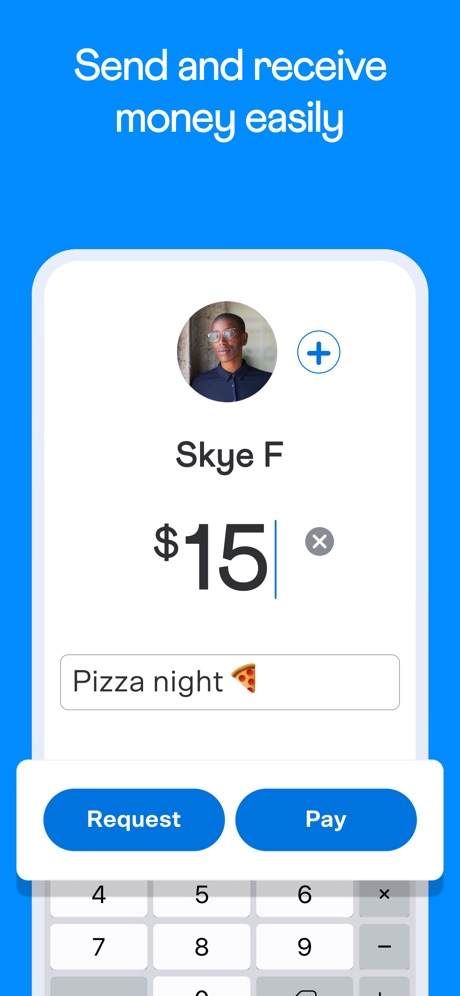
“Send and receive money easily”

“Invest with as little as $1”

“Connect with a dedicated advisor”

“Just ask Fargo®”

“Account preferences”

“Send money with Zelle®”
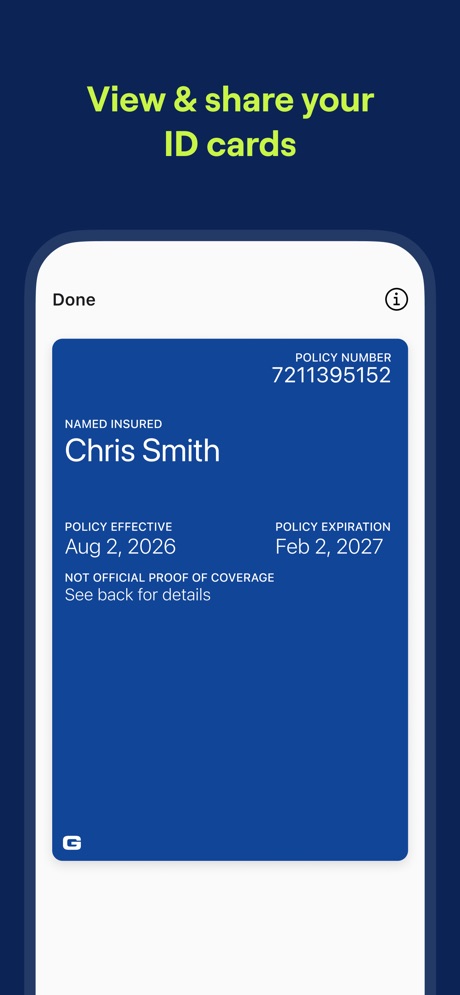
“View & share your ID cards”
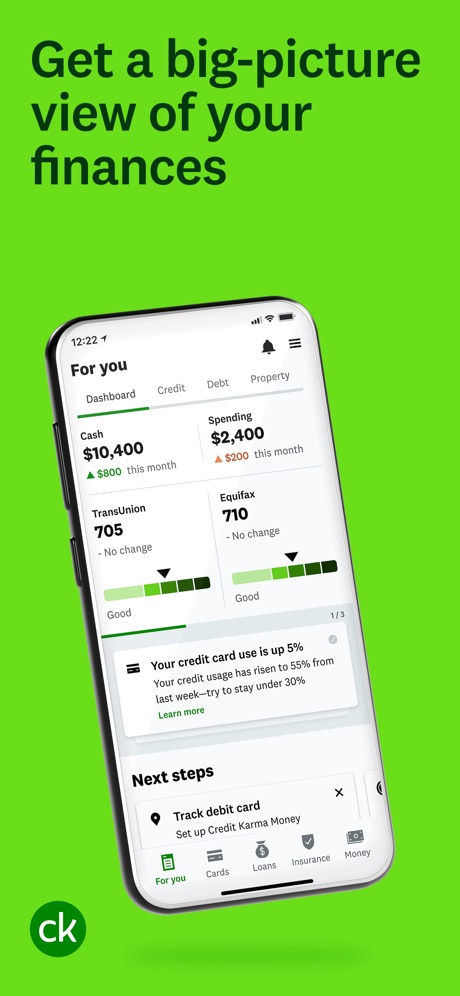
“Get a big-picture view of your finances”

“Atlas Rewards Credit Card”

“Stay up-to-date on your portfolio’s performance”
What these screenshots say, word for word.
The words on 40 of the 67 that carry any, as each app wrote them.
“Keep an eye on your credit with a flick of your thumb.”
Capital One Mobile · #3 · screenshot 4“The app for every money move”
Cash App · #5 · screenshot 1“Send and receive money easily”
Venmo · #6 · screenshot 1“Invest with as little as $1”
OnePay Invest brings stocks and ETFs to your fingertips.OnePay – Mobile Banking · #8 · screenshot 6“Connect with a dedicated advisor”
Your Fidelity team is here to help grow and protect your wealth.Fidelity Investments · #13 · screenshot 2“Just ask Fargo®”
Your AI-powered assistant8 is always ready to help youWells Fargo Mobile® · #14 · screenshot 3“Account preferences”
Customize your experience.State Farm® · #15 · screenshot 4“Send money with Zelle®”
A fast and easy way to send and receive money.Bank of America Mobile Banking · #16 · screenshot 3“View & share your ID cards”
GEICO Mobile - Car Insurance · #18 · screenshot 3“Get a big-picture view of your finances”
Intuit Credit Karma · #21 · screenshot 1“Atlas Rewards Credit Card”
Atlas - Rewards Credit Card · #28 · screenshot 1“Stay up-to-date on your portfolio’s performance”
Empower ® · #29 · screenshot 5“Disclaimers:”
*Terms & conditions apply. Grant Cash Advance Plus subscription $9.99/mo. To qualify, you must satisfy eligibility & verification requirements. Advances range from $25 to $500 for repeat users; amounts may vary based on financial risk factors.Grant Cash Advance · #31 · screenshot 6“Earn points on rent”
Earn points on your largest expense, rent.Bilt Rewards · #37 · screenshot 1“Account at a Glance”
Check your available credit and other account details from your home screenCredit One Bank Mobile · #44 · screenshot 3“See your money and stay on top of it”
Budget. Save. Spend. Invest. All in one incredibly powerful app.Albert: Budgeting and Banking · #47 · screenshot 1“Start trading in seconds”
Buy trending tokens using Apple Pay, 24 hours a day, 7 days a week.fomo - never miss out · #53 · screenshot 1“Trade intuitively”
Build and place trades for a variety of products (stocks, options, ETFs, mutual funds) from a single location.Schwab Mobile · #56 · screenshot 2- RENT REPORTING
“Pay rent & utilities³”
build credit historyBright: Loans & Credit Builder · #57 · screenshot 3 “Secure”
Store prepaid cards securely in your Apple WalletMyCardWallet. · #61 · screenshot 1- Employer
“Invite and onboard new 👋 employees.”
Gusto Mobile · #63 · screenshot 2 “Review monthly spending and set budgets.”
PNC Mobile Banking · #70 · screenshot 6- COLLABORATION
“Manage money together. No drama.”
“Best App for Couples”Monarch: Budget & Track Money · #77 · screenshot 4 “Bread Financial, at your fingertips”
Bread Financial · #79 · screenshot 2“No late fees. Ever.”
On average, our customers saved $470 with Possible†Possible: Fast Cash & Credit · #82 · screenshot 3“Track balances”
Keep track of shared expenses, balances, and who owes who.Splitwise · #87 · screenshot 1“Biometric Log in Options”
Willow® Mastercard® · #88 · screenshot 1“Get your tax records”
IRS · #91 · screenshot 4- Robinhood Gold Card
“3% cash back on all categories”
It's the only credit card you'll needRobinhood Banking · #94 · screenshot 1 “Check your account balances”
Principal® · #96 · screenshot 1“SWAP 1,000'S OF CRYPTO PAIRINGS, INSTANTLY”
Trust: Crypto & Bitcoin Wallet · #99 · screenshot 3“Get paychecks faster with direct deposit”
Cash App · #5 · screenshot 5“Get paid up to 2 days early”
Venmo · #6 · screenshot 4“Take your trading on the go”
Fidelity Trader+ Mobile mode is designed for faster trading, interactive charting, and real-time insights.Fidelity Investments · #13 · screenshot 5“Accelerate your progress with Credit Karma Money™”
Intuit Credit Karma · #21 · screenshot 4“Grows with you”
Safe spending limits that grow over time.Atlas - Rewards Credit Card · #28 · screenshot 3“Unlock benefits in your neighborhood”
Get access to exclusive benefits at local restaurants, fitness studios, on Lyft rides, and more.Bilt Rewards · #37 · screenshot 2“Track Your Credit Score”
Know where your credit stands and how it changes over time for freeCredit One Bank Mobile · #44 · screenshot 4“Shop and travel within your budget”
Find products and deals, and research places to stay and things to do.Albert: Budgeting and Banking · #47 · screenshot 4“Take the guesswork out of trading”
Follow friends and top traders, see their moves in real-time.fomo - never miss out · #53 · screenshot 2
Top ten Finance apps that do it.
- #3Capital One Mobile1 of its 6 screenshots
- #5Cash App2 of its 6 screenshots
- #6Venmo3 of its 6 screenshots
- #8OnePay – Mobile Banking1 of its 6 screenshots
The same tactic in other categories.
| Category | Apps that do it | Screenshots | Top ten |
|---|---|---|---|
| Education | 45% 45 of 100 | 18% 102 of 555 | 6 of 10 |
| Social Networking | 45% 45 of 100 | 21% 117 of 554 | 7 of 10 |
| Health & Fitness | 44% 44 of 100 | 18% 102 of 574 | 2 of 10 |
| Utilities | 42% 42 of 100 | 17% 92 of 549 | 3 of 10 |
| Medical | 41% 41 of 100 | 24% 129 of 548 | 5 of 10 |
| Travel | 41% 41 of 100 | 17% 93 of 561 | 3 of 10 |
| Productivity | 40% 40 of 99 | 19% 106 of 551 | 4 of 10 |
| Photo & Video | 38% 38 of 100 | 18% 101 of 566 | 3 of 10 |
| Business | 37% 37 of 100 | 21% 114 of 554 | 6 of 10 |
| Lifestyle | 37% 37 of 100 | 18% 102 of 556 | 3 of 10 |
| Music | 36% 36 of 100 | 12% 67 of 550 | 5 of 10 |
| Shopping | 36% 36 of 100 | 15% 86 of 562 | 3 of 10 |
| Food & Drink | 33% 33 of 100 | 13% 71 of 540 | 5 of 10 |
| Entertainment | 32% 32 of 100 | 12% 65 of 544 | 2 of 10 |
| Finance | 31% 31 of 100 | 12% 67 of 581 | 4 of 10 |
| Reference | 30% 30 of 100 | 13% 71 of 566 | 3 of 10 |
| Developer Tools | 29% 29 of 100 | 13% 64 of 507 | 3 of 10 |
| Graphics & Design | 27% 27 of 99 | 11% 64 of 564 | 1 of 10 |
| Navigation | 27% 27 of 99 | 13% 74 of 566 | 3 of 10 |
| News | 26% 25 of 98 | 11% 57 of 517 | 3 of 10 |
| Sports | 20% 20 of 100 | 8% 47 of 558 | 3 of 10 |
| Weather | 20% 20 of 100 | 7% 41 of 555 | 3 of 10 |
| Games | 16% 16 of 100 | 6% 33 of 567 | 3 of 10 |
Related tactics.
Often on the same screenshot
- Blue61% of these screenshots, against 32% of all Finance screenshots
- Background is the icon’s colour73% of these screenshots, against 50% of all Finance screenshots
- Subline explains the headline48% of these screenshots, against 29% of all Finance screenshots
- Headline under five words51% of these screenshots, against 35% of all Finance screenshots
- Gradient background60% of these screenshots, against 46% of all Finance screenshots
- Has a subline54% of these screenshots, against 42% of all Finance screenshots
More in look
- Light78%
- Background is the icon’s colour67%
- Gradient background62%
- Solid background60%
- A word in a different colour53%
- Black, white or grey45%
- Blue45%
- High contrast words45%
- Dark34%
- Green20%
- Teal17%
- Orange16%
- Photo background14%
- Rounded headline type14%
- Pattern or texture13%
- Serif headline12%
- Pink10%
- Purple9%
- Red8%
- Yellow8%
- Condensed or display type4%
- The app itself is the background4%
Questions, answered from the chart.
How many top Finance apps have App Store screenshots with low-contrast text?
Which Finance apps have App Store screenshots with low-contrast text?
Should my Finance app have App Store screenshots with low-contrast text?
See your own app against this.
Pagefully reads your screenshots the same way, and makes a custom product page for each search people type, from your real screens.
Preview your pages