Photo & Video app screenshots with low-contrast text
The headline sits close to its background in brightness. Words close to their background in brightness are harder to read, most of all at small sizes.
From the top 100 free Photo & Video apps on the US App Store, read on October 9, 2026. Screenshots are the developers’ own, shown from Apple’s servers with a link to each app.
The numbers
101 of the 566 Photo & Video screenshots read (18%) do this, across 38 of the top 100 apps (38%). 3 of the top ten do it (30%), against 35 of the other 90 (39%): the top ten do it about as often as the rest. Of the 23 categories read so far, Photo & Video is 8th for this. It is most common in Education (45% of apps) and least common in Games (16%).
12 examples from the chart.
12 of the 101 Photo & Video app screenshots with low-contrast text, one from each app, the highest on the chart first.

“Snap”

“Get creative with video effects”

“Easily share with your friends”

“Get chatting”

“Watch videos from award winning creators”

“AI Templates For Every Style”

“Wireless Connection With Ease”

“Modify Motion Speed”

“Professional Headshots”

“Cinematic filters”
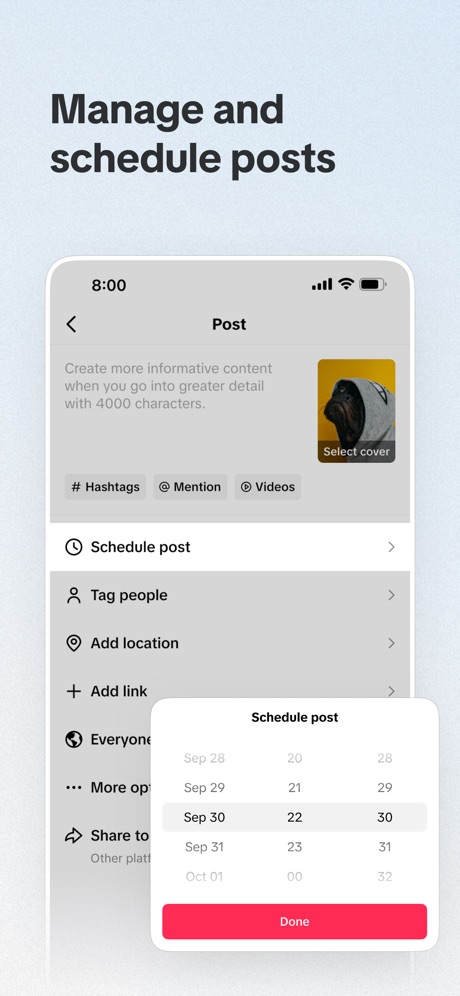
“Manage and schedule posts”

“Access 100+ viral styles”
What these screenshots say, word for word.
The words on 40 of the 101 that carry any, as each app wrote them.
“Snap”
Share the momentSnapchat · #5 · screenshot 1“Get creative with video effects”
Edits: Video Editor · #7 · screenshot 2“Easily share with your friends”
Google Photos: Backup & Edit · #8 · screenshot 5“Get chatting”
Twitch: Live Streaming · #12 · screenshot 4“Watch videos from award winning creators”
Vimeo · #13 · screenshot 1“AI Templates For Every Style”
PixVerse Lite · #21 · screenshot 2“Wireless Connection With Ease”
DJI Mimo · #24 · screenshot 2“Modify Motion Speed”
InShot - Video Editor · #26 · screenshot 6“Professional Headshots”
Facetune: Photo & Video Editor · #27 · screenshot 3“Cinematic filters”
Hypic - Photo Editor & AI Art · #31 · screenshot 4“Manage and schedule posts”
TikTok Studio · #36 · screenshot 2“Access 100+ viral styles”
Captions: AI Edits Your Video · #39 · screenshot 3“BEFORE AFTER”
ism: Retro Camera & Vintage · #40 · screenshot 3“Enhance Images with AI Repair”
Airbrush: Face Photo Editor · #41 · screenshot 4“Import anytime”
Canon Camera Connect · #43 · screenshot 2“AI Flash”
Meitu AI Photo & Video Editor · #45 · screenshot 1“ANY STYLE”
VideoGPT - AI Video Generator · #50 · screenshot 3“New aesthetic: relight effects”
Prequel: Photo & Video Editor · #52 · screenshot 3“PHOTO & VIDEO MAKER”
BeautyPlus-Selfie Photo Editor · #55 · screenshot 1“Body Effects”
VN: Photo & Video Editor · #56 · screenshot 2“Share more joy”
From phone to frame, enjoy all your memories with easeAura Frames · #57 · screenshot 1“DISCOVERY”
Discover new and trending gamesMedal - Game Clipping · #59 · screenshot 5“Save your Favorites to your Channel”
GIPHY: The GIF Search Engine · #64 · screenshot 2“Get photos off your phone and into your home.”
Over 26 years. Millions of happy customers. Trust your memories with the experts.Shutterfly: Prints Cards Gifts · #66 · screenshot 1“CARTOON YOURSELF”
Toonapp: AI Video & Toon Photo · #69 · screenshot 4“Video to Live Wallpapers”
intoLive - Live Wallpapers · #70 · screenshot 1“fontmaker”
Now you can use your own HandwhittingFontmaker - Font Keyboard App · #74 · screenshot 1“Keyframe Animation”
Easily create sophisticated custom animations.Alight Motion · #75 · screenshot 1“IMPRESSION”
FaceApp: Perfect Face Editor · #76 · screenshot 1- PRESETS
“AI-powered edits across 200+ presets”
VSCO: Photo & Video Editor · #77 · screenshot 2 - Viral
“AI Videos”
AI Mirror: AI Photo Editor · #81 · screenshot 3 “Makeup Editor”
Natural to glam makeup filtersYouCam Makeup: Face Editor · #84 · screenshot 1“Reshape”
Firm & shapely figurePeachy - AI Face & Body Editor · #85 · screenshot 2“Create something beautifully unique in just 5 minutes”
→ Photo Books → Photo Tiles → Calendars → Prints → OrnamentsPopsa | Print Your Photos · #86 · screenshot 2“UNLEASH THE POWER OF REVEAL”
Tactacam REVEAL · #87 · screenshot 1“New version”
Better experienceViidure · #90 · screenshot 1“WRINKLE REMOVAL”
Achieve Smooth and Wrinkle-Free SkinBeautyCam-Digicam&Photo Editor · #96 · screenshot 1“Vintage Photo & Video Editor”
Esti: Aesthetic Photo Editor · #97 · screenshot 3“Lenses”
Millions of augmented reality experiencesSnapchat · #5 · screenshot 3“Easily remove any background”
Edits: Video Editor · #7 · screenshot 4
Top ten Photo & Video apps that do it.
- #5Snapchat4 of its 6 screenshots
- #7Edits: Video Editor2 of its 6 screenshots
- #8Google Photos: Backup & Edit1 of its 6 screenshots
The same tactic in other categories.
| Category | Apps that do it | Screenshots | Top ten |
|---|---|---|---|
| Education | 45% 45 of 100 | 18% 102 of 555 | 6 of 10 |
| Social Networking | 45% 45 of 100 | 21% 117 of 554 | 7 of 10 |
| Health & Fitness | 44% 44 of 100 | 18% 102 of 574 | 2 of 10 |
| Utilities | 42% 42 of 100 | 17% 92 of 549 | 3 of 10 |
| Medical | 41% 41 of 100 | 24% 129 of 548 | 5 of 10 |
| Travel | 41% 41 of 100 | 17% 93 of 561 | 3 of 10 |
| Productivity | 40% 40 of 99 | 19% 106 of 551 | 4 of 10 |
| Photo & Video | 38% 38 of 100 | 18% 101 of 566 | 3 of 10 |
| Business | 37% 37 of 100 | 21% 114 of 554 | 6 of 10 |
| Lifestyle | 37% 37 of 100 | 18% 102 of 556 | 3 of 10 |
| Music | 36% 36 of 100 | 12% 67 of 550 | 5 of 10 |
| Shopping | 36% 36 of 100 | 15% 86 of 562 | 3 of 10 |
| Food & Drink | 33% 33 of 100 | 13% 71 of 540 | 5 of 10 |
| Entertainment | 32% 32 of 100 | 12% 65 of 544 | 2 of 10 |
| Finance | 31% 31 of 100 | 12% 67 of 581 | 4 of 10 |
| Reference | 30% 30 of 100 | 13% 71 of 566 | 3 of 10 |
| Developer Tools | 29% 29 of 100 | 13% 64 of 507 | 3 of 10 |
| Graphics & Design | 27% 27 of 99 | 11% 64 of 564 | 1 of 10 |
| Navigation | 27% 27 of 99 | 13% 74 of 566 | 3 of 10 |
| News | 26% 25 of 98 | 11% 57 of 517 | 3 of 10 |
| Sports | 20% 20 of 100 | 8% 47 of 558 | 3 of 10 |
| Weather | 20% 20 of 100 | 7% 41 of 555 | 3 of 10 |
| Games | 16% 16 of 100 | 6% 33 of 567 | 3 of 10 |
Related tactics.
Often on the same screenshot
- Gradient background62% of these screenshots, against 42% of all Photo & Video screenshots
- Headline on one line31% of these screenshots, against 16% of all Photo & Video screenshots
- Headline too small to read31% of these screenshots, against 17% of all Photo & Video screenshots
- Has a subline36% of these screenshots, against 25% of all Photo & Video screenshots
- Pink15% of these screenshots, against 4% of all Photo & Video screenshots
- Background is the icon’s colour31% of these screenshots, against 22% of all Photo & Video screenshots
More in look
- Orange69%
- Gradient background60%
- Black, white or grey59%
- Solid background57%
- High contrast words56%
- Dark55%
- Light50%
- A word in a different colour48%
- Background is the icon’s colour45%
- Blue40%
- Red29%
- Photo background26%
- Rounded headline type25%
- Teal22%
- Green12%
- Pattern or texture12%
- Pink12%
- The app itself is the background8%
- Purple7%
- Serif headline6%
- Yellow6%
- Condensed or display type1%
Questions, answered from the chart.
How many top Photo & Video apps have App Store screenshots with low-contrast text?
Which Photo & Video apps have App Store screenshots with low-contrast text?
Should my Photo & Video app have App Store screenshots with low-contrast text?
See your own app against this.
Pagefully reads your screenshots the same way, and makes a custom product page for each search people type, from your real screens.
Preview your pages