Pink Photo & Video app screenshots
Pink is the main colour.
From the top 100 free Photo & Video apps on the US App Store, read on October 9, 2026. Screenshots are the developers’ own, shown from Apple’s servers with a link to each app.
The numbers
24 of the 566 Photo & Video screenshots read (4%) do this, across 12 of the top 100 apps (12%). 1 of the top ten do it (10%), against 11 of the other 90 (12%): the top ten do it about as often as the rest. Of the 23 categories read so far, Photo & Video is 5th for this. It is most common in Graphics & Design (27% of apps) and least common in Weather (0%).
12 examples from the chart.
12 of the 24 pink Photo & Video app screenshots, one from each app, the highest on the chart first.
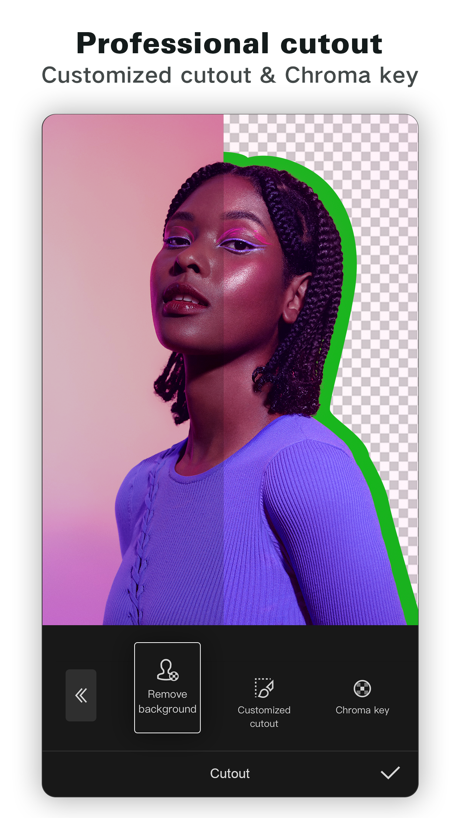
“Professional cutout”

“Watch videos from award winning creators”
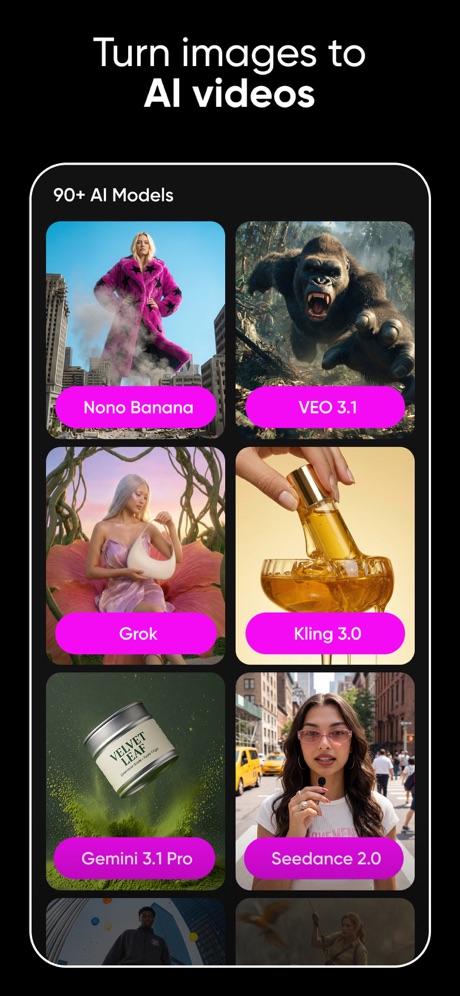
“Turn images to AI videos”

“PixVerse Lite”

“bedazzle your selfie”

“Choose From 100+ Fonts”

“Save your Favorites to your Channel”

“Video effects for TikTok & Reels”

“Create something beautifully unique in just 5 minutes”

“Select, resize, and combine pics from your POV.”

“DOUBLE CHIN REMOVAL”

“PHOTO COLLAGE MAKER”
What these screenshots say, word for word.
The words on all 24 that carry any, as each app wrote them.
“Professional cutout”
Customized cutout & Chroma keyCapCut: Photo & Video Editor · #1 · screenshot 5“Watch videos from award winning creators”
Vimeo · #13 · screenshot 1“Turn images to AI videos”
Picsart AI Photo Editor, Video · #15 · screenshot 3“PixVerse Lite”
AI Creative StudioPixVerse Lite · #21 · screenshot 1“bedazzle your selfie”
FaceLab: Face Age, Hair Filter · #28 · screenshot 6“Choose From 100+ Fonts”
PicCollage: Magic Photo Editor · #51 · screenshot 3“Save your Favorites to your Channel”
GIPHY: The GIF Search Engine · #64 · screenshot 2- 150+
“Video effects for TikTok & Reels”
intoLive - Live Wallpapers · #70 · screenshot 3 “Create something beautifully unique in just 5 minutes”
→ Photo Books → Photo Tiles → Calendars → Prints → OrnamentsPopsa | Print Your Photos · #86 · screenshot 2“Select, resize, and combine pics from your POV.”
Adobe Photoshop: Photo Editor · #89 · screenshot 5“DOUBLE CHIN REMOVAL”
Easily Remove the Extra LayerBeautyCam-Digicam&Photo Editor · #96 · screenshot 2“PHOTO COLLAGE MAKER”
Photo Collage Maker PicJointer · #99 · screenshot 1“AI Templates For Every Style”
PixVerse Lite · #21 · screenshot 2“Peel Stickers right from iMessage”
GIPHY: The GIF Search Engine · #64 · screenshot 5“120+ Trendy text styles”
intoLive - Live Wallpapers · #70 · screenshot 4“Add captions and customize their appearance”
Popsa | Print Your Photos · #86 · screenshot 6“AI WEIGHT LOSS”
Tone Up Your Body EffortlesslyBeautyCam-Digicam&Photo Editor · #96 · screenshot 3“Trending Now Tap To Create”
PixVerse Lite · #21 · screenshot 3“TEETH CORRECTION”
Show Your Grin with Perfect TeethBeautyCam-Digicam&Photo Editor · #96 · screenshot 4“Turn Ideas Into Epic AI Videos”
PixVerse Lite · #21 · screenshot 4“IPHONE CAM”
The Secret to Clean Girl SkinBeautyCam-Digicam&Photo Editor · #96 · screenshot 5“Create Viral Looks In Seconds”
PixVerse Lite · #21 · screenshot 5“AI AUTO ELEGANCE”
Experience the Power of Instant GlamorBeautyCam-Digicam&Photo Editor · #96 · screenshot 6“Become The Star Of Any Scene”
PixVerse Lite · #21 · screenshot 6
Top ten Photo & Video apps that do it.
- #1CapCut: Photo & Video Editor1 of its 6 screenshots
The same tactic in other categories.
| Category | Apps that do it | Screenshots | Top ten |
|---|---|---|---|
| Graphics & Design | 27% 27 of 99 | 8% 44 of 564 | 3 of 10 |
| Education | 20% 20 of 100 | 6% 35 of 555 | 2 of 10 |
| Entertainment | 19% 19 of 100 | 9% 49 of 544 | 2 of 10 |
| Music | 13% 13 of 100 | 6% 33 of 550 | 2 of 10 |
| Games | 12% 12 of 100 | 3% 15 of 567 | 0 of 10 |
| Lifestyle | 12% 12 of 100 | 6% 33 of 556 | 2 of 10 |
| Photo & Video | 12% 12 of 100 | 4% 24 of 566 | 1 of 10 |
| Medical | 11% 11 of 100 | 4% 20 of 548 | 0 of 10 |
| Finance | 10% 10 of 100 | 5% 27 of 581 | 0 of 10 |
| Food & Drink | 8% 8 of 100 | 5% 29 of 540 | 1 of 10 |
| Social Networking | 7% 7 of 100 | 2% 12 of 554 | 2 of 10 |
| Health & Fitness | 6% 6 of 100 | 2% 9 of 574 | 0 of 10 |
| Utilities | 6% 6 of 100 | 3% 17 of 549 | 0 of 10 |
| Business | 5% 5 of 100 | 3% 17 of 554 | 1 of 10 |
| Shopping | 4% 4 of 100 | 2% 9 of 562 | 0 of 10 |
| News | 3% 3 of 98 | 1% 3 of 517 | 2 of 10 |
| Navigation | 3% 3 of 99 | 1% 3 of 566 | 1 of 10 |
| Productivity | 3% 3 of 99 | 1% 4 of 551 | 1 of 10 |
| Reference | 3% 3 of 100 | 1% 3 of 566 | 0 of 10 |
| Sports | 3% 3 of 100 | 2% 13 of 558 | 0 of 10 |
| Travel | 3% 3 of 100 | 1% 8 of 561 | 1 of 10 |
| Developer Tools | 2% 2 of 100 | under 1% 2 of 507 | 0 of 10 |
| Weather | 0% 0 of 100 | 0% 0 of 555 | 0 of 10 |
Related tactics.
Often on the same screenshot
- Low contrast words63% of these screenshots, against 18% of all Photo & Video screenshots
- Gradient background79% of these screenshots, against 42% of all Photo & Video screenshots
- Light54% of these screenshots, against 32% of all Photo & Video screenshots
- Whole phone shown79% of these screenshots, against 60% of all Photo & Video screenshots
- A person in the picture88% of these screenshots, against 72% of all Photo & Video screenshots
- Tells you to do something54% of these screenshots, against 40% of all Photo & Video screenshots
More in look
- Orange69%
- Gradient background60%
- Black, white or grey59%
- Solid background57%
- High contrast words56%
- Dark55%
- Light50%
- A word in a different colour48%
- Background is the icon’s colour45%
- Blue40%
- Low contrast words38%
- Red29%
- Photo background26%
- Rounded headline type25%
- Teal22%
- Green12%
- Pattern or texture12%
- The app itself is the background8%
- Purple7%
- Serif headline6%
- Yellow6%
- Condensed or display type1%
Questions, answered from the chart.
How many top Photo & Video apps have pink App Store screenshots?
Which Photo & Video apps have pink App Store screenshots?
Should my Photo & Video app have pink App Store screenshots?
See your own app against this.
Pagefully reads your screenshots the same way, and makes a custom product page for each search people type, from your real screens.
Preview your pages