Photo & Video app screenshots in the app icon’s colour
The picture’s main colour is the app icon’s. In a search result the icon and the screenshots sit side by side, and a shared colour makes them read as one brand.
From the top 100 free Photo & Video apps on the US App Store, read on October 9, 2026. Screenshots are the developers’ own, shown from Apple’s servers with a link to each app.
The numbers
123 of the 566 Photo & Video screenshots read (22%) do this, across 45 of the top 100 apps (45%). 2 of the top ten do it (20%), against 43 of the other 90 (48%): the top ten do it less than the rest. Of the 23 categories read so far, Photo & Video is 22nd for this. It is most common in Education (79% of apps) and least common in Developer Tools (31%).
12 examples from the chart.
12 of the 123 Photo & Video app screenshots in the app icon’s colour, one from each app, the highest on the chart first.

“Snap”

“Build and export on-brand emails”

“HOME WHAT'S PICKED FOR YOU”

“Discover new streams, clips, and stories”

“Upload and share anywhere on your terms”

“Keep it in the Circle”

“Add a classic film look with one tap.”

“AI Video Editor”


“DIGI CAM IT!”
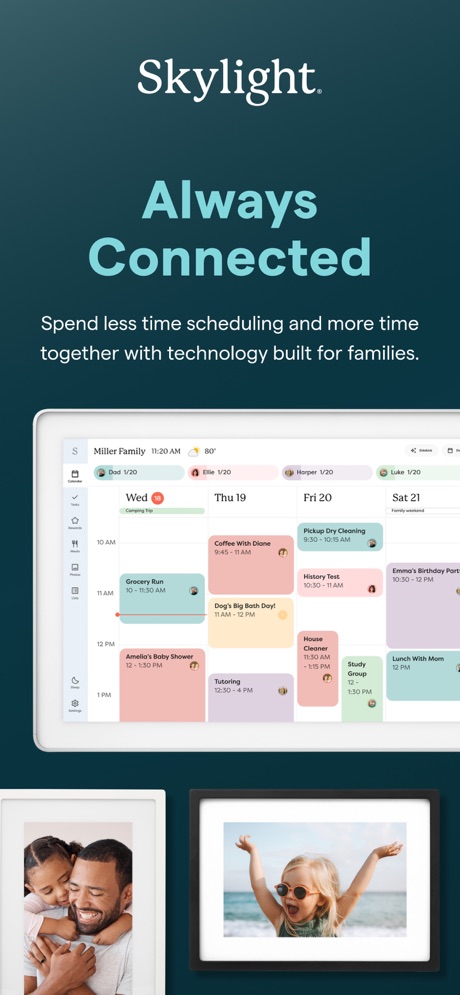
“Always Connected”
What these screenshots say, word for word.
The words on 40 of the 115 that carry any, as each app wrote them.
“Snap”
Share the momentSnapchat · #5 · screenshot 1“Build and export on-brand emails”
Canva AI Photo & Video Editor · #6 · screenshot 6“HOME WHAT'S PICKED FOR YOU”
KICK - Live Streaming · #11 · screenshot 1“Discover new streams, clips, and stories”
Twitch: Live Streaming · #12 · screenshot 1“Upload and share anywhere on your terms”
Vimeo · #13 · screenshot 2“Keep it in the Circle”
Share PrivatelyPhotoCircle · #22 · screenshot 1“Add a classic film look with one tap.”
Lightroom: AI Photo Editor · #23 · screenshot 3“AI Video Editor”
And Slideshow MakerInShot - Video Editor · #26 · screenshot 1“DIGI CAM IT!”
Photo didn't hit?WayShot:Aesthetic Photo Editor · #33 · screenshot 1“Always Connected”
Spend less time scheduling and more time together with technology built for families.Skylight App · #34 · screenshot 1“THE NEW FILM STANDARD.”
Snapseed: Photo Editor · #37 · screenshot 2“Easy”
Get photos from your phone and social mediaFreePrints – Print Photos · #38 · screenshot 2“Edit videos instantly with AI Edit”
Captions: AI Edits Your Video · #39 · screenshot 1“SYNC YOUR STYLE: BULK APPLY FILTERS WITH EASE”
ism: Retro Camera & Vintage · #40 · screenshot 4“One-tap AI Retouch”
Airbrush: Face Photo Editor · #41 · screenshot 1“Canon Camera Connect”
Connect to the cameraCanon Camera Connect · #43 · screenshot 1“AI Effects”
Meitu AI Photo & Video Editor · #45 · screenshot 6“YOUR LOVE YOUR MOMENT”
ReelMe: AI Photo & Video · #46 · screenshot 2“15+ Retakes”
in a minRetake AI Face & Selfie Editor · #48 · screenshot 6- 1-hour
“Photo Gifts & Prints”
Picta x CVS Photo · #53 · screenshot 1 “The full experience”
Frameo · #54 · screenshot 1“FUNNY PET AVATAR”
BeautyPlus-Selfie Photo Editor · #55 · screenshot 6“Share”
Relive special memories in a private, unlimited family photo albumAura Frames · #57 · screenshot 2“The Best Film Effects”
Tezza: Aesthetic Photo Editor · #58 · screenshot 1“B&W Cinematic Long Take”
AI Catch: AI Video Generator · #60 · screenshot 1“AI edits like your favorite creators”
AI Avatar Generator - HeyGen · #61 · screenshot 2“Enhance your photos' quality.”
Remini - AI Photo Enhancer · #63 · screenshot 1“Photo to Fantasy video”
AI Photo Video Editor, Enhance · #65 · screenshot 6“Get photos off your phone and into your home.”
Over 26 years. Millions of happy customers. Trust your memories with the experts.Shutterfly: Prints Cards Gifts · #66 · screenshot 1“Create eye-catching videos”
intoLive - Live Wallpapers · #70 · screenshot 2“Deep Track 3.0”
Whether a person, animal, or a moving object, keep the subject centered in your shot with a single tap!Insta360 · #71 · screenshot 3“fontmaker”
Now you can use your own HandwhittingFontmaker - Font Keyboard App · #74 · screenshot 1“Keyframe Animation”
Easily create sophisticated custom animations.Alight Motion · #75 · screenshot 1“Natural HD Clarity in 1 Tap”
“20 MILLION EDITS PER MONTH”Citrus 1 Tap Photo Enhancer AI · #78 · screenshot 1“MOBILE STREAMING”
EARLY ACCESSKICK - Go Live · #80 · screenshot 1“Create something beautifully unique in just 5 minutes”
→ Photo Books → Photo Tiles → Calendars → Prints → OrnamentsPopsa | Print Your Photos · #86 · screenshot 2“CONNECT YOUR TRAILCAMS”
Tactacam REVEAL · #87 · screenshot 2“New version”
Better experienceViidure · #90 · screenshot 1“Add Cinematic Presets”
Evoto: Photo Editor & Retouch · #94 · screenshot 3“DOUBLE CHIN REMOVAL”
Easily Remove the Extra LayerBeautyCam-Digicam&Photo Editor · #96 · screenshot 2
Top ten Photo & Video apps that do it.
- #5Snapchat6 of its 6 screenshots
- #6Canva AI Photo & Video Editor1 of its 6 screenshots
The same tactic in other categories.
| Category | Apps that do it | Screenshots | Top ten |
|---|---|---|---|
| Education | 79% 79 of 100 | 51% 281 of 555 | 6 of 10 |
| Food & Drink | 71% 71 of 100 | 51% 278 of 540 | 6 of 10 |
| Medical | 68% 68 of 100 | 46% 251 of 548 | 7 of 10 |
| Finance | 67% 67 of 100 | 50% 288 of 581 | 8 of 10 |
| Business | 64% 64 of 100 | 47% 258 of 554 | 9 of 10 |
| Reference | 64% 64 of 100 | 49% 275 of 566 | 7 of 10 |
| Travel | 64% 64 of 100 | 44% 245 of 561 | 5 of 10 |
| Music | 62% 62 of 100 | 41% 225 of 550 | 5 of 10 |
| Entertainment | 61% 61 of 100 | 45% 243 of 544 | 4 of 10 |
| Social Networking | 61% 61 of 100 | 43% 237 of 554 | 9 of 10 |
| Productivity | 60% 59 of 99 | 45% 249 of 551 | 3 of 10 |
| Shopping | 59% 59 of 100 | 43% 241 of 562 | 7 of 10 |
| Lifestyle | 58% 58 of 100 | 41% 230 of 556 | 8 of 10 |
| Weather | 57% 57 of 100 | 38% 212 of 555 | 6 of 10 |
| News | 56% 55 of 98 | 39% 204 of 517 | 4 of 10 |
| Health & Fitness | 56% 56 of 100 | 39% 225 of 574 | 3 of 10 |
| Sports | 56% 56 of 100 | 44% 245 of 558 | 5 of 10 |
| Games | 55% 55 of 100 | 35% 198 of 567 | 6 of 10 |
| Utilities | 55% 55 of 100 | 43% 238 of 549 | 4 of 10 |
| Graphics & Design | 54% 53 of 99 | 26% 148 of 564 | 6 of 10 |
| Navigation | 53% 52 of 99 | 40% 225 of 566 | 7 of 10 |
| Photo & Video | 45% 45 of 100 | 22% 123 of 566 | 2 of 10 |
| Developer Tools | 31% 31 of 100 | 23% 119 of 507 | 2 of 10 |
Related tactics.
Often on the same screenshot
- Whole phone shown70% of these screenshots, against 60% of all Photo & Video screenshots
- Blue24% of these screenshots, against 15% of all Photo & Video screenshots
- Phone drawn84% of these screenshots, against 75% of all Photo & Video screenshots
- Red15% of these screenshots, against 7% of all Photo & Video screenshots
- Headline in capitals26% of these screenshots, against 18% of all Photo & Video screenshots
- Green12% of these screenshots, against 5% of all Photo & Video screenshots
More in look
- Orange69%
- Gradient background60%
- Black, white or grey59%
- Solid background57%
- High contrast words56%
- Dark55%
- Light50%
- A word in a different colour48%
- Blue40%
- Low contrast words38%
- Red29%
- Photo background26%
- Rounded headline type25%
- Teal22%
- Green12%
- Pattern or texture12%
- Pink12%
- The app itself is the background8%
- Purple7%
- Serif headline6%
- Yellow6%
- Condensed or display type1%
Questions, answered from the chart.
How many top Photo & Video apps have App Store screenshots in the app icon’s colour?
Which Photo & Video apps have App Store screenshots in the app icon’s colour?
Should my Photo & Video app have App Store screenshots in the app icon’s colour?
See your own app against this.
Pagefully reads your screenshots the same way, and makes a custom product page for each search people type, from your real screens.
Preview your pages