Photo & Video app screenshots with a command headline
The headline is a command: Track your sleep, Start a session. A command starts with a verb, so the first word is what the reader can do with the app.
From the top 100 free Photo & Video apps on the US App Store, read on October 9, 2026. Screenshots are the developers’ own, shown from Apple’s servers with a link to each app.
The numbers
224 of the 566 Photo & Video screenshots read (40%) do this, across 72 of the top 100 apps (72%). 8 of the top ten do it (80%), against 64 of the other 90 (71%): the top ten do it about as often as the rest. Of the 23 categories read so far, Photo & Video is 21st for this. It is most common in Health & Fitness (95% of apps) and least common in Weather (45%).
12 examples from the chart.
12 of the 224 Photo & Video app screenshots with a command headline, one from each app, the highest on the chart first.
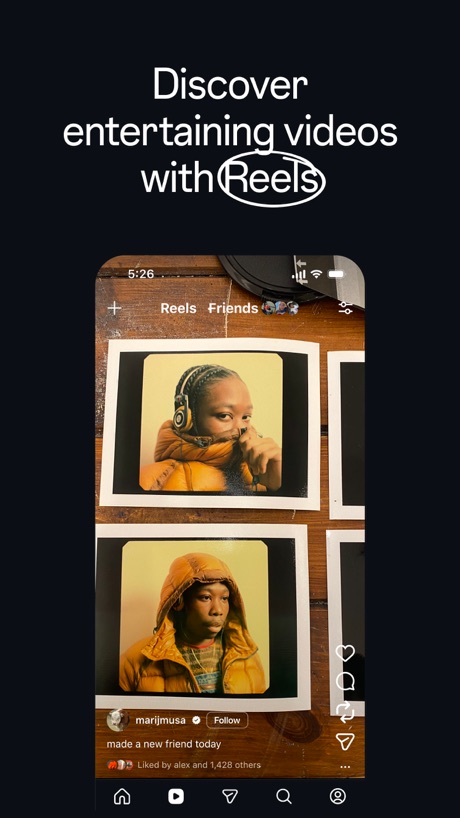
“Discover entertaining videos with Reels”

“Create”

“Animate”

“Design anything”

“Customize your captions”
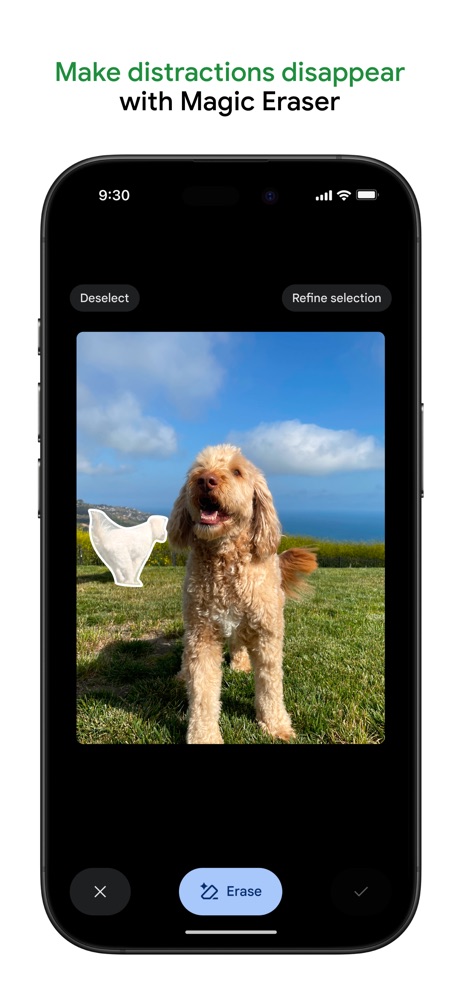
“Make distractions disappear with Magic Eraser”

“Turn imagination into characters”

“Share”

“BROWSE”

“Discover new streams, clips, and stories”

“Watch videos from award winning creators”

“Share On Social Media”
Real headline examples, word for word.
The words on 40 of the 224 that carry any, as each app wrote them.
“Discover entertaining videos with Reels”
Instagram · #2 · screenshot 1“Create”
Fun videos easily with ShortsYouTube · #3 · screenshot 1“Animate”
any photoShots: Photo & Video Generator · #4 · screenshot 3“Design anything”
Canva AI Photo & Video Editor · #6 · screenshot 1“Customize your captions”
Edits: Video Editor · #7 · screenshot 1“Make distractions disappear with Magic Eraser”
Google Photos: Backup & Edit · #8 · screenshot 2“Turn imagination into characters”
Cantina: AI Video & Characters · #9 · screenshot 1“Share”
on social mediaDance AI - Video Generator · #10 · screenshot 3“BROWSE”
BEYOND THE USUALKICK - Live Streaming · #11 · screenshot 2“Discover new streams, clips, and stories”
Twitch: Live Streaming · #12 · screenshot 1“Watch videos from award winning creators”
Vimeo · #13 · screenshot 1“Share On Social Media”
Momo: AI Photo & Video Maker · #14 · screenshot 4“Explore your styles with AI try on”
Picsart AI Photo Editor, Video · #15 · screenshot 1“Try Viral Dances”
AI Video Generator - Vixel · #16 · screenshot 2“Stand out with your collages”
SCRL: Photo Collage Maker · #17 · screenshot 1“Edit your images in any way imaginable.”
Runway: AI Image & Video · #19 · screenshot 2“Express yourself”
how you wantYouTube Studio · #20 · screenshot 3“Trending Now Tap To Create”
PixVerse Lite · #21 · screenshot 3“Keep it in the Circle”
Share PrivatelyPhotoCircle · #22 · screenshot 1“Extend your photo to fit any size.”
Lightroom: AI Photo Editor · #23 · screenshot 2“Keep your memories safe”
Amazon Photos: Photo & Video · #25 · screenshot 2“Apply Super Transitions”
InShot - Video Editor · #26 · screenshot 2“bedazzle your selfie”
FaceLab: Face Age, Hair Filter · #28 · screenshot 6“Put on trending makeup with 1 tap”
Hypic - Photo Editor & AI Art · #31 · screenshot 2“DIGI CAM IT!”
Photo didn't hit?WayShot:Aesthetic Photo Editor · #33 · screenshot 1“Share Photos That Show up in Seconds”
Skylight App · #34 · screenshot 2“Get topic insights with search”
TikTok Studio · #36 · screenshot 1“LOCK IN YOUR CUSTOM LOOK.”
Snapseed: Photo Editor · #37 · screenshot 4- Free!
“Get 1,000 free 4x6 photo prints a year”
FreePrints – Print Photos · #38 · screenshot 1 “Edit videos instantly with AI Edit”
Captions: AI Edits Your Video · #39 · screenshot 1“SYNC YOUR STYLE: BULK APPLY FILTERS WITH EASE”
ism: Retro Camera & Vintage · #40 · screenshot 4“Reshape Everything”
Airbrush: Face Photo Editor · #41 · screenshot 2“Bring your voice to life with lip sync.”
ElevenLabs: AI Voice Generator · #42 · screenshot 1“Create AI backgrounds”
Photoroom: AI Photo Editor · #44 · screenshot 1“STEP INTO YOUR ICONIC 80S ERA”
ReelMe: AI Photo & Video · #46 · screenshot 3“Retake your photos with AI”
Retake AI Face & Selfie Editor · #48 · screenshot 2“Make It HD”
Wink: Video Enhancer & Editor · #49 · screenshot 1“MAKE ANYTHING”
VideoGPT - AI Video Generator · #50 · screenshot 1“Remove Backgrounds”
PicCollage: Magic Photo Editor · #51 · screenshot 2“Turn any photo into a masterpiece”
Prequel: Photo & Video Editor · #52 · screenshot 4
Top ten Photo & Video apps that do it.
- #2Instagram6 of its 6 screenshots
- #3YouTube4 of its 5 screenshots
- #4Shots: Photo & Video Generator2 of its 6 screenshots
- #6Canva AI Photo & Video Editor4 of its 6 screenshots
- #7Edits: Video Editor4 of its 6 screenshots
- #8Google Photos: Backup & Edit3 of its 6 screenshots
- #9Cantina: AI Video & Characters3 of its 5 screenshots
- #10Dance AI - Video Generator1 of its 5 screenshots
The same tactic in other categories.
| Category | Apps that do it | Screenshots | Top ten |
|---|---|---|---|
| Health & Fitness | 95% 95 of 100 | 60% 342 of 574 | 10 of 10 |
| Food & Drink | 93% 93 of 100 | 55% 295 of 540 | 10 of 10 |
| Productivity | 93% 92 of 99 | 54% 299 of 551 | 10 of 10 |
| Finance | 90% 90 of 100 | 54% 311 of 581 | 7 of 10 |
| Lifestyle | 88% 88 of 100 | 58% 322 of 556 | 10 of 10 |
| Shopping | 88% 88 of 100 | 50% 281 of 562 | 9 of 10 |
| Travel | 85% 85 of 100 | 48% 267 of 561 | 9 of 10 |
| Entertainment | 84% 84 of 100 | 45% 245 of 544 | 9 of 10 |
| Music | 83% 83 of 100 | 52% 287 of 550 | 8 of 10 |
| Social Networking | 83% 83 of 100 | 50% 279 of 554 | 9 of 10 |
| Business | 82% 82 of 100 | 51% 282 of 554 | 9 of 10 |
| Sports | 82% 82 of 100 | 45% 249 of 558 | 9 of 10 |
| Navigation | 82% 81 of 99 | 48% 269 of 566 | 8 of 10 |
| Graphics & Design | 81% 80 of 99 | 39% 221 of 564 | 7 of 10 |
| Education | 80% 80 of 100 | 49% 274 of 555 | 8 of 10 |
| Reference | 78% 78 of 100 | 45% 255 of 566 | 8 of 10 |
| Games | 74% 74 of 100 | 43% 243 of 567 | 9 of 10 |
| Medical | 73% 73 of 100 | 49% 268 of 548 | 9 of 10 |
| Utilities | 73% 73 of 100 | 39% 214 of 549 | 8 of 10 |
| News | 72% 71 of 98 | 48% 248 of 517 | 10 of 10 |
| Photo & Video | 72% 72 of 100 | 40% 224 of 566 | 8 of 10 |
| Developer Tools | 56% 56 of 100 | 31% 158 of 507 | 5 of 10 |
| Weather | 45% 45 of 100 | 19% 106 of 555 | 5 of 10 |
Related tactics.
Often on the same screenshot
- States a benefit50% of these screenshots, against 39% of all Photo & Video screenshots
- Says “you” or “your”30% of these screenshots, against 20% of all Photo & Video screenshots
- Phone drawn84% of these screenshots, against 75% of all Photo & Video screenshots
- Plain tone81% of these screenshots, against 73% of all Photo & Video screenshots
- Whole phone shown69% of these screenshots, against 60% of all Photo & Video screenshots
- Words at the top98% of these screenshots, against 91% of all Photo & Video screenshots
More in words
- Has a headline95%
- Headline under five words86%
- Says “you” or “your”55%
- Has a subline49%
- Headline in Title Case38%
- Headline on one line35%
- Uses a number31%
- Headline in capitals22%
- Has a kicker13%
- Names the app12%
- No words at all11%
- Headline over eight words10%
- Says “I” or “my”6%
- Uses an emoji2%
- Exclaims1%
- Names another app1%
- Uses a percentage1%
Questions, answered from the chart.
How many top Photo & Video apps have App Store screenshots with a command headline?
Which Photo & Video apps have App Store screenshots with a command headline?
Should my Photo & Video app have App Store screenshots with a command headline?
See your own app against this.
Pagefully reads your screenshots the same way, and makes a custom product page for each search people type, from your real screens.
Preview your pages