Reference app screenshots that ask a question
The headline ends in a question mark. A question puts the reader’s own situation first, and the app is the answer.
From the top 100 free Reference apps on the US App Store, read on October 9, 2026. Screenshots are the developers’ own, shown from Apple’s servers with a link to each app.
The numbers
10 of the 566 Reference screenshots read (2%) do this, across 5 of the top 100 apps (5%). 1 of the top ten do it (10%), against 4 of the other 90 (4%): the top ten do it about as often as the rest. Of the 23 categories read so far, Reference is 1st for this. It is most common in Reference (5% of apps) and least common in Productivity (0%).
All 10 examples from the chart.
Every one of the Reference app screenshots that ask a question on the chart, the highest app first.

“Hello! how are you?”

“Who's singing?”

“Can't understand foreign media?”
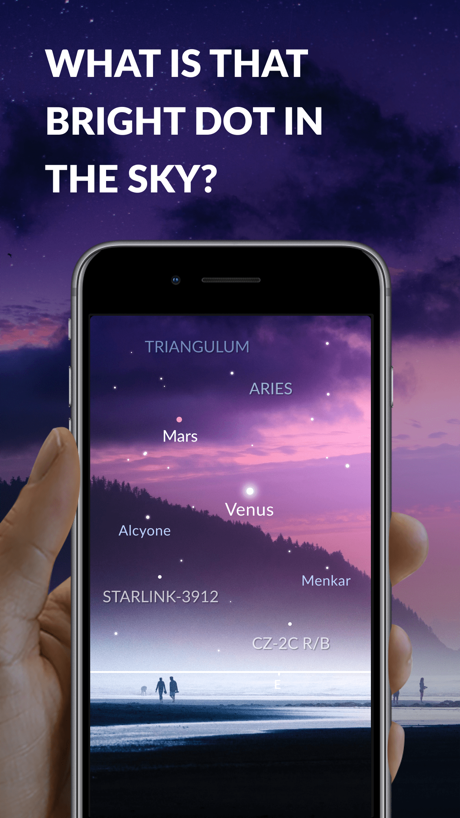
“WHAT IS THAT BRIGHT DOT IN THE SKY?”

“Missed Church?”

“HOW TO FIND JUPITER OR SATURN?”

“WHEN TO SEE THE ISS?”

“WHAT IS A PLANET PARADE?”

“WHEN IS THE NEXT FULL MOON?”

“WHAT IS IN THE SKY TONIGHT?”
Real headline examples, word for word.
The words on all 10 that carry any, as each app wrote them.
“Hello! how are you?”
Google Translate · #2 · screenshot 4“Who's singing?”
Merlin Bird ID can tell youMerlin Bird ID by Cornell Lab · #24 · screenshot 1“Can't understand foreign media?”
Try the Movie Viewing ModeeTranslator-AI Translate · #67 · screenshot 3“WHAT IS THAT BRIGHT DOT IN THE SKY?”
Sky Tonight - Stargazing Guide · #75 · screenshot 1“Missed Church?”
Sunday's sermon, wherever you areVessel: Bible Study & Notes · #98 · screenshot 5“HOW TO FIND JUPITER OR SATURN?”
Sky Tonight - Stargazing Guide · #75 · screenshot 2“WHEN TO SEE THE ISS?”
Sky Tonight - Stargazing Guide · #75 · screenshot 3“WHAT IS A PLANET PARADE?”
Sky Tonight - Stargazing Guide · #75 · screenshot 4“WHEN IS THE NEXT FULL MOON?”
Sky Tonight - Stargazing Guide · #75 · screenshot 5“WHAT IS IN THE SKY TONIGHT?”
Sky Tonight - Stargazing Guide · #75 · screenshot 6
Top ten Reference apps that do it.
- #2Google Translate1 of its 6 screenshots
The same tactic in other categories.
| Category | Apps that do it | Screenshots | Top ten |
|---|---|---|---|
| Reference | 5% 5 of 100 | 2% 10 of 566 | 1 of 10 |
| Lifestyle | 4% 4 of 100 | 1% 4 of 556 | 0 of 10 |
| Sports | 4% 4 of 100 | 1% 4 of 558 | 0 of 10 |
| Games | 3% 3 of 100 | 1% 3 of 567 | 1 of 10 |
| Finance | 2% 2 of 100 | under 1% 2 of 581 | 0 of 10 |
| Shopping | 2% 2 of 100 | under 1% 2 of 562 | 0 of 10 |
| Weather | 2% 2 of 100 | 1% 3 of 555 | 0 of 10 |
| News | 1% 1 of 98 | under 1% 1 of 517 | 0 of 10 |
| Navigation | 1% 1 of 99 | under 1% 1 of 566 | 0 of 10 |
| Developer Tools | 1% 1 of 100 | under 1% 1 of 507 | 0 of 10 |
| Entertainment | 1% 1 of 100 | under 1% 1 of 544 | 1 of 10 |
| Food & Drink | 1% 1 of 100 | under 1% 1 of 540 | 0 of 10 |
| Health & Fitness | 1% 1 of 100 | under 1% 1 of 574 | 0 of 10 |
| Social Networking | 1% 1 of 100 | under 1% 1 of 554 | 0 of 10 |
| Travel | 1% 1 of 100 | under 1% 1 of 561 | 0 of 10 |
| Utilities | 1% 1 of 100 | under 1% 1 of 549 | 0 of 10 |
| Business | 0% 0 of 100 | 0% 0 of 554 | 0 of 10 |
| Education | 0% 0 of 100 | 0% 0 of 555 | 0 of 10 |
| Graphics & Design | 0% 0 of 99 | 0% 0 of 564 | 0 of 10 |
| Medical | 0% 0 of 100 | 0% 0 of 548 | 0 of 10 |
| Music | 0% 0 of 100 | 0% 0 of 550 | 0 of 10 |
| Photo & Video | 0% 0 of 100 | 0% 0 of 566 | 0 of 10 |
| Productivity | 0% 0 of 99 | 0% 0 of 551 | 0 of 10 |
Related tactics.
Often on the same screenshot
- Headline in capitals60% of these screenshots, against 9% of all Reference screenshots
- Two or more screens50% of these screenshots, against 5% of all Reference screenshots
- Leads with a problem40% of these screenshots, against 1% of all Reference screenshots
- Dark60% of these screenshots, against 24% of all Reference screenshots
- Words aligned left50% of these screenshots, against 17% of all Reference screenshots
- Headline readable at thumbnail size70% of these screenshots, against 39% of all Reference screenshots
More in words
- Has a headline93%
- Headline under five words87%
- Tells you to do something78%
- Says “you” or “your”66%
- Headline in Title Case61%
- Has a subline48%
- Uses a number37%
- Says “I” or “my”21%
- Names the app19%
- Headline on one line17%
- Headline in capitals14%
- No words at all14%
- Has a kicker13%
- Headline over eight words11%
- Exclaims6%
- Uses an emoji3%
- Names another app1%
- Uses a percentage1%
Questions, answered from the chart.
How many top Reference apps have App Store screenshots that ask a question?
Which Reference apps have App Store screenshots that ask a question?
Should my Reference app have App Store screenshots that ask a question?
See your own app against this.
Pagefully reads your screenshots the same way, and makes a custom product page for each search people type, from your real screens.
Preview your pages