Navigation app screenshots with a solid background
One flat colour behind everything. A flat colour leaves the words and the screen as the only things to look at.
From the top 99 free Navigation apps on the US App Store, read on October 9, 2026. Screenshots are the developers’ own, shown from Apple’s servers with a link to each app.
The numbers
206 of the 566 Navigation screenshots read (36%) do this, across 56 of the top 99 apps (57%). 7 of the top ten do it (70%), against 49 of the other 89 (55%): the top ten do it more than the rest. Of the 23 categories read so far, Navigation is 10th for this. It is most common in Food & Drink (68% of apps) and least common in Games (20%).
12 examples from the chart.
12 of the 206 Navigation app screenshots with a solid background, one from each app, the highest on the chart first.

“Never miss a turn”

“Get there faster with live traffic updates & precise ETAs”

“Discover all of our offerings”


“Explore Your City with Retro Map Themes”

“Save more with in-app offers”

“Compare & book parking in 400+ cities”

“Earn points and save up to 50¢/gal off at participating Chevron stations”

“Find parking that works for you”

“Tickets for LIRR & Metro-North”

“Remarkable parking”
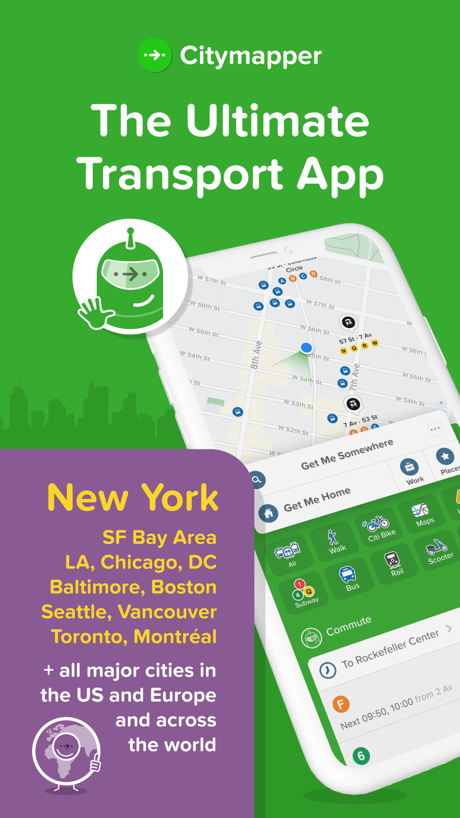
“The Ultimate Transport App”
What these screenshots say, word for word.
The words on 40 of the 196 that carry any, as each app wrote them.
“Never miss a turn”
Google Maps · #1 · screenshot 1“Get there faster with live traffic updates & precise ETAs”
Waze Navigation & Live Traffic · #3 · screenshot 1“Discover all of our offerings”
ParkMobile: Park. Pay. Go. · #4 · screenshot 2“Explore Your City with Retro Map Themes”
Game Maps IRL · #7 · screenshot 2“Save more with in-app offers”
Shell: Fuel, Charge & More · #8 · screenshot 2“Compare & book parking in 400+ cities”
SpotHero: #1 Rated Parking App · #9 · screenshot 1“Earn points and save up to 50¢/gal off at participating Chevron stations”
Chevron · #11 · screenshot 1“Find parking that works for you”
ParkWhiz - #1 Parking App · #12 · screenshot 1“Tickets for LIRR & Metro-North”
MTA TrainTime · #15 · screenshot 1“Remarkable parking”
Metropolis: Remarkable Parking · #16 · screenshot 1“The Ultimate Transport App”
Citymapper: All Live Transit · #18 · screenshot 1“Start charging instantly”
ChargePoint® · #20 · screenshot 6“Book ahead for dining, care and style”
NAVER Maps, Navigation · #22 · screenshot 4“Travel with ease”
Buy and validate your Navigo passes and t+ tickets with your phone, saving time and effort!Île-de-France Mobilités · #26 · screenshot 2“Autocharge+ Charging Starts On Plug In”
Enroll in Autocharge+ with ease!EVgo - Find a Fast EV Charger · #28 · screenshot 5“GPS navigation for Trucks”
Trucker Path: Truck GPS & Fuel · #29 · screenshot 2“MapQuest is back”
“Your quest begins here!”MapQuest GPS Navigation & Maps · #30 · screenshot 1“Say Bonjour to the city”
Bonjour RATP · #32 · screenshot 1“Select Pluses”, a new spot for great deals in Yandex Maps
“Select Pluses” — a new spot for great deals in Yandex MapsYandex Maps & Navigator · #33 · screenshot 1“Find EV Charging Stations”
PlugShare: Charging Stations · #36 · screenshot 1“OFFLINE MAPS”
Navigate With PrivacyOrganic Maps・Offline Maps, GPS · #37 · screenshot 1“Fog of War. Unlock the City.”
Drive new roads to unlock the map. The more you explore, the more you own.Exit51 · #38 · screenshot 6“Check live arrival times”
MBTA Go — Official · #39 · screenshot 2- MUDFLAP
“The #1 Trucking App for Big Diesel Discounts”
Mudflap · #41 · screenshot 1 “BETTER MAPS. BETTER DAYS.”
onX Backcountry: 3D Trail Maps · #42 · screenshot 1“GET REWARDED WITH FUEL SAVINGS”
Marathon Rewards · #43 · screenshot 1“GET REWARDED WITH FUEL SAVINGS”
ARCO Rewards · #44 · screenshot 1“Fuel Your Journey, Go the ExtraMile™”
ExtraMile® · #45 · screenshot 1“Search over 3,400 carriers for jobs”
Driver Pulse by Tenstreet · #46 · screenshot 3“I want to hunt with a”
GOHUNT empowers hunters with the research tools, technology, gear, and resources they need to get the most out of their time in the field.GOHUNT: Research & Maps · #50 · screenshot 1“kakaomap 좋은 곳을 함께 찾아가는 카카오맵”
KakaoMap - Korea No.1 Map · #51 · screenshot 1“Find EV Charging Locations”
Blink Charging Mobile App · #52 · screenshot 1“Satellite View Features”
Live Satellite View & GPS Maps · #53 · screenshot 1“GET MORE WITH THE CLUB CITGO APP”
Club CITGO - Gas Rewards · #60 · screenshot 1“Automatically Track Your Drives”
Wheelz - Social Drive Tracker · #62 · screenshot 1“Find free parking”
SpotAngels Parking & Gas · #63 · screenshot 1“Space”
Search for parking near your destinationPremium Parking · #65 · screenshot 1“Choose the best route”
TfL Go: Plan, Pay, Travel · #66 · screenshot 1“Interactive railway map”
Japan Travel - Smart Transit · #69 · screenshot 1“Thousands of bikes. All around Chicago.”
Divvy Bikes · #70 · screenshot 2
Top ten Navigation apps that do it.
- #1Google Maps6 of its 6 screenshots
- #3Waze Navigation & Live Traffic6 of its 6 screenshots
- #4ParkMobile: Park. Pay. Go.2 of its 6 screenshots
- #6earnify1 of its 6 screenshots
- #7Game Maps IRL2 of its 6 screenshots
- #8Shell: Fuel, Charge & More2 of its 6 screenshots
- #9SpotHero: #1 Rated Parking App5 of its 5 screenshots
The same tactic in other categories.
| Category | Apps that do it | Screenshots | Top ten |
|---|---|---|---|
| Food & Drink | 68% 68 of 100 | 48% 257 of 540 | 9 of 10 |
| Medical | 68% 68 of 100 | 48% 265 of 548 | 4 of 10 |
| Education | 65% 65 of 100 | 40% 221 of 555 | 8 of 10 |
| Shopping | 63% 63 of 100 | 47% 264 of 562 | 8 of 10 |
| Finance | 60% 60 of 100 | 41% 240 of 581 | 7 of 10 |
| Business | 58% 58 of 100 | 37% 207 of 554 | 4 of 10 |
| Developer Tools | 58% 58 of 100 | 36% 183 of 507 | 7 of 10 |
| Travel | 58% 58 of 100 | 38% 211 of 561 | 5 of 10 |
| Photo & Video | 57% 57 of 100 | 42% 235 of 566 | 8 of 10 |
| Navigation | 57% 56 of 99 | 36% 206 of 566 | 7 of 10 |
| News | 54% 53 of 98 | 39% 202 of 517 | 7 of 10 |
| Productivity | 43% 43 of 99 | 34% 189 of 551 | 5 of 10 |
| Lifestyle | 43% 43 of 100 | 29% 160 of 556 | 5 of 10 |
| Utilities | 43% 43 of 100 | 25% 135 of 549 | 5 of 10 |
| Social Networking | 42% 42 of 100 | 30% 167 of 554 | 6 of 10 |
| Reference | 39% 39 of 100 | 27% 152 of 566 | 4 of 10 |
| Health & Fitness | 38% 38 of 100 | 26% 148 of 574 | 4 of 10 |
| Music | 38% 38 of 100 | 27% 149 of 550 | 7 of 10 |
| Graphics & Design | 37% 37 of 99 | 23% 129 of 564 | 4 of 10 |
| Sports | 32% 32 of 100 | 17% 96 of 558 | 3 of 10 |
| Weather | 30% 30 of 100 | 14% 75 of 555 | 6 of 10 |
| Entertainment | 25% 25 of 100 | 13% 73 of 544 | 2 of 10 |
| Games | 20% 20 of 100 | 12% 69 of 567 | 2 of 10 |
Related tactics.
Often on the same screenshot
- Light54% of these screenshots, against 47% of all Navigation screenshots
- Background is the icon’s colour47% of these screenshots, against 40% of all Navigation screenshots
- Phone cut off at the foot23% of these screenshots, against 17% of all Navigation screenshots
- Words aligned left20% of these screenshots, against 14% of all Navigation screenshots
- Plain tone85% of these screenshots, against 80% of all Navigation screenshots
- Tells you to do something52% of these screenshots, against 48% of all Navigation screenshots
More in look
- Light65%
- Background is the icon’s colour53%
- Gradient background52%
- High contrast words51%
- Blue48%
- Dark48%
- Black, white or grey47%
- A word in a different colour40%
- Photo background30%
- Low contrast words27%
- Pattern or texture25%
- Green22%
- Teal22%
- Rounded headline type21%
- Orange20%
- Red11%
- Condensed or display type8%
- The app itself is the background6%
- Yellow6%
- Pink3%
- Purple2%
Questions, answered from the chart.
How many top Navigation apps have App Store screenshots with a solid background?
Which Navigation apps have App Store screenshots with a solid background?
Should my Navigation app have App Store screenshots with a solid background?
See your own app against this.
Pagefully reads your screenshots the same way, and makes a custom product page for each search people type, from your real screens.
Preview your pages