Navigation app screenshots with a phone cropped below
The device runs off the bottom edge. Cropping the device at the bottom lets it be drawn larger, so the top of the screen is easier to read.
From the top 99 free Navigation apps on the US App Store, read on October 9, 2026. Screenshots are the developers’ own, shown from Apple’s servers with a link to each app.
The numbers
95 of the 566 Navigation screenshots read (17%) do this, across 49 of the top 99 apps (49%). 4 of the top ten do it (40%), against 45 of the other 89 (51%): the top ten do it less than the rest. Of the 23 categories read so far, Navigation is 8th for this. It is most common in Finance (70% of apps) and least common in Games (6%).
12 examples from the chart.
12 of the 95 Navigation app screenshots with a phone cropped below, one from each app, the highest on the chart first.

“Get directions from the voice you love”


“Make Real-Life Navigation Feel More Playful”

“Reserve your parking ahead of time”

“Pay for fuel from the comfort of your car!”

“View parking history and easily book again”

“on Sharing”
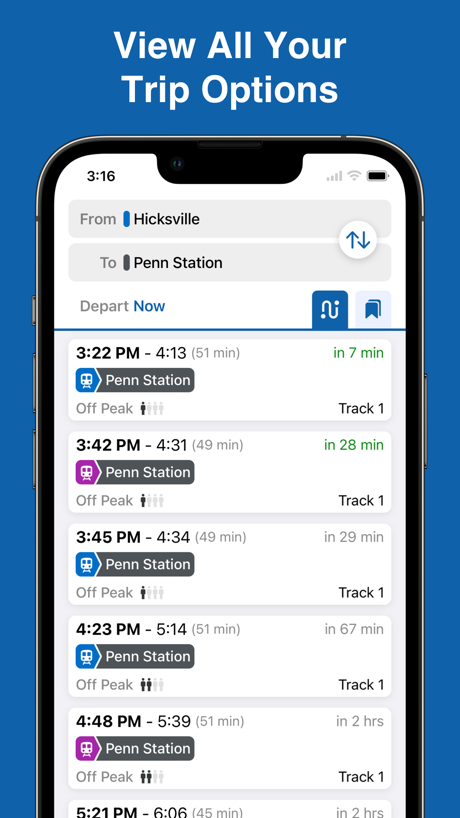
“View All Your Trip Options”

“Claim free or discounted parking”

“Apps of the Year”

“Your All-in-One Way to Explore Korea”

“Travel in a new way”
What these screenshots say, word for word.
The words on 40 of the 93 that carry any, as each app wrote them.
“Get directions from the voice you love”
Waze Navigation & Live Traffic · #3 · screenshot 4“Make Real-Life Navigation Feel More Playful”
Game Maps IRL · #7 · screenshot 4“Reserve your parking ahead of time”
SpotHero: #1 Rated Parking App · #9 · screenshot 2“Pay for fuel from the comfort of your car!”
Chevron · #11 · screenshot 2“View parking history and easily book again”
ParkWhiz - #1 Parking App · #12 · screenshot 5“on Sharing”
Real-time GPS Location Sharing · #13 · screenshot 2“View All Your Trip Options”
MTA TrainTime · #15 · screenshot 2“Claim free or discounted parking”
Metropolis: Remarkable Parking · #16 · screenshot 4- Apple
“Apps of the Year”
5 years in a rowCitymapper: All Live Transit · #18 · screenshot 2 “Your All-in-One Way to Explore Korea”
NAVER Maps, Navigation · #22 · screenshot 2“Travel in a new way”
Biking, carpooling, car sharing... Think about alternative solutions with Île-de-France Mobilités services.Île-de-France Mobilités · #26 · screenshot 5“Avoid Road Restrictions”
Stay clear of low bridges, narrow roads and weight limitsRouteXL: Smart Truck GPS · #27 · screenshot 3“Access 5M+ reviews from truckers”
Trucker Path: Truck GPS & Fuel · #29 · screenshot 5“Coffee? Gas? Hotel? Search for all your spots at once”
MapQuest GPS Navigation & Maps · #30 · screenshot 3“All local mobility options in one app”
Moovit: Bus & Transit Tracker · #31 · screenshot 1“Select Pluses”, a new spot for great deals in Yandex Maps
“Select Pluses” — a new spot for great deals in Yandex MapsYandex Maps & Navigator · #33 · screenshot 1“Enjoy the ride.”
Citi Bike · #34 · screenshot 5“Track your All-Time Stats”
Keep track of all your trips with in depth statistics and your full trip history.Exit51 · #38 · screenshot 3“No Contracts. No Credit Checks. No hassle.”
Mudflap · #41 · screenshot 6“Get special New Member Rewards when you sign up”
ExtraMile® · #45 · screenshot 2“NAVIGATE IN CONFIDENCE”
WITH EASY-TO-USE MAPPING TOOLSHuntWise: A Better Hunting App · #49 · screenshot 2“Know your odds before you apply.”
GOHUNT: Research & Maps · #50 · screenshot 4“Filter Search to Locate Charging Stations”
Blink Charging Mobile App · #52 · screenshot 2“Satellite View Features”
Live Satellite View & GPS Maps · #53 · screenshot 1“Discover New Inspiration”
Find new activities and routes with articles on the activity feed.Gaia GPS: Mobile Trail Maps · #55 · screenshot 3“Mark assets during field data collection”
Avenza Maps: Offline Mapping · #56 · screenshot 3“Get Any Country's Details”
Locator: My Family & Friend · #58 · screenshot 1“Car Insurance Savings Quotes from 50 carriers”
Up to $70 /mo savingsSpotAngels Parking & Gas · #63 · screenshot 6“for you”
Real-time location occupancy reportsPremium Parking · #65 · screenshot 2“Choose the best route”
TfL Go: Plan, Pay, Travel · #66 · screenshot 1“The #1 Mapping App For Trout Fishing”
Designed by trout anglers, for trout anglers.TroutRoutes: Fly Fishing App · #68 · screenshot 1“Japan Rail Pass optimized routes”
Japan Travel - Smart Transit · #69 · screenshot 2“Thousands of bikes. All around Chicago.”
Divvy Bikes · #70 · screenshot 2- Download games to earn rewards
“HIGH SCORES. BIG DISCOUNTS.”
DINOPAY - Sinclair Oil · #72 · screenshot 2 “Real-time transit data at your fingertips.”
myStop Mobile · #83 · screenshot 1“Send realtime alerts with PackRide”
Cardo Ride - Motorcycle App · #84 · screenshot 5“SPEEDOMETER”
ACCURATE GPS SPEED TRACKERSpeedometer GPS : MPH Tracker · #85 · screenshot 1“Turn-by-Turn Navigation”
هدهد: خرائط الخليج الأدق · #87 · screenshot 2“Compatible with CarPlay”
Customize and use the app directly on CarPlayproRadar・Radar & Speed Cameras · #88 · screenshot 2“Easily locate geographic points and see popular routes.”
Garmin Explore™ · #89 · screenshot 2
Top ten Navigation apps that do it.
- #3Waze Navigation & Live Traffic1 of its 6 screenshots
- #6earnify1 of its 6 screenshots
- #7Game Maps IRL1 of its 6 screenshots
- #9SpotHero: #1 Rated Parking App2 of its 5 screenshots
The same tactic in other categories.
| Category | Apps that do it | Screenshots | Top ten |
|---|---|---|---|
| Finance | 70% 70 of 100 | 33% 191 of 581 | 6 of 10 |
| Food & Drink | 62% 62 of 100 | 23% 122 of 540 | 5 of 10 |
| Health & Fitness | 62% 62 of 100 | 25% 145 of 574 | 5 of 10 |
| Business | 61% 61 of 100 | 21% 119 of 554 | 7 of 10 |
| Reference | 60% 60 of 100 | 21% 121 of 566 | 3 of 10 |
| Productivity | 53% 52 of 99 | 22% 122 of 551 | 4 of 10 |
| Lifestyle | 50% 50 of 100 | 18% 101 of 556 | 6 of 10 |
| Navigation | 49% 49 of 99 | 17% 95 of 566 | 4 of 10 |
| Utilities | 49% 49 of 100 | 18% 98 of 549 | 4 of 10 |
| Graphics & Design | 47% 47 of 99 | 14% 77 of 564 | 3 of 10 |
| Travel | 47% 47 of 100 | 16% 90 of 561 | 4 of 10 |
| Shopping | 46% 46 of 100 | 18% 102 of 562 | 6 of 10 |
| Medical | 45% 45 of 100 | 16% 90 of 548 | 7 of 10 |
| Music | 44% 44 of 100 | 17% 94 of 550 | 4 of 10 |
| Social Networking | 44% 44 of 100 | 17% 94 of 554 | 5 of 10 |
| Sports | 43% 43 of 100 | 15% 82 of 558 | 6 of 10 |
| News | 41% 40 of 98 | 15% 79 of 517 | 6 of 10 |
| Education | 38% 38 of 100 | 15% 83 of 555 | 5 of 10 |
| Entertainment | 36% 36 of 100 | 12% 65 of 544 | 3 of 10 |
| Weather | 32% 32 of 100 | 11% 63 of 555 | 3 of 10 |
| Photo & Video | 28% 28 of 100 | 10% 57 of 566 | 5 of 10 |
| Developer Tools | 26% 26 of 100 | 10% 52 of 507 | 0 of 10 |
| Games | 6% 6 of 100 | 2% 11 of 567 | 0 of 10 |
Related tactics.
Often on the same screenshot
- Solid background51% of these screenshots, against 36% of all Navigation screenshots
- Words at the top96% of these screenshots, against 85% of all Navigation screenshots
- Words aligned left24% of these screenshots, against 14% of all Navigation screenshots
- Phone drawn100% of these screenshots, against 91% of all Navigation screenshots
- Arrows or callouts24% of these screenshots, against 17% of all Navigation screenshots
- Plain tone87% of these screenshots, against 80% of all Navigation screenshots
More in layout
- Phone drawn100%
- Screen fills the picture99%
- Whole phone shown94%
- Words at the top92%
- Illustration or mascot78%
- A photograph76%
- Headline readable at thumbnail size58%
- Headline too small to read49%
- Arrows or callouts45%
- App icon shown40%
- A person in the picture31%
- Words aligned left31%
- No phone, bare screen23%
- Phone cut off at the head21%
- Phone at an angle19%
- Words at the bottom18%
- Screen is small17%
- A hand holds the phone15%
- Two or more screens15%
- Zoomed detail of the UI15%
- No app screen at all12%
- Watch, iPad or Mac beside it9%
- Words over the screen5%
Questions, answered from the chart.
How many top Navigation apps have App Store screenshots with a phone cropped below?
Which Navigation apps have App Store screenshots with a phone cropped below?
Should my Navigation app have App Store screenshots with a phone cropped below?
See your own app against this.
Pagefully reads your screenshots the same way, and makes a custom product page for each search people type, from your real screens.
Preview your pages