Lifestyle app screenshots with a phone cropped below
The device runs off the bottom edge. Cropping the device at the bottom lets it be drawn larger, so the top of the screen is easier to read.
From the top 100 free Lifestyle apps on the US App Store, read on October 9, 2026. Screenshots are the developers’ own, shown from Apple’s servers with a link to each app.
The numbers
101 of the 556 Lifestyle screenshots read (18%) do this, across 50 of the top 100 apps (50%). 6 of the top ten do it (60%), against 44 of the other 90 (49%): the top ten do it more than the rest. Of the 23 categories read so far, Lifestyle is 7th for this. It is most common in Finance (70% of apps) and least common in Games (6%).
12 examples from the chart.
12 of the 101 Lifestyle app screenshots with a phone cropped below, one from each app, the highest on the chart first.

“Visual assistance is just a tap away”
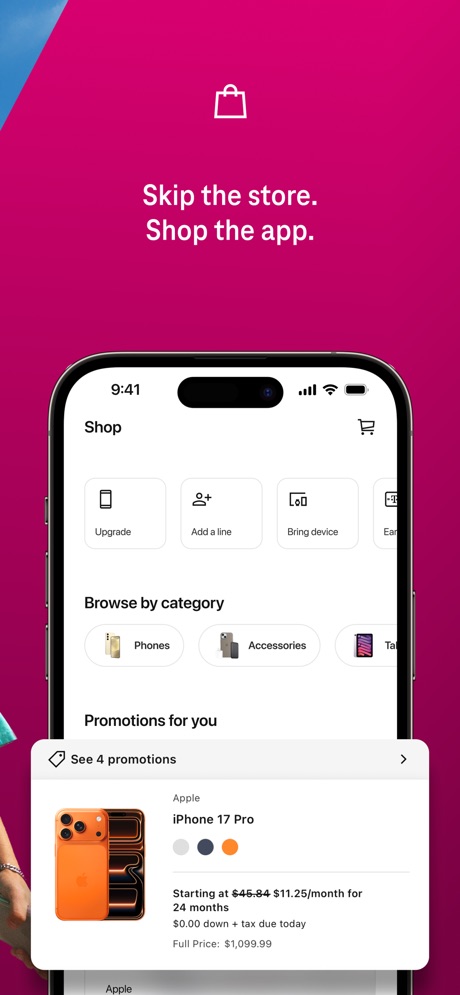
“Skip the store. Shop the app.”

“Know what's happening at home from wherever you are with Ring Alarm.”

“Customize Your Event Page”

“Start on the same page”

“Set your favorites”

“CELEBRATE EVERY MILESTONE IN ONE PLACE”

“Talk to Alexa on-the-go”

“Book some you time”
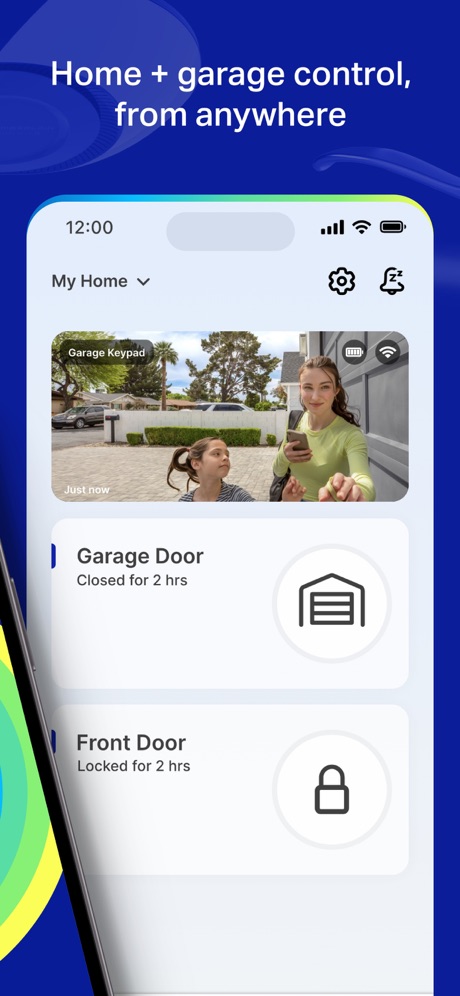
“Home + garage control, from anywhere”

“Continuously Evolving Appliances”

“Check and Manage History PDF Clearly”
What these screenshots say, word for word.
The words on 40 of the 99 that carry any, as each app wrote them.
“Visual assistance is just a tap away”
Be My Eyes · #1 · screenshot 4“Skip the store. Shop the app.”
T-Life · #3 · screenshot 2“Know what's happening at home from wherever you are with Ring Alarm.”
Ring - Always Home · #4 · screenshot 3“Customize Your Event Page”
Design your party invite with animated themes, effects, and your photosPartiful: Party Invite Maker · #5 · screenshot 2“Start on the same page”
with Dating IntentionsHinge Dating App: Match & Date · #7 · screenshot 3“Set your favorites”
Gather the devices, services, and scenes you use the most so you can access them quicklySmartThings · #9 · screenshot 2“CELEBRATE EVERY MILESTONE IN ONE PLACE”
KidHub by Unleashed Brands · #11 · screenshot 3“Talk to Alexa on-the-go”
Amazon Alexa · #12 · screenshot 1- APPOINTMENT BOOKING
“Book some you time”
Vagaro · #14 · screenshot 2 “Home + garage control, from anywhere”
myQ Garage & Access Control · #15 · screenshot 2“Continuously Evolving Appliances”
Try ThinQ UP and experience appliances that get better.LG ThinQ · #17 · screenshot 5“Check and Manage History PDF Clearly”
PDF Scan · #18 · screenshot 2“Control your vehicle from the palm of your hand”
Remote Connect subscription required. Only available on select vehicles.Toyota · #20 · screenshot 3“No Fake”
Duet Dating App: Chat & Meet · #21 · screenshot 1“Meet people looking for the same thing”
Bumble Dating App: Meet & Date · #22 · screenshot 3“You'll wake up. Always.”
Built for Heavy SleepersAlarmy - Loud alarm clock · #25 · screenshot 1“Build an energy-efficient home”
SmartLife: Smart Living · #31 · screenshot 4“Check Weight & See Progress”
*This feature may not be available in all regionsVeSync · #33 · screenshot 3“#1 Roadside Assistance”
Faster on-the-go with AAA.AAA Mobile · #37 · screenshot 2“CATCH THEIR ATTENTION WITH A GIFT”
PURE: Open-Minded Dating App · #38 · screenshot 5“Confidently tackle your home projects.”
Thumbtack: Home Service Pros · #39 · screenshot 1“Get paid for your opinion”
Google Opinion Rewards · #43 · screenshot 2“Measure Heart Rate”
Blood Pressure Log, Heart Rate · #44 · screenshot 1“add items from Any Store”
Giftful - Wishlist & Registry · #45 · screenshot 3“INSTANT CASH ADVANCE”
Instant Cash Advance - Zora · #46 · screenshot 1“Never Wonder”
The only official app for your Wyze devices.The Official Wyze App · #47 · screenshot 1“Find home help that fits your schedule.”
Chat and book in minutes.Taskrabbit - Handyman & more · #50 · screenshot 4“get msgs & love”
NGL: ask me anything · #51 · screenshot 4“Find others who share the same desires.”
Feeld: Dating for the Curious · #52 · screenshot 2“Learn about leaks before it's too late”
First Alert by Resideo · #53 · screenshot 5“Get Community Support”
I Am Sober · #54 · screenshot 6“Your home's clean, at- a-glance”
Roomba Home · #57 · screenshot 2“Calculate Your Cost”
Estimate one-time fees and monthly expensesApartments.com Rental Finder · #58 · screenshot 3“Playful chats that spark something new”
DOWN: The Casual Dating App · #63 · screenshot 6“Maps and analysis”
MyDyson™ · #65 · screenshot 3“Track Live Health Readings including Pulse Rate & Oxygen”
Owlet Dream · #67 · screenshot 3“Heart Rate & HRV Monitoring”
Wello - Heart Health Monitor · #68 · screenshot 1“A car buying and selling experience designed for you”
CarMax: Used Cars for Sale · #69 · screenshot 1“Your Personal AI stylist”
Alta Daily: Digital AI Closet · #72 · screenshot 1“Pay rent, request maintenance, and more”
Homebody: Better Renting · #74 · screenshot 1
Top ten Lifestyle apps that do it.
- #1Be My Eyes1 of its 4 screenshots
- #3T-Life4 of its 6 screenshots
- #4Ring - Always Home3 of its 5 screenshots
- #5Partiful: Party Invite Maker3 of its 6 screenshots
- #7Hinge Dating App: Match & Date3 of its 6 screenshots
- #9SmartThings3 of its 5 screenshots
The same tactic in other categories.
| Category | Apps that do it | Screenshots | Top ten |
|---|---|---|---|
| Finance | 70% 70 of 100 | 33% 191 of 581 | 6 of 10 |
| Food & Drink | 62% 62 of 100 | 23% 122 of 540 | 5 of 10 |
| Health & Fitness | 62% 62 of 100 | 25% 145 of 574 | 5 of 10 |
| Business | 61% 61 of 100 | 21% 119 of 554 | 7 of 10 |
| Reference | 60% 60 of 100 | 21% 121 of 566 | 3 of 10 |
| Productivity | 53% 52 of 99 | 22% 122 of 551 | 4 of 10 |
| Lifestyle | 50% 50 of 100 | 18% 101 of 556 | 6 of 10 |
| Navigation | 49% 49 of 99 | 17% 95 of 566 | 4 of 10 |
| Utilities | 49% 49 of 100 | 18% 98 of 549 | 4 of 10 |
| Graphics & Design | 47% 47 of 99 | 14% 77 of 564 | 3 of 10 |
| Travel | 47% 47 of 100 | 16% 90 of 561 | 4 of 10 |
| Shopping | 46% 46 of 100 | 18% 102 of 562 | 6 of 10 |
| Medical | 45% 45 of 100 | 16% 90 of 548 | 7 of 10 |
| Music | 44% 44 of 100 | 17% 94 of 550 | 4 of 10 |
| Social Networking | 44% 44 of 100 | 17% 94 of 554 | 5 of 10 |
| Sports | 43% 43 of 100 | 15% 82 of 558 | 6 of 10 |
| News | 41% 40 of 98 | 15% 79 of 517 | 6 of 10 |
| Education | 38% 38 of 100 | 15% 83 of 555 | 5 of 10 |
| Entertainment | 36% 36 of 100 | 12% 65 of 544 | 3 of 10 |
| Weather | 32% 32 of 100 | 11% 63 of 555 | 3 of 10 |
| Photo & Video | 28% 28 of 100 | 10% 57 of 566 | 5 of 10 |
| Developer Tools | 26% 26 of 100 | 10% 52 of 507 | 0 of 10 |
| Games | 6% 6 of 100 | 2% 11 of 567 | 0 of 10 |
Related tactics.
Often on the same screenshot
- Phone drawn99% of these screenshots, against 85% of all Lifestyle screenshots
- Has a subline34% of these screenshots, against 21% of all Lifestyle screenshots
- Subline explains the headline28% of these screenshots, against 16% of all Lifestyle screenshots
- States a benefit60% of these screenshots, against 49% of all Lifestyle screenshots
- Plain tone84% of these screenshots, against 74% of all Lifestyle screenshots
- Words at the top94% of these screenshots, against 84% of all Lifestyle screenshots
More in layout
- Screen fills the picture100%
- Phone drawn99%
- Words at the top94%
- Whole phone shown91%
- A photograph86%
- A person in the picture74%
- Illustration or mascot67%
- Headline readable at thumbnail size66%
- Arrows or callouts46%
- App icon shown45%
- Headline too small to read41%
- Words aligned left36%
- A hand holds the phone35%
- No phone, bare screen31%
- No app screen at all23%
- Phone cut off at the head23%
- Two or more screens23%
- Zoomed detail of the UI19%
- Screen is small18%
- Words at the bottom18%
- Phone at an angle16%
- Words over the screen16%
- Watch, iPad or Mac beside it8%
Questions, answered from the chart.
How many top Lifestyle apps have App Store screenshots with a phone cropped below?
Which Lifestyle apps have App Store screenshots with a phone cropped below?
Should my Lifestyle app have App Store screenshots with a phone cropped below?
See your own app against this.
Pagefully reads your screenshots the same way, and makes a custom product page for each search people type, from your real screens.
Preview your pages