Navigation app screenshots with tiny headlines
The headline is under a twentieth of the picture’s height. Small type can be read on the product page at full size, and is hard to read in search results.
From the top 99 free Navigation apps on the US App Store, read on October 9, 2026. Screenshots are the developers’ own, shown from Apple’s servers with a link to each app.
The numbers
83 of the 566 Navigation screenshots read (15%) do this, across 49 of the top 99 apps (49%). 4 of the top ten do it (40%), against 45 of the other 89 (51%): the top ten do it less than the rest. Of the 23 categories read so far, Navigation is 7th for this. It is most common in Health & Fitness (64% of apps) and least common in Games (17%).
12 examples from the chart.
12 of the 83 Navigation app screenshots with tiny headlines, one from each app, the highest on the chart first.
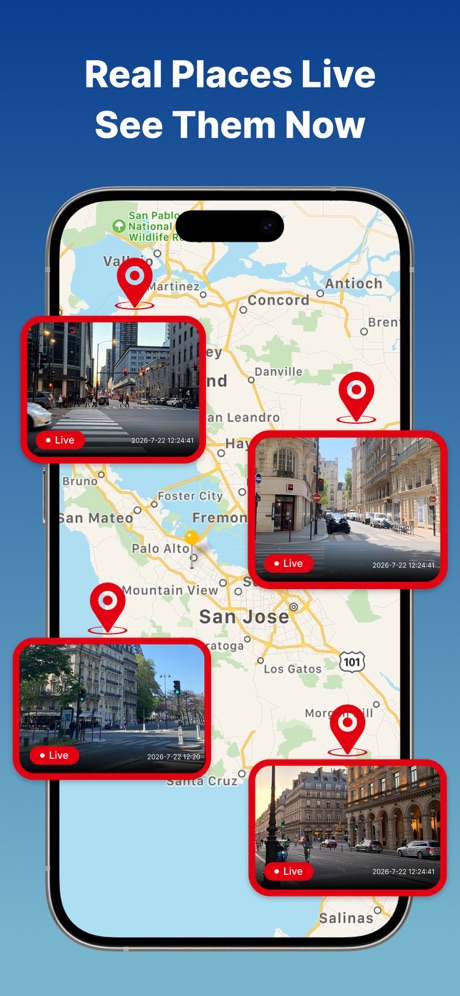
“Real Places Live See Them Now”

“Find fuel or charge up along the way”

“Available Nationwide”

“Up-to-date disruption info”

“Use any payment method for contactless pay”

“Quick and secure checkout”

“Speed Camera Alerts”

“Now supporting 78 global languages”

“Find Your Train & Station”

“Just drive in and park”

“Track all your charging in one place”

“Safe travel with AI Co-pilot”
What these screenshots say, word for word.
The words on 40 of the 83 that carry any, as each app wrote them.
“Real Places Live See Them Now”
EarthScope: GPS Map Camera · #2 · screenshot 1“Find fuel or charge up along the way”
Waze Navigation & Live Traffic · #3 · screenshot 5“Available Nationwide”
ParkMobile: Park. Pay. Go. · #4 · screenshot 3“Up-to-date disruption info”
Transit • Subway & Bus Times · #5 · screenshot 3“Use any payment method for contactless pay”
Chevron · #11 · screenshot 4“Quick and secure checkout”
ParkWhiz - #1 Parking App · #12 · screenshot 3“Speed Camera Alerts”
In Real TimeReal-time GPS Location Sharing · #13 · screenshot 3- This image is for reference only, actual products or events are subject to official information.
“Now supporting 78 global languages”
AMap Global · #14 · screenshot 2 “Find Your Train & Station”
MTA TrainTime · #15 · screenshot 5“Just drive in and park”
Metropolis: Remarkable Parking · #16 · screenshot 2“Track all your charging in one place”
ChargePoint® · #20 · screenshot 3“Safe travel with AI Co-pilot”
MapXplorer: GPS Maps & Radar · #21 · screenshot 3“View all your driving info on one screen”
NAVER Maps, Navigation · #22 · screenshot 6“Reliable, turn-by-turn guidance”
MapQuest GPS Navigation & Maps · #30 · screenshot 2“Choose the best Route”
Moovit: Bus & Transit Tracker · #31 · screenshot 2“Say Bonjour to the city”
Bonjour RATP · #32 · screenshot 1“Transport schedules and movement in real time”
Yandex Maps & Navigator · #33 · screenshot 4“Explore public transit near you.”
Citi Bike · #34 · screenshot 3“Track your bus and train”
MBTA Go — Official · #39 · screenshot 3“The largest public fast charging network in the U.S.”
Electrify America · #40 · screenshot 1“VIEW LIST OF ALL STORES”
Marathon Rewards · #43 · screenshot 3“GET REWARDED WITH FUEL SAVINGS”
ARCO Rewards · #44 · screenshot 1“Enjoy exclusive everyday offers”
ExtraMile® · #45 · screenshot 5“Your ride is just a click away”
TripShot · #48 · screenshot 1“Keep a record of your route.”
GOHUNT: Research & Maps · #50 · screenshot 3“별도 설치 없이 바로 연결되는 내비게이션”
KakaoMap - Korea No.1 Map · #51 · screenshot 3“Satellite View Features”
Live Satellite View & GPS Maps · #53 · screenshot 1“Interact With Fellow Randonauts”
Randonautica · #57 · screenshot 4“Share Your Location With Friends”
Locator: My Family & Friend · #58 · screenshot 3“GET MORE WITH THE CLUB CITGO APP”
Club CITGO - Gas Rewards · #60 · screenshot 1“Drive With Your Friends”
Wheelz - Social Drive Tracker · #62 · screenshot 2“Track your Pay As You Go spending”
TfL Go: Plan, Pay, Travel · #66 · screenshot 2“Choose Your Drive Sounds”
Car Dashboard Widgets - HiCar · #67 · screenshot 2“Navigation based on real-time traffic congestion”
Japan Travel - Smart Transit · #69 · screenshot 3“Road Markings Are Shown In High Detail To Make Driving Easier”
Maps 4u · #71 · screenshot 3“Turn-By-Turn Truck GPS”
TruckMap - Truck GPS Routes · #73 · screenshot 2“Real-time voiced corner callouts as you drive”
Rods — Corner & Road Alerts · #74 · screenshot 2“Check the real time location of your loved one”
Number tracker: Phone Location · #78 · screenshot 3“Select and save charging locations”
JOLT Electric Vehicle Charging · #80 · screenshot 4“Turn-by-turn navigation built for riders”
Cardo Ride - Motorcycle App · #84 · screenshot 3
Top ten Navigation apps that do it.
- #2EarthScope: GPS Map Camera1 of its 6 screenshots
- #3Waze Navigation & Live Traffic1 of its 6 screenshots
- #4ParkMobile: Park. Pay. Go.3 of its 6 screenshots
- #5Transit • Subway & Bus Times1 of its 6 screenshots
The same tactic in other categories.
| Category | Apps that do it | Screenshots | Top ten |
|---|---|---|---|
| Health & Fitness | 64% 64 of 100 | 18% 104 of 574 | 5 of 10 |
| Productivity | 59% 58 of 99 | 19% 102 of 551 | 8 of 10 |
| Entertainment | 57% 57 of 100 | 17% 94 of 544 | 7 of 10 |
| Social Networking | 56% 56 of 100 | 17% 95 of 554 | 7 of 10 |
| Photo & Video | 53% 53 of 100 | 17% 94 of 566 | 5 of 10 |
| Business | 51% 51 of 100 | 16% 91 of 554 | 7 of 10 |
| Navigation | 49% 49 of 99 | 15% 83 of 566 | 4 of 10 |
| Education | 49% 49 of 100 | 12% 68 of 555 | 3 of 10 |
| Finance | 49% 49 of 100 | 11% 66 of 581 | 3 of 10 |
| Travel | 48% 48 of 100 | 13% 71 of 561 | 6 of 10 |
| Medical | 43% 43 of 100 | 15% 81 of 548 | 5 of 10 |
| Music | 42% 42 of 100 | 11% 62 of 550 | 6 of 10 |
| Reference | 42% 42 of 100 | 11% 63 of 566 | 3 of 10 |
| Lifestyle | 41% 41 of 100 | 13% 72 of 556 | 5 of 10 |
| Graphics & Design | 40% 40 of 99 | 11% 61 of 564 | 6 of 10 |
| Sports | 39% 39 of 100 | 13% 72 of 558 | 3 of 10 |
| Utilities | 39% 39 of 100 | 12% 68 of 549 | 6 of 10 |
| News | 38% 37 of 98 | 13% 66 of 517 | 5 of 10 |
| Food & Drink | 37% 37 of 100 | 11% 61 of 540 | 5 of 10 |
| Shopping | 37% 37 of 100 | 13% 72 of 562 | 2 of 10 |
| Developer Tools | 31% 31 of 100 | 11% 56 of 507 | 4 of 10 |
| Weather | 31% 31 of 100 | 10% 53 of 555 | 6 of 10 |
| Games | 17% 17 of 100 | 4% 20 of 567 | 3 of 10 |
Related tactics.
Often on the same screenshot
- Low contrast words27% of these screenshots, against 13% of all Navigation screenshots
- Words at the top98% of these screenshots, against 85% of all Navigation screenshots
- Leads with a feature72% of these screenshots, against 60% of all Navigation screenshots
- Plain tone90% of these screenshots, against 80% of all Navigation screenshots
- Screen fills the picture89% of these screenshots, against 79% of all Navigation screenshots
- Light57% of these screenshots, against 47% of all Navigation screenshots
More in layout
- Phone drawn100%
- Screen fills the picture99%
- Whole phone shown94%
- Words at the top92%
- Illustration or mascot78%
- A photograph76%
- Headline readable at thumbnail size58%
- Phone cut off at the foot49%
- Arrows or callouts45%
- App icon shown40%
- A person in the picture31%
- Words aligned left31%
- No phone, bare screen23%
- Phone cut off at the head21%
- Phone at an angle19%
- Words at the bottom18%
- Screen is small17%
- A hand holds the phone15%
- Two or more screens15%
- Zoomed detail of the UI15%
- No app screen at all12%
- Watch, iPad or Mac beside it9%
- Words over the screen5%
Questions, answered from the chart.
How many top Navigation apps have App Store screenshots with tiny headlines?
Which Navigation apps have App Store screenshots with tiny headlines?
Should my Navigation app have App Store screenshots with tiny headlines?
See your own app against this.
Pagefully reads your screenshots the same way, and makes a custom product page for each search people type, from your real screens.
Preview your pages