Navigation app screenshots with a top-cropped phone
The device runs off the top edge. Cropping the device at the top shows the lower part of the screen larger: tab bars, buttons, keyboards.
From the top 99 free Navigation apps on the US App Store, read on October 9, 2026. Screenshots are the developers’ own, shown from Apple’s servers with a link to each app.
The numbers
26 of the 566 Navigation screenshots read (5%) do this, across 21 of the top 99 apps (21%). 1 of the top ten do it (10%), against 20 of the other 89 (22%): the top ten do it less than the rest. Of the 23 categories read so far, Navigation is 10th for this. It is most common in Finance (30% of apps) and least common in Games (3%).
12 examples from the chart.
12 of the 26 Navigation app screenshots with a top-cropped phone, one from each app, the highest on the chart first.


“Find parking that works for you”

“GPS Locati”
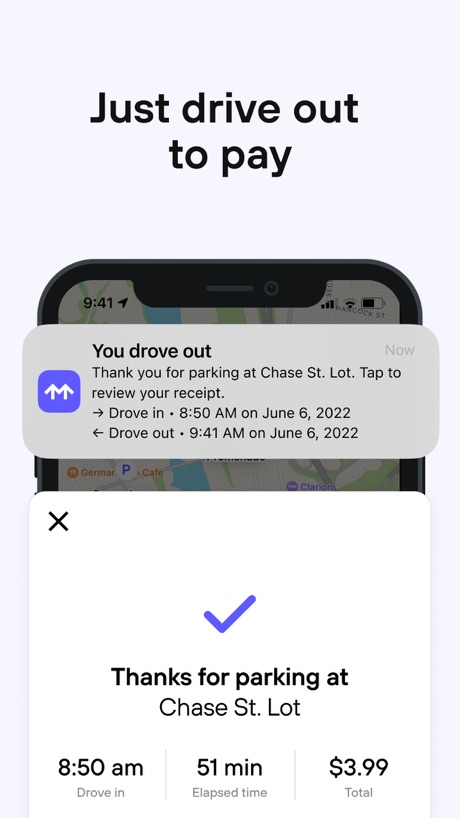
“Just drive out to pay”

“28 min 32 min 37 min 39 min 0 min”

“Find places while driving OTR”

“Reliable, turn-by-turn guidance”

“See Nearby Lines”

“Drive Together with Convoy”

“Share app feedback”

“Buy Fuel Securely With Your Debit or Credit Card”

“BETTER MAPS. BETTER DAYS.”
What these screenshots say, word for word.
The words on all 24 that carry any, as each app wrote them.
“Find parking that works for you”
ParkWhiz - #1 Parking App · #12 · screenshot 1“GPS Locati”
Real-time GPS Location Sharing · #13 · screenshot 1“Just drive out to pay”
Metropolis: Remarkable Parking · #16 · screenshot 3“28 min 32 min 37 min 39 min 0 min”
Citymapper: All Live Transit · #18 · screenshot 3“Find places while driving OTR”
Trucker Path: Truck GPS & Fuel · #29 · screenshot 3“Reliable, turn-by-turn guidance”
MapQuest GPS Navigation & Maps · #30 · screenshot 2“See Nearby Lines”
Moovit: Bus & Transit Tracker · #31 · screenshot 3“Drive Together with Convoy”
Create a convoy, invite friends, and follow each other live on the map.Exit51 · #38 · screenshot 4“Share app feedback”
Help us improve and add new featuresMBTA Go — Official · #39 · screenshot 5“Buy Fuel Securely With Your Debit or Credit Card”
Mudflap · #41 · screenshot 4“BETTER MAPS. BETTER DAYS.”
onX Backcountry: 3D Trail Maps · #42 · screenshot 1“Offline Maps”
No cell service? No problem. Download maps for offline use.Gaia GPS: Mobile Trail Maps · #55 · screenshot 2“Track your location with GPS”
Avenza Maps: Offline Mapping · #56 · screenshot 4“If Your Journey Is Truly Random Where Will You Go?”
Randonautica · #57 · screenshot 2“GET MORE WITH THE CLUB CITGO APP”
Club CITGO - Gas Rewards · #60 · screenshot 1“Top up, buy a Travelcard, and more”
TfL Go: Plan, Pay, Travel · #66 · screenshot 3“TRACK RECEIPTS”
Sunoco · #79 · screenshot 5“See detailed information about each bus.”
myStop Mobile · #83 · screenshot 4“Add Area”
iLocate MobiIe Area · #90 · screenshot 6“Real-time info on facility conditions”
Trucker Path: Truck GPS & Fuel · #29 · screenshot 6“Your location data stays safe and protected”
MapQuest GPS Navigation & Maps · #30 · screenshot 4“All Lines in your City”
Moovit: Bus & Transit Tracker · #31 · screenshot 4“Use at Over 2,300 Truck Stops Nationwide”
Mudflap · #41 · screenshot 5“SAVE ON SNACKS AND DRINKS”
Club CITGO - Gas Rewards · #60 · screenshot 4
Top ten Navigation apps that do it.
- #6earnify1 of its 6 screenshots
The same tactic in other categories.
| Category | Apps that do it | Screenshots | Top ten |
|---|---|---|---|
| Finance | 30% 30 of 100 | 7% 43 of 581 | 2 of 10 |
| Food & Drink | 26% 26 of 100 | 6% 35 of 540 | 2 of 10 |
| Music | 25% 25 of 100 | 5% 26 of 550 | 2 of 10 |
| Business | 24% 24 of 100 | 6% 33 of 554 | 2 of 10 |
| Travel | 24% 24 of 100 | 6% 33 of 561 | 4 of 10 |
| Health & Fitness | 23% 23 of 100 | 5% 31 of 574 | 2 of 10 |
| Lifestyle | 23% 23 of 100 | 5% 26 of 556 | 3 of 10 |
| Sports | 22% 22 of 100 | 4% 25 of 558 | 0 of 10 |
| Utilities | 22% 22 of 100 | 5% 28 of 549 | 2 of 10 |
| Navigation | 21% 21 of 99 | 5% 26 of 566 | 1 of 10 |
| Entertainment | 20% 20 of 100 | 5% 27 of 544 | 0 of 10 |
| Productivity | 19% 19 of 99 | 4% 23 of 551 | 3 of 10 |
| Reference | 19% 19 of 100 | 5% 26 of 566 | 1 of 10 |
| Education | 18% 18 of 100 | 4% 23 of 555 | 2 of 10 |
| Social Networking | 18% 18 of 100 | 4% 24 of 554 | 2 of 10 |
| News | 16% 16 of 98 | 4% 21 of 517 | 2 of 10 |
| Graphics & Design | 13% 13 of 99 | 3% 15 of 564 | 1 of 10 |
| Developer Tools | 12% 12 of 100 | 3% 15 of 507 | 1 of 10 |
| Medical | 12% 12 of 100 | 2% 13 of 548 | 1 of 10 |
| Photo & Video | 12% 12 of 100 | 2% 14 of 566 | 1 of 10 |
| Shopping | 9% 9 of 100 | 2% 9 of 562 | 3 of 10 |
| Weather | 7% 7 of 100 | 2% 9 of 555 | 1 of 10 |
| Games | 3% 3 of 100 | 1% 4 of 567 | 0 of 10 |
Related tactics.
Often on the same screenshot
- Words at the bottom42% of these screenshots, against 6% of all Navigation screenshots
- Headline readable at thumbnail size42% of these screenshots, against 24% of all Navigation screenshots
- Arrows or callouts35% of these screenshots, against 17% of all Navigation screenshots
- Screen is small19% of these screenshots, against 4% of all Navigation screenshots
- Light62% of these screenshots, against 47% of all Navigation screenshots
- Blue50% of these screenshots, against 35% of all Navigation screenshots
More in layout
- Phone drawn100%
- Screen fills the picture99%
- Whole phone shown94%
- Words at the top92%
- Illustration or mascot78%
- A photograph76%
- Headline readable at thumbnail size58%
- Headline too small to read49%
- Phone cut off at the foot49%
- Arrows or callouts45%
- App icon shown40%
- A person in the picture31%
- Words aligned left31%
- No phone, bare screen23%
- Phone at an angle19%
- Words at the bottom18%
- Screen is small17%
- A hand holds the phone15%
- Two or more screens15%
- Zoomed detail of the UI15%
- No app screen at all12%
- Watch, iPad or Mac beside it9%
- Words over the screen5%
Questions, answered from the chart.
How many top Navigation apps have App Store screenshots with a top-cropped phone?
Which Navigation apps have App Store screenshots with a top-cropped phone?
Should my Navigation app have App Store screenshots with a top-cropped phone?
See your own app against this.
Pagefully reads your screenshots the same way, and makes a custom product page for each search people type, from your real screens.
Preview your pages