Productivity app screenshots that state a benefit
Says what the reader gains, not only what the app does. A benefit answers “what do I get”, where a feature answers “what does it have”.
From the top 99 free Productivity apps on the US App Store, read on October 9, 2026. Screenshots are the developers’ own, shown from Apple’s servers with a link to each app.
The numbers
267 of the 551 Productivity screenshots read (48%) do this, across 91 of the top 99 apps (92%). 10 of the top ten do it (100%), against 81 of the other 89 (91%): the top ten do it about as often as the rest. Of the 23 categories read so far, Productivity is 4th for this. It is most common in Food & Drink (97% of apps) and least common in Weather (44%).
12 examples from the chart.
12 of the 267 Productivity app screenshots that state a benefit, one from each app, the highest on the chart first.
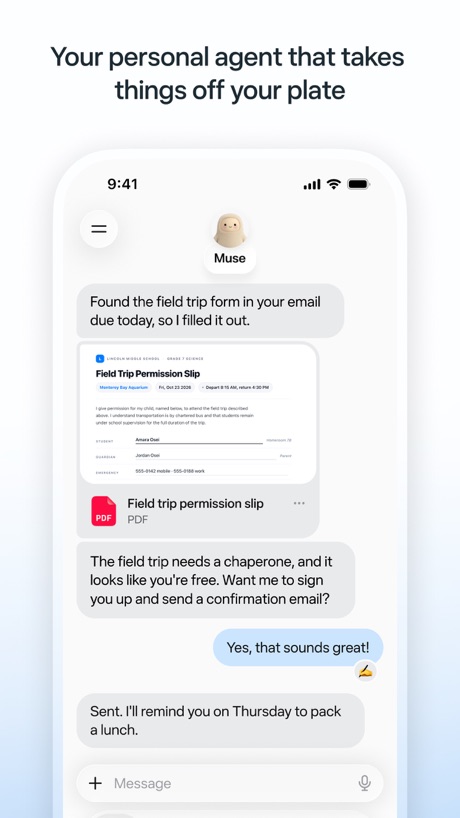
“Your personal agent that takes things off your plate”

“Get quick answers”

“Dive deep into any topic”

“Get useful answers wherever you are”

“Get the best of Gmail on iPhone”

“Greater security across your accounts”

“Finished files, not just suggestions”

“Chat and learn something new”

“Create anywhere, anytime - even offline”

“Store and access your content from anywhere”

“Generate a new draft quickly”

“Your team of always-on agents that finish the work”
Real headline examples, word for word.
The words on 40 of the 267 that carry any, as each app wrote them.
“Your personal agent that takes things off your plate”
Muse from Meta · #1 · screenshot 1“Get quick answers”
ChatGPT · #2 · screenshot 3“Dive deep into any topic”
Google Gemini · #3 · screenshot 4“Get useful answers wherever you are”
Claude by Anthropic · #4 · screenshot 1“Get the best of Gmail on iPhone”
Gmail - Email by Google · #5 · screenshot 1“Greater security across your accounts”
Microsoft Authenticator · #6 · screenshot 1“Finished files, not just suggestions”
Microsoft Copilot · #7 · screenshot 3“Chat and learn something new”
Grok AI · #8 · screenshot 2“Create anywhere, anytime - even offline”
Google Docs · #9 · screenshot 1“Store and access your content from anywhere”
Google Drive · #10 · screenshot 1“Generate a new draft quickly”
Microsoft Outlook · #11 · screenshot 4“Your team of always-on agents that finish the work”
Grok Bot · #12 · screenshot 1“Create anywhere, anytime, even offline”
Google Sheets · #13 · screenshot 2“Make your words shine”
Microsoft Word · #14 · screenshot 1“Access your favorite content anywhere, anytime”
VPN - Super Unlimited Proxy · #15 · screenshot 1“Find the best local spots around you.”
Meta AI · #16 · screenshot 2“From birthdays to appointments, keep track of them all”
Google Calendar: Get Organized · #17 · screenshot 1“Get insights on your data”
Microsoft Excel · #19 · screenshot 1“Present to anyone, from any device”
Google Slides · #20 · screenshot 1“Designed to simplify your life”
Yahoo Mail: Your Email & Inbox · #21 · screenshot 1“Your HP devices, all in one place”
HP · #22 · screenshot 1“Automatic backup protection”
Microsoft OneDrive · #23 · screenshot 2“GET REAL-TIME RECOMMENDATIONS AT YOUR FINGERTIPS”
Smart Home Manager · #24 · screenshot 1“SIGN”
docs on the goCamScanner - PDF Scanner App · #25 · screenshot 4“One Tap”
Secure Your PrivacyVPN - Fast & Secure VPN ™ · #26 · screenshot 1“Enhance your storytelling”
Microsoft PowerPoint · #27 · screenshot 1- Dropbox
“Save and organize your files securely”
Dropbox: Cloud Storage Backup · #28 · screenshot 1 “Easily check calls, messages and voicemail”
Google Voice · #29 · screenshot 1“Sign on easily”
PingID · #30 · screenshot 4“Find answers to anything”
Perplexity - AI Search & Chat · #31 · screenshot 2“A simpler way to stay secure”
ID.me Authenticator · #32 · screenshot 1- NEVER
“Doomscroll Again”
With RemindersBePresent: Screen Time Control · #33 · screenshot 3 “Create & join audio discussions to learn on the go 🚆”
Gemini Notebook · #34 · screenshot 4“Never take notes again”
When recording with (mic icon) Summary AISummary - AI Note Taker · #35 · screenshot 1“Understand images, discover more”
DeepSeek - AI Assistant · #36 · screenshot 2“Stay on track throughout the day”
Saturn Calendar · #37 · screenshot 2“showcase your Photos”
Widgetsmith · #38 · screenshot 3“Read 3x Faster by Listening”
Speechify – Text to Speech PDF · #39 · screenshot 1“Choose the right words”
Grammarly: AI Keyboard & Voice · #40 · screenshot 3“One Tap Go Anonymous”
X-VPN: VPN Fast & Secure · #41 · screenshot 2
Top ten Productivity apps that do it.
- #1Muse from Meta3 of its 6 screenshots
- #2ChatGPT2 of its 6 screenshots
- #3Google Gemini1 of its 6 screenshots
- #4Claude by Anthropic3 of its 6 screenshots
- #5Gmail - Email by Google5 of its 6 screenshots
- #6Microsoft Authenticator3 of its 6 screenshots
- #7Microsoft Copilot3 of its 6 screenshots
- #8Grok AI2 of its 5 screenshots
- #9Google Docs2 of its 4 screenshots
- #10Google Drive2 of its 5 screenshots
The same tactic in other categories.
| Category | Apps that do it | Screenshots | Top ten |
|---|---|---|---|
| Food & Drink | 97% 97 of 100 | 58% 315 of 540 | 10 of 10 |
| Shopping | 95% 95 of 100 | 64% 360 of 562 | 10 of 10 |
| Finance | 94% 94 of 100 | 65% 377 of 581 | 10 of 10 |
| Productivity | 92% 91 of 99 | 48% 267 of 551 | 10 of 10 |
| Lifestyle | 89% 89 of 100 | 49% 275 of 556 | 10 of 10 |
| Social Networking | 87% 87 of 100 | 47% 258 of 554 | 10 of 10 |
| Travel | 87% 87 of 100 | 51% 288 of 561 | 10 of 10 |
| Health & Fitness | 85% 85 of 100 | 42% 240 of 574 | 9 of 10 |
| Utilities | 85% 85 of 100 | 42% 233 of 549 | 8 of 10 |
| Business | 84% 84 of 100 | 55% 303 of 554 | 9 of 10 |
| Sports | 84% 84 of 100 | 41% 226 of 558 | 10 of 10 |
| Navigation | 83% 82 of 99 | 37% 208 of 566 | 9 of 10 |
| Reference | 81% 81 of 100 | 45% 254 of 566 | 8 of 10 |
| Entertainment | 80% 80 of 100 | 45% 243 of 544 | 10 of 10 |
| Photo & Video | 78% 78 of 100 | 39% 221 of 566 | 7 of 10 |
| Education | 76% 76 of 100 | 39% 214 of 555 | 8 of 10 |
| Music | 75% 75 of 100 | 31% 170 of 550 | 9 of 10 |
| Medical | 74% 74 of 100 | 38% 209 of 548 | 9 of 10 |
| News | 71% 70 of 98 | 34% 174 of 517 | 8 of 10 |
| Graphics & Design | 70% 69 of 99 | 26% 148 of 564 | 7 of 10 |
| Games | 59% 59 of 100 | 24% 136 of 567 | 8 of 10 |
| Developer Tools | 58% 58 of 100 | 26% 133 of 507 | 6 of 10 |
| Weather | 44% 44 of 100 | 19% 106 of 555 | 6 of 10 |
Related tactics.
Often on the same screenshot
- Leads with an outcome14% of these screenshots, against 7% of all Productivity screenshots
- Says “you” or “your”37% of these screenshots, against 30% of all Productivity screenshots
- Tells you to do something59% of these screenshots, against 54% of all Productivity screenshots
- Words at the top95% of these screenshots, against 91% of all Productivity screenshots
- Gradient background53% of these screenshots, against 49% of all Productivity screenshots
- Has a subline24% of these screenshots, against 20% of all Productivity screenshots
More in meaning
- Plain tone99%
- Leads with a feature97%
- Leads with an outcome29%
- Subline explains the headline27%
- Leads with trust21%
- Subline adds a second benefit17%
- Playful tone11%
- Asks for an action10%
- Compares with something9%
- Names its audience9%
- Premium tone6%
- Technical tone4%
- Leads with what is new3%
- Leads with who it is for3%
- Leads with a problem2%
- Urgent tone2%
Questions, answered from the chart.
How many top Productivity apps have App Store screenshots that state a benefit?
Which Productivity apps have App Store screenshots that state a benefit?
Should my Productivity app have App Store screenshots that state a benefit?
See your own app against this.
Pagefully reads your screenshots the same way, and makes a custom product page for each search people type, from your real screens.
Preview your pages