Productivity app screenshots that name their audience
The words say who the app is for. Naming the audience narrows the promise to the people most likely to want the app.
From the top 99 free Productivity apps on the US App Store, read on October 9, 2026. Screenshots are the developers’ own, shown from Apple’s servers with a link to each app.
The numbers
10 of the 551 Productivity screenshots read (2%) do this, across 9 of the top 99 apps (9%). 2 of the top ten do it (20%), against 7 of the other 89 (8%): the top ten do it more than the rest. Of the 23 categories read so far, Productivity is 19th for this. It is most common in Sports (32% of apps) and least common in Games (6%).
All 10 examples from the chart.
Every one of the Productivity app screenshots that name their audience on the chart, the highest app first.

“Single sign-on for your work or school accounts”
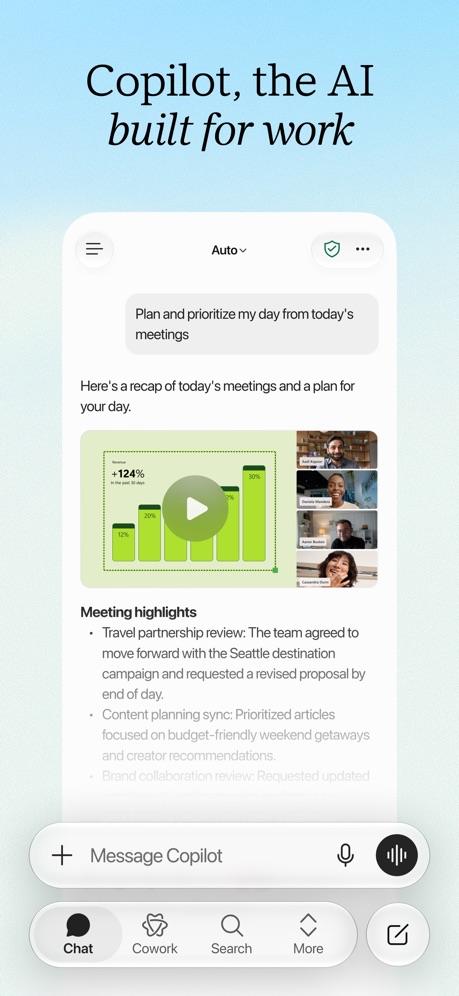
“Copilot, the AI built for work”

“Accelerate”

“The calendar for you and your friends”

“We protect what matters most, your privacy and safety.”

“Share your membership with your whole family.”

“Manage your Pop-Up Store”

“Share calendars with your family, partner, or coworkers”

“Delivery Built By Drivers”

“Paid in 72 Hours or Less”
Real headline examples, word for word.
The words on all 10 that carry any, as each app wrote them.
“Single sign-on for your work or school accounts”
Microsoft Authenticator · #6 · screenshot 5“Copilot, the AI built for work”
Microsoft Copilot · #7 · screenshot 1“Accelerate”
Your Gaming ExperienceVPN - Fast & Secure VPN ™ · #26 · screenshot 4“The calendar for you and your friends”
Saturn Calendar · #37 · screenshot 1“We protect what matters most, your privacy and safety.”
Cloaked finds your exposure, removes it, and guards what matters - for you and your family.Cloaked: Protect your privacy · #42 · screenshot 1“Share your membership with your whole family.”
Certain features can only be accessed by the plan managerGoogle One · #52 · screenshot 5“Manage your Pop-Up Store”
Double Good · #53 · screenshot 4“Share calendars with your family, partner, or coworkers”
TimeTree: Shared Calendar · #69 · screenshot 2“Delivery Built By Drivers”
You work hard enough, so we’ve made finding local opportunities and extra income easy.FRAYT Driver (next) · #97 · screenshot 1“Paid in 72 Hours or Less”
With delivery, speed matters. Your payouts are no different.FRAYT Driver (next) · #97 · screenshot 2
Top ten Productivity apps that do it.
- #6Microsoft Authenticator1 of its 6 screenshots
- #7Microsoft Copilot1 of its 6 screenshots
The same tactic in other categories.
| Category | Apps that do it | Screenshots | Top ten |
|---|---|---|---|
| Sports | 32% 32 of 100 | 7% 40 of 558 | 3 of 10 |
| Education | 30% 30 of 100 | 8% 45 of 555 | 4 of 10 |
| Navigation | 28% 28 of 99 | 8% 45 of 566 | 2 of 10 |
| Shopping | 28% 28 of 100 | 6% 34 of 562 | 3 of 10 |
| Social Networking | 28% 28 of 100 | 7% 39 of 554 | 4 of 10 |
| Medical | 22% 22 of 100 | 7% 37 of 548 | 2 of 10 |
| Business | 21% 21 of 100 | 6% 32 of 554 | 1 of 10 |
| Travel | 19% 19 of 100 | 4% 22 of 561 | 0 of 10 |
| Finance | 18% 18 of 100 | 5% 30 of 581 | 2 of 10 |
| Lifestyle | 17% 17 of 100 | 3% 19 of 556 | 4 of 10 |
| Reference | 16% 16 of 100 | 3% 19 of 566 | 0 of 10 |
| Food & Drink | 15% 15 of 100 | 3% 17 of 540 | 1 of 10 |
| Entertainment | 14% 14 of 100 | 3% 18 of 544 | 2 of 10 |
| Music | 13% 13 of 100 | 3% 15 of 550 | 1 of 10 |
| News | 12% 12 of 98 | 2% 12 of 517 | 3 of 10 |
| Health & Fitness | 12% 12 of 100 | 3% 15 of 574 | 1 of 10 |
| Utilities | 11% 11 of 100 | 3% 14 of 549 | 0 of 10 |
| Photo & Video | 10% 10 of 100 | 2% 12 of 566 | 0 of 10 |
| Graphics & Design | 9% 9 of 99 | 2% 10 of 564 | 1 of 10 |
| Productivity | 9% 9 of 99 | 2% 10 of 551 | 2 of 10 |
| Weather | 9% 9 of 100 | 2% 12 of 555 | 3 of 10 |
| Developer Tools | 7% 7 of 100 | 2% 8 of 507 | 1 of 10 |
| Games | 6% 6 of 100 | 1% 6 of 567 | 1 of 10 |
Related tactics.
Often on the same screenshot
- Says “you” or “your”90% of these screenshots, against 30% of all Productivity screenshots
- Subline explains the headline50% of these screenshots, against 13% of all Productivity screenshots
- Has a subline50% of these screenshots, against 20% of all Productivity screenshots
- Background is the icon’s colour70% of these screenshots, against 45% of all Productivity screenshots
- Blue50% of these screenshots, against 34% of all Productivity screenshots
- Dark30% of these screenshots, against 16% of all Productivity screenshots
More in meaning
- Plain tone99%
- Leads with a feature97%
- States a benefit92%
- Leads with an outcome29%
- Subline explains the headline27%
- Leads with trust21%
- Subline adds a second benefit17%
- Playful tone11%
- Asks for an action10%
- Compares with something9%
- Premium tone6%
- Technical tone4%
- Leads with what is new3%
- Leads with who it is for3%
- Leads with a problem2%
- Urgent tone2%
Questions, answered from the chart.
How many top Productivity apps have App Store screenshots that name their audience?
Which Productivity apps have App Store screenshots that name their audience?
Should my Productivity app have App Store screenshots that name their audience?
See your own app against this.
Pagefully reads your screenshots the same way, and makes a custom product page for each search people type, from your real screens.
Preview your pages