Education app screenshots with a serif headline
The headline is set in a serif typeface. Serif type is associated with print and editorial design.
From the top 100 free Education apps on the US App Store, read on October 9, 2026. Screenshots are the developers’ own, shown from Apple’s servers with a link to each app.
The numbers
38 of the 555 Education screenshots read (7%) do this, across 8 of the top 100 apps (8%). 0 of the top ten do it (0%), against 8 of the other 90 (9%): the top ten do it about as often as the rest. Of the 23 categories read so far, Education is 12th for this. It is most common in Reference (21% of apps) and least common in Navigation (0%).
12 examples from the chart.
12 of the 38 Education app screenshots with a serif headline, one from each app, the highest on the chart first.

“Scan your Clever badge”

“Only 1 min per day”

“Get Answers Verified by Top AI Models”

“IXL is the #1 K-12 Learning App”

“Visualize upcoming activities, manage your time, and stay on top of coursework”

“Language learning that works”

“You can learn anything”
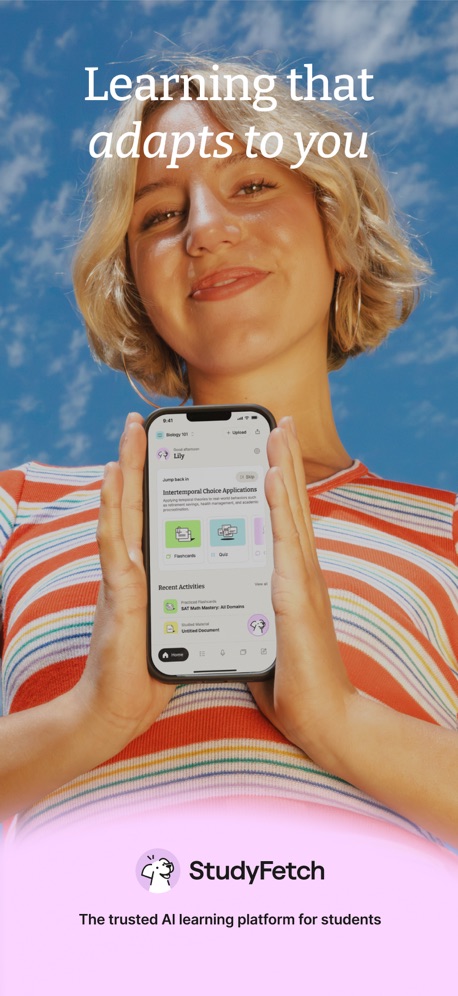
“Learning that adapts to you”

“Access your student portal”

“Learn 10,000+ words”

“Practice 20,000+ skills”

“Stay informed and up to date through push notifications”
What these screenshots say, word for word.
The words on all 38 that carry any, as each app wrote them.
“Scan your Clever badge”
Clever · #28 · screenshot 1“Only 1 min per day”
Vocabulary - Learn words daily · #32 · screenshot 1“Get Answers Verified by Top AI Models”
Solvely - AI Study Tools · #33 · screenshot 2- IXL
“IXL is the #1 K-12 Learning App”
IXL - Math, English, & More · #44 · screenshot 1 “Visualize upcoming activities, manage your time, and stay on top of coursework”
Brightspace Pulse · #50 · screenshot 1“Language learning that works”
Self-study lessons Live online classes Podcasts GamesBabbel - Language Learning · #52 · screenshot 1“You can learn anything”
Khan Academy · #60 · screenshot 1“Learning that adapts to you”
The trusted AI learning platform for studentsStudyFetch: AI Tutor · #90 · screenshot 1“Access your student portal”
Clever · #28 · screenshot 2“Learn 10,000+ words”
Vocabulary - Learn words daily · #32 · screenshot 2“Practice 20,000+ skills”
Math, language arts, science, social studies, and SpanishIXL - Math, English, & More · #44 · screenshot 2“Stay informed and up to date through push notifications”
Brightspace Pulse · #50 · screenshot 2“Start speaking right away”
Babbel - Language Learning · #52 · screenshot 2“Track your progress”
Khan Academy · #60 · screenshot 3“All your study tools in one place”
StudyFetch: AI Tutor · #90 · screenshot 2“Track your progress”
Vocabulary - Learn words daily · #32 · screenshot 3“Master skills with step-by-step explanations”
IXL - Math, English, & More · #44 · screenshot 3“Review course content, even when you are off-line on the go”
Brightspace Pulse · #50 · screenshot 3“Short lessons created by experts”
Babbel - Language Learning · #52 · screenshot 3“Sharpen your skills”
Khan Academy · #60 · screenshot 4“Build a personalized, step-by-step learning path”
StudyFetch: AI Tutor · #90 · screenshot 3“Improve your vocabulary”
Vocabulary - Learn words daily · #32 · screenshot 4“Review concepts with video tutorials”
IXL - Math, English, & More · #44 · screenshot 4“View grades and feedback for the entire course”
Brightspace Pulse · #50 · screenshot 4“Real-life dialogues”
Babbel - Language Learning · #52 · screenshot 4“Explore our entire library of videos”
Khan Academy · #60 · screenshot 5“Review and memorize key terms”
StudyFetch: AI Tutor · #90 · screenshot 4“Practice to internalize new words”
Vocabulary - Learn words daily · #32 · screenshot 5“Answer problems in your own handwriting”
IXL - Math, English, & More · #44 · screenshot 5“Participate in discussions in the Activity Feed”
Brightspace Pulse · #50 · screenshot 5“Variety of learning methods”
Babbel - Language Learning · #52 · screenshot 5“Learn on the go”
Khan Academy · #60 · screenshot 6“Make podcast-style recaps from your materials”
StudyFetch: AI Tutor · #90 · screenshot 5“Choose from a variety of topics”
Vocabulary - Learn words daily · #32 · screenshot 6“Explore personalized recommendations”
IXL - Math, English, & More · #44 · screenshot 6“Also available in dark mode”
Brightspace Pulse · #50 · screenshot 6“Review exercises to make it stick”
Babbel - Language Learning · #52 · screenshot 6“Practice tests that match your actual exam”
StudyFetch: AI Tutor · #90 · screenshot 6
Top ten Education apps that do it.
None of the top ten do. The highest app on the chart that does is Clever, at #28.
The same tactic in other categories.
| Category | Apps that do it | Screenshots | Top ten |
|---|---|---|---|
| Reference | 21% 21 of 100 | 15% 86 of 566 | 3 of 10 |
| Shopping | 18% 18 of 100 | 12% 67 of 562 | 1 of 10 |
| Food & Drink | 17% 17 of 100 | 12% 64 of 540 | 0 of 10 |
| News | 16% 16 of 98 | 15% 80 of 517 | 2 of 10 |
| Finance | 12% 12 of 100 | 9% 53 of 581 | 1 of 10 |
| Medical | 12% 12 of 100 | 11% 59 of 548 | 3 of 10 |
| Travel | 12% 12 of 100 | 10% 54 of 561 | 0 of 10 |
| Health & Fitness | 11% 11 of 100 | 8% 45 of 574 | 2 of 10 |
| Lifestyle | 11% 11 of 100 | 9% 50 of 556 | 2 of 10 |
| Graphics & Design | 10% 10 of 99 | 7% 39 of 564 | 4 of 10 |
| Productivity | 8% 8 of 99 | 8% 45 of 551 | 2 of 10 |
| Education | 8% 8 of 100 | 7% 38 of 555 | 0 of 10 |
| Business | 7% 7 of 100 | 4% 21 of 554 | 0 of 10 |
| Entertainment | 7% 7 of 100 | 4% 23 of 544 | 1 of 10 |
| Games | 6% 6 of 100 | 2% 11 of 567 | 0 of 10 |
| Photo & Video | 6% 6 of 100 | 6% 35 of 566 | 0 of 10 |
| Music | 5% 5 of 100 | 5% 25 of 550 | 1 of 10 |
| Sports | 5% 5 of 100 | 3% 18 of 558 | 0 of 10 |
| Social Networking | 4% 4 of 100 | 4% 24 of 554 | 0 of 10 |
| Utilities | 4% 4 of 100 | 4% 21 of 549 | 0 of 10 |
| Weather | 3% 3 of 100 | 2% 13 of 555 | 1 of 10 |
| Developer Tools | 2% 2 of 100 | 1% 7 of 507 | 1 of 10 |
| Navigation | 0% 0 of 99 | 0% 0 of 566 | 0 of 10 |
Related tactics.
Often on the same screenshot
- Whole phone shown82% of these screenshots, against 52% of all Education screenshots
- Orange42% of these screenshots, against 13% of all Education screenshots
- Leads with a feature79% of these screenshots, against 50% of all Education screenshots
- Plain tone97% of these screenshots, against 72% of all Education screenshots
- Phone drawn97% of these screenshots, against 76% of all Education screenshots
- Tells you to do something71% of these screenshots, against 49% of all Education screenshots
More in look
- Light86%
- Background is the icon’s colour79%
- Solid background65%
- Blue62%
- Gradient background62%
- A word in a different colour56%
- Low contrast words45%
- High contrast words39%
- Orange34%
- Rounded headline type32%
- Black, white or grey30%
- Dark29%
- Green28%
- Teal22%
- The app itself is the background22%
- Pattern or texture21%
- Pink20%
- Purple19%
- Photo background15%
- Red14%
- Yellow3%
- Condensed or display type1%
Questions, answered from the chart.
How many top Education apps have App Store screenshots with a serif headline?
Which Education apps have App Store screenshots with a serif headline?
Should my Education app have App Store screenshots with a serif headline?
See your own app against this.
Pagefully reads your screenshots the same way, and makes a custom product page for each search people type, from your real screens.
Preview your pages