Photo & Video app screenshots with a technical tone
Specifications, formats, precision. Specifications and formats speak to readers who already know what they need and are checking that the app has it.
From the top 100 free Photo & Video apps on the US App Store, read on October 9, 2026. Screenshots are the developers’ own, shown from Apple’s servers with a link to each app.
The numbers
7 of the 566 Photo & Video screenshots read (1%) do this, across 6 of the top 100 apps (6%). 2 of the top ten do it (20%), against 4 of the other 90 (4%): the top ten do it more than the rest. Of the 23 categories read so far, Photo & Video is 7th for this. It is most common in Developer Tools (21% of apps) and least common in Travel (0%).
All 7 examples from the chart.
Every one of the Photo & Video app screenshots with a technical tone on the chart, the highest app first.
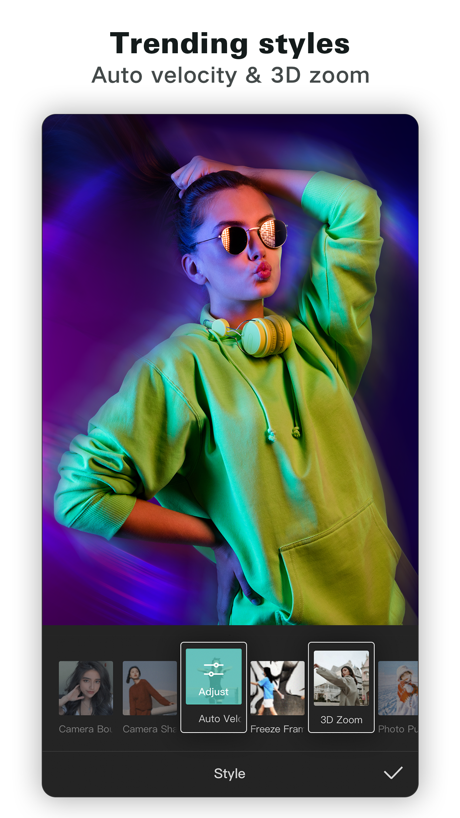
“Trending styles”

“Animate transitions with keyframes”

“None ProRAW Sharpness Removal RAW Sharpness Removal HDR Removal Original”

“Multi-track timeline & frame-accurate controls.”

“Parenting”
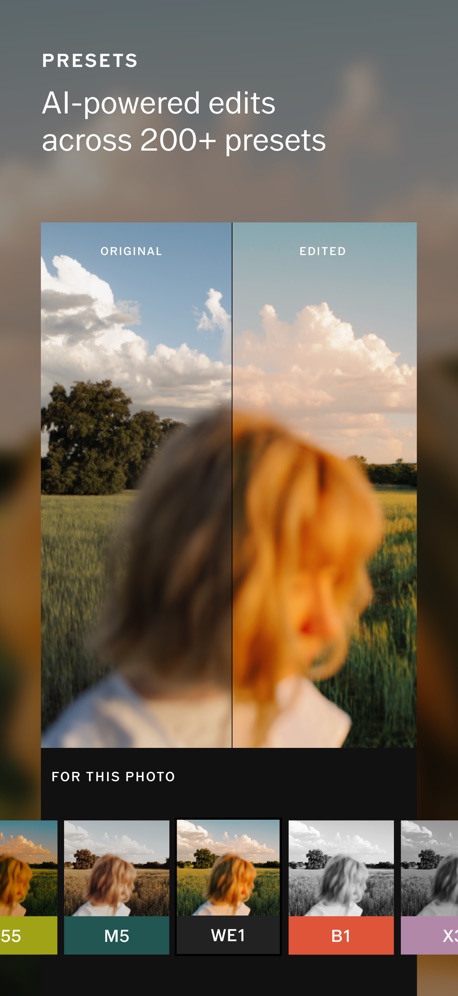
“AI-powered edits across 200+ presets”

“Export in 4K with no watermark”
Real headline examples, word for word.
The words on all 7 that carry any, as each app wrote them.
“Trending styles”
Auto velocity & 3D zoomCapCut: Photo & Video Editor · #1 · screenshot 3“Animate transitions with keyframes”
Edits: Video Editor · #7 · screenshot 3“None ProRAW Sharpness Removal RAW Sharpness Removal HDR Removal Original”
Dazz Cam - Vintage Camera · #35 · screenshot 6“Multi-track timeline & frame-accurate controls.”
Adobe Premiere AI Video Editor · #67 · screenshot 6“Parenting”
Link layers in a hierarchy for sophisticated animations such as character rigging.Alight Motion · #75 · screenshot 3- PRESETS
“AI-powered edits across 200+ presets”
VSCO: Photo & Video Editor · #77 · screenshot 2 “Export in 4K with no watermark”
Edits: Video Editor · #7 · screenshot 5
Top ten Photo & Video apps that do it.
- #1CapCut: Photo & Video Editor1 of its 6 screenshots
- #7Edits: Video Editor2 of its 6 screenshots
The same tactic in other categories.
| Category | Apps that do it | Screenshots | Top ten |
|---|---|---|---|
| Developer Tools | 21% 21 of 100 | 7% 38 of 507 | 1 of 10 |
| Weather | 17% 17 of 100 | 5% 30 of 555 | 3 of 10 |
| Graphics & Design | 8% 8 of 99 | 2% 9 of 564 | 2 of 10 |
| Health & Fitness | 8% 8 of 100 | 2% 9 of 574 | 0 of 10 |
| Navigation | 7% 7 of 99 | 2% 9 of 566 | 1 of 10 |
| Music | 7% 7 of 100 | 2% 9 of 550 | 0 of 10 |
| Photo & Video | 6% 6 of 100 | 1% 7 of 566 | 2 of 10 |
| Medical | 5% 5 of 100 | 1% 6 of 548 | 0 of 10 |
| Reference | 5% 5 of 100 | 1% 5 of 566 | 0 of 10 |
| Sports | 5% 5 of 100 | 1% 5 of 558 | 0 of 10 |
| Productivity | 4% 4 of 99 | 1% 4 of 551 | 0 of 10 |
| Finance | 4% 4 of 100 | 1% 4 of 581 | 1 of 10 |
| Lifestyle | 4% 4 of 100 | 1% 4 of 556 | 0 of 10 |
| Utilities | 3% 3 of 100 | 1% 3 of 549 | 0 of 10 |
| News | 2% 2 of 98 | 1% 3 of 517 | 0 of 10 |
| Business | 2% 2 of 100 | under 1% 2 of 554 | 0 of 10 |
| Entertainment | 2% 2 of 100 | under 1% 2 of 544 | 1 of 10 |
| Education | 1% 1 of 100 | under 1% 1 of 555 | 0 of 10 |
| Food & Drink | 1% 1 of 100 | under 1% 1 of 540 | 0 of 10 |
| Social Networking | 1% 1 of 100 | 1% 3 of 554 | 0 of 10 |
| Games | 0% 0 of 100 | 0% 0 of 567 | 0 of 10 |
| Shopping | 0% 0 of 100 | 0% 0 of 562 | 0 of 10 |
| Travel | 0% 0 of 100 | 0% 0 of 561 | 0 of 10 |
Related tactics.
Often on the same screenshot
- Uses a number43% of these screenshots, against 7% of all Photo & Video screenshots
- Dark71% of these screenshots, against 41% of all Photo & Video screenshots
- Blue43% of these screenshots, against 15% of all Photo & Video screenshots
- Whole phone shown86% of these screenshots, against 60% of all Photo & Video screenshots
- Phone drawn86% of these screenshots, against 75% of all Photo & Video screenshots
- Screen fills the picture100% of these screenshots, against 92% of all Photo & Video screenshots
More in meaning
- Plain tone95%
- Leads with a feature92%
- States a benefit78%
- Subline explains the headline36%
- Playful tone20%
- Premium tone20%
- Leads with an outcome18%
- Subline adds a second benefit15%
- Names its audience10%
- Asks for an action9%
- Leads with what is new7%
- Leads with trust6%
- Compares with something5%
- Leads with price2%
- Leads with who it is for2%
- Urgent tone2%
- Leads with a problem1%
Questions, answered from the chart.
How many top Photo & Video apps have App Store screenshots with a technical tone?
Which Photo & Video apps have App Store screenshots with a technical tone?
Should my Photo & Video app have App Store screenshots with a technical tone?
See your own app against this.
Pagefully reads your screenshots the same way, and makes a custom product page for each search people type, from your real screens.
Preview your pages