Education app screenshots that lead with what’s new
New, now, just added, introducing. Screenshots can change with each release, so they are one place to announce a feature to people who have not installed yet.
From the top 100 free Education apps on the US App Store, read on October 9, 2026. Screenshots are the developers’ own, shown from Apple’s servers with a link to each app.
The numbers
6 of the 555 Education screenshots read (1%) do this, across 5 of the top 100 apps (5%). 1 of the top ten do it (10%), against 4 of the other 90 (4%): the top ten do it about as often as the rest. Of the 23 categories read so far, Education is 9th for this. It is most common in Shopping (15% of apps) and least common in Weather (0%).
All 6 examples from the chart.
Every one of the Education app screenshots that lead with what’s new on the chart, the highest app first.

“New and intuitive course navigation!”

“New gifts”

“Welcome to the new ParentVUE. The following will take you through a tour of some of the new features.”

“All-new activities!”

“Welcome to the new StudentVUE. The following will take you through a tour of some of the new features.”
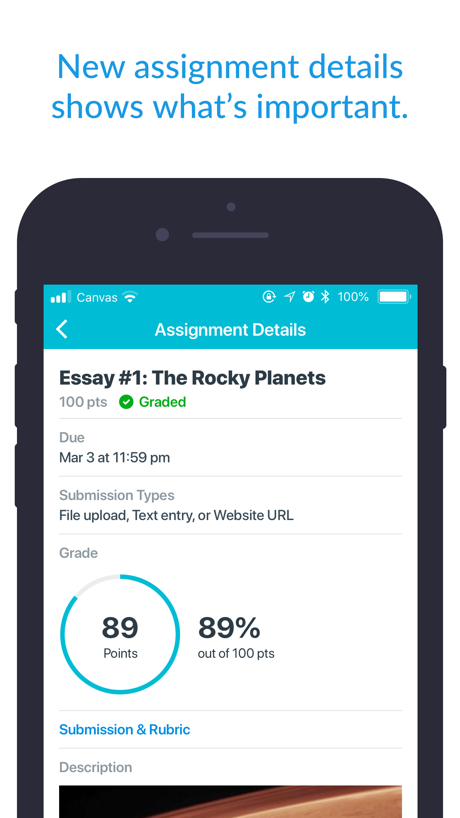
“New assignment details shows what’s important.”
Real headline examples, word for word.
The words on all 6 that carry any, as each app wrote them.
“New and intuitive course navigation!”
Canvas by Instructure · #7 · screenshot 2“New gifts”
every FridayToca Boca World: Game & Play · #17 · screenshot 5“Welcome to the new ParentVUE. The following will take you through a tour of some of the new features.”
ParentVUE (New) · #30 · screenshot 3“All-new activities!”
Lingokids: Games & Shows · #34 · screenshot 4“Welcome to the new StudentVUE. The following will take you through a tour of some of the new features.”
StudentVUE (New) · #51 · screenshot 3“New assignment details shows what’s important.”
Canvas by Instructure · #7 · screenshot 6
Top ten Education apps that do it.
- #7Canvas by Instructure2 of its 6 screenshots
The same tactic in other categories.
| Category | Apps that do it | Screenshots | Top ten |
|---|---|---|---|
| Shopping | 15% 15 of 100 | 3% 17 of 562 | 0 of 10 |
| Games | 10% 10 of 100 | 2% 10 of 567 | 2 of 10 |
| Entertainment | 9% 9 of 100 | 2% 11 of 544 | 1 of 10 |
| News | 8% 8 of 98 | 2% 8 of 517 | 0 of 10 |
| Photo & Video | 7% 7 of 100 | 1% 7 of 566 | 0 of 10 |
| Lifestyle | 6% 6 of 100 | 1% 6 of 556 | 0 of 10 |
| Sports | 6% 6 of 100 | 1% 7 of 558 | 2 of 10 |
| Utilities | 6% 6 of 100 | 1% 6 of 549 | 0 of 10 |
| Education | 5% 5 of 100 | 1% 6 of 555 | 1 of 10 |
| Food & Drink | 5% 5 of 100 | 1% 5 of 540 | 0 of 10 |
| Productivity | 3% 3 of 99 | 1% 3 of 551 | 0 of 10 |
| Business | 3% 3 of 100 | 1% 3 of 554 | 1 of 10 |
| Medical | 3% 3 of 100 | 1% 3 of 548 | 0 of 10 |
| Music | 3% 3 of 100 | 1% 3 of 550 | 0 of 10 |
| Travel | 3% 3 of 100 | 1% 4 of 561 | 1 of 10 |
| Navigation | 2% 2 of 99 | under 1% 2 of 566 | 0 of 10 |
| Developer Tools | 2% 2 of 100 | under 1% 2 of 507 | 0 of 10 |
| Reference | 2% 2 of 100 | under 1% 2 of 566 | 0 of 10 |
| Social Networking | 2% 2 of 100 | under 1% 2 of 554 | 0 of 10 |
| Graphics & Design | 1% 1 of 99 | under 1% 1 of 564 | 0 of 10 |
| Finance | 1% 1 of 100 | under 1% 1 of 581 | 1 of 10 |
| Health & Fitness | 1% 1 of 100 | under 1% 1 of 574 | 1 of 10 |
| Weather | 0% 0 of 100 | 0% 0 of 555 | 0 of 10 |
Related tactics.
Often on the same screenshot
- Two or more screens50% of these screenshots, against 9% of all Education screenshots
- Headline too small to read50% of these screenshots, against 12% of all Education screenshots
- Words at the top100% of these screenshots, against 80% of all Education screenshots
- Light83% of these screenshots, against 66% of all Education screenshots
- Has a headline100% of these screenshots, against 86% of all Education screenshots
- Solid background50% of these screenshots, against 40% of all Education screenshots
More in meaning
- Plain tone90%
- Leads with a feature83%
- States a benefit76%
- Leads with an outcome40%
- Names its audience30%
- Subline explains the headline27%
- Playful tone22%
- Compares with something16%
- Subline adds a second benefit15%
- Asks for an action11%
- Premium tone7%
- Leads with who it is for6%
- Leads with trust4%
- Urgent tone4%
- Leads with a problem1%
- Leads with price1%
- Technical tone1%
Questions, answered from the chart.
How many top Education apps have App Store screenshots that lead with what’s new?
Which Education apps have App Store screenshots that lead with what’s new?
Should my Education app have App Store screenshots that lead with what’s new?
See your own app against this.
Pagefully reads your screenshots the same way, and makes a custom product page for each search people type, from your real screens.
Preview your pages