Green Productivity app screenshots
Green is the main colour.
From the top 99 free Productivity apps on the US App Store, read on October 9, 2026. Screenshots are the developers’ own, shown from Apple’s servers with a link to each app.
The numbers
22 of the 551 Productivity screenshots read (4%) do this, across 9 of the top 99 apps (9%). 1 of the top ten do it (10%), against 8 of the other 89 (9%): the top ten do it about as often as the rest. Of the 23 categories read so far, Productivity is 21st for this. It is most common in Games (32% of apps) and least common in News (7%).
12 examples from the chart.
12 of the 22 green Productivity app screenshots, one from each app, the highest on the chart first.

“Use Authenticator to sign in”

“Customize your calendar with dark mode and color coding”

“Get insights on your data”
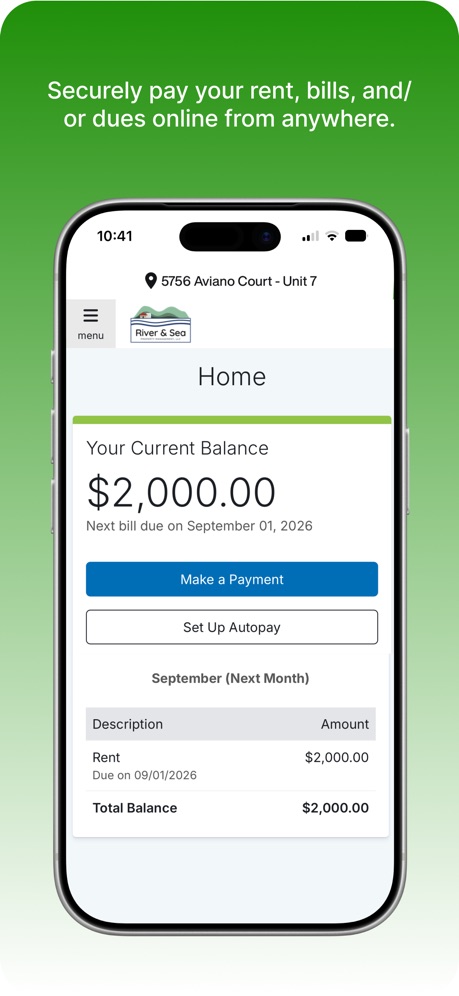
“Securely pay your rent, bills, and/ or dues online from anywhere.”

“Shared Calendar App”

“Spreadsheet”

“Spreadsheet”

“With WasteConnect+, never miss your collection day again!”

“Listen your way”

“Data Analysis made easy”

“Share calendars with your family, partner, or coworkers”

“Choose between calendar and list view for collection schedules.”
What these screenshots say, word for word.
The words on all 22 that carry any, as each app wrote them.
“Use Authenticator to sign in”
Microsoft Authenticator · #6 · screenshot 3“Customize your calendar with dark mode and color coding”
Google Calendar: Get Organized · #17 · screenshot 6“Get insights on your data”
Microsoft Excel · #19 · screenshot 1“Securely pay your rent, bills, and/ or dues online from anywhere.”
FolioSpace Online Portal · #43 · screenshot 2“Shared Calendar App”
TimeTree: Shared Calendar · #69 · screenshot 1“Spreadsheet”
Analyze, Visualise and edit dataOffice Word:Edit Word Document · #73 · screenshot 2“Spreadsheet”
Analyze and Edit DataOffice Word: Edit Document · #78 · screenshot 2“With WasteConnect+, never miss your collection day again!”
View Schedule Pay Your Bill WasteWise Disposal GuideWasteConnect+ · #93 · screenshot 1“Listen your way”
ElevenReader: Read Books Aloud · #96 · screenshot 5“Data Analysis made easy”
Microsoft Excel · #19 · screenshot 2“Share calendars with your family, partner, or coworkers”
TimeTree: Shared Calendar · #69 · screenshot 2“Choose between calendar and list view for collection schedules.”
WasteConnect+ · #93 · screenshot 2“Manage complex data tasks”
Microsoft Excel · #19 · screenshot 3“Real-time notifications from added events and changes”
TimeTree: Shared Calendar · #69 · screenshot 3“Get quick answers to your sorting questions with WasteWise.”
WasteConnect+ · #93 · screenshot 3“Data visualization with charts”
Microsoft Excel · #19 · screenshot 4“Create multiple calendars for every need”
TimeTree: Shared Calendar · #69 · screenshot 4“Quickly access invoices and payment information.”
WasteConnect+ · #93 · screenshot 4“Do more with Excel on iPhone”
Microsoft Excel · #19 · screenshot 5“Chat by event for easy coordination”
TimeTree: Shared Calendar · #69 · screenshot 5“Collaborate in real-time”
Microsoft Excel · #19 · screenshot 6“Share photos in albums, Save your memories”
TimeTree: Shared Calendar · #69 · screenshot 6
Top ten Productivity apps that do it.
- #6Microsoft Authenticator1 of its 6 screenshots
The same tactic in other categories.
| Category | Apps that do it | Screenshots | Top ten |
|---|---|---|---|
| Games | 32% 32 of 100 | 14% 82 of 567 | 2 of 10 |
| Weather | 30% 30 of 100 | 7% 38 of 555 | 3 of 10 |
| Education | 28% 28 of 100 | 11% 63 of 555 | 3 of 10 |
| Navigation | 22% 22 of 99 | 13% 75 of 566 | 5 of 10 |
| Reference | 22% 22 of 100 | 10% 59 of 566 | 2 of 10 |
| Finance | 20% 20 of 100 | 14% 83 of 581 | 2 of 10 |
| Sports | 20% 20 of 100 | 11% 59 of 558 | 3 of 10 |
| Food & Drink | 18% 18 of 100 | 10% 56 of 540 | 1 of 10 |
| Health & Fitness | 17% 17 of 100 | 10% 56 of 574 | 2 of 10 |
| Social Networking | 17% 17 of 100 | 6% 34 of 554 | 4 of 10 |
| Business | 15% 15 of 100 | 9% 49 of 554 | 1 of 10 |
| Shopping | 15% 15 of 100 | 6% 31 of 562 | 0 of 10 |
| Travel | 14% 14 of 100 | 6% 36 of 561 | 1 of 10 |
| Graphics & Design | 13% 13 of 99 | 5% 26 of 564 | 2 of 10 |
| Lifestyle | 12% 12 of 100 | 4% 23 of 556 | 0 of 10 |
| Photo & Video | 12% 12 of 100 | 5% 26 of 566 | 0 of 10 |
| Utilities | 12% 12 of 100 | 6% 33 of 549 | 0 of 10 |
| Entertainment | 10% 10 of 100 | 5% 25 of 544 | 1 of 10 |
| Medical | 10% 10 of 100 | 3% 17 of 548 | 2 of 10 |
| Music | 10% 10 of 100 | 4% 20 of 550 | 0 of 10 |
| Productivity | 9% 9 of 99 | 4% 22 of 551 | 1 of 10 |
| Developer Tools | 9% 9 of 100 | 5% 24 of 507 | 2 of 10 |
| News | 7% 7 of 98 | 2% 12 of 517 | 2 of 10 |
Related tactics.
Often on the same screenshot
- Whole phone shown77% of these screenshots, against 59% of all Productivity screenshots
- Headline too small to read36% of these screenshots, against 19% of all Productivity screenshots
- Arrows or callouts32% of these screenshots, against 15% of all Productivity screenshots
- Pattern or texture23% of these screenshots, against 7% of all Productivity screenshots
- Headline over eight words18% of these screenshots, against 5% of all Productivity screenshots
- Phone drawn100% of these screenshots, against 88% of all Productivity screenshots
More in look
- Light85%
- Gradient background65%
- Background is the icon’s colour60%
- Black, white or grey60%
- A word in a different colour47%
- Blue47%
- Solid background43%
- Low contrast words40%
- High contrast words36%
- Dark33%
- Photo background20%
- Orange19%
- Pattern or texture16%
- Teal16%
- Rounded headline type11%
- Serif headline8%
- Purple6%
- Red6%
- Yellow4%
- Pink3%
- The app itself is the background2%
Questions, answered from the chart.
How many top Productivity apps have green App Store screenshots?
Which Productivity apps have green App Store screenshots?
Should my Productivity app have green App Store screenshots?
See your own app against this.
Pagefully reads your screenshots the same way, and makes a custom product page for each search people type, from your real screens.
Preview your pages