Photo & Video app screenshots with left-aligned text
The headline is set from the left edge, not centred.
From the top 100 free Photo & Video apps on the US App Store, read on October 9, 2026. Screenshots are the developers’ own, shown from Apple’s servers with a link to each app.
The numbers
73 of the 566 Photo & Video screenshots read (13%) do this, across 22 of the top 100 apps (22%). 1 of the top ten do it (10%), against 21 of the other 90 (23%): the top ten do it less than the rest. Of the 23 categories read so far, Photo & Video is 20th for this. It is most common in Finance (52% of apps) and least common in Graphics & Design (11%).
12 examples from the chart.
12 of the 73 Photo & Video app screenshots with left-aligned text, one from each app, the highest on the chart first.

“Design anything”

“Explore your styles with AI try on”
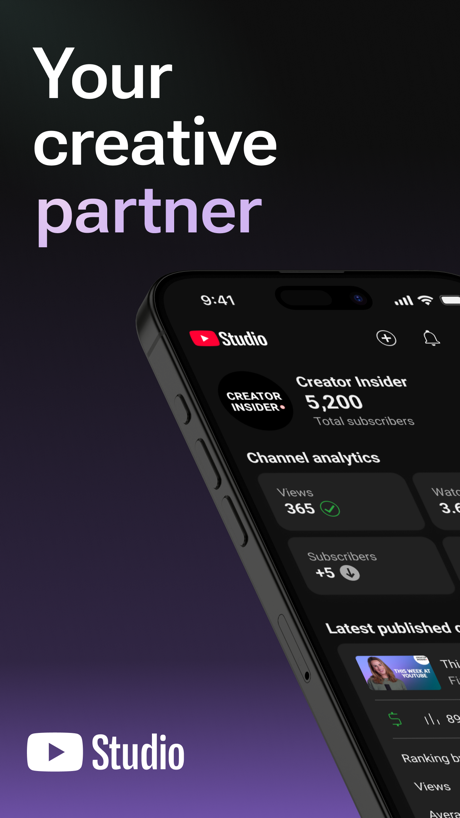
“Your creative partner”

“Get topic insights with search”

“Retake your photos with AI”

“Layouts For All Occasions”

“Photo Gifts & Prints”

“PHOTO & VIDEO MAKER”

“The Best Film Effects”

“LIBRARY”

“Enhance your photos' quality.”

“Video editing without the price tag.”
What these screenshots say, word for word.
The words on 40 of the 73 that carry any, as each app wrote them.
“Design anything”
Canva AI Photo & Video Editor · #6 · screenshot 1“Explore your styles with AI try on”
Picsart AI Photo Editor, Video · #15 · screenshot 1“Your creative partner”
YouTube Studio · #20 · screenshot 1“Get topic insights with search”
TikTok Studio · #36 · screenshot 1“Retake your photos with AI”
Retake AI Face & Selfie Editor · #48 · screenshot 2“Layouts For All Occasions”
PicCollage: Magic Photo Editor · #51 · screenshot 1- 1-hour
“Photo Gifts & Prints”
Picta x CVS Photo · #53 · screenshot 1 “PHOTO & VIDEO MAKER”
BeautyPlus-Selfie Photo Editor · #55 · screenshot 1“The Best Film Effects”
Tezza: Aesthetic Photo Editor · #58 · screenshot 1- FEATURE #01
“LIBRARY”
Watch your game clips anywhereMedal - Game Clipping · #59 · screenshot 1 “Enhance your photos' quality.”
Remini - AI Photo Enhancer · #63 · screenshot 1“Video editing without the price tag.”
Adobe Premiere AI Video Editor · #67 · screenshot 1“EDIT PHOTOS AND VIDEO JOIN THE COMMUNITY PROMOTE YOUR WORK”
Elevate your photography with quality tools and opportunities to expand your work.VSCO: Photo & Video Editor · #77 · screenshot 1“Natural HD Clarity in 1 Tap”
“20 MILLION EDITS PER MONTH”Citrus 1 Tap Photo Enhancer AI · #78 · screenshot 1“Flight Interface”
Effortless Aerial PhotographyDJI Fly · #79 · screenshot 1“Makeup Editor”
Natural to glam makeup filtersYouCam Makeup: Face Editor · #84 · screenshot 1“Face & Body Editor”
Professional edits, made simplePeachy - AI Face & Body Editor · #85 · screenshot 1- 50% off in our Black Friday Sale
“The easiest way to print your memories”
Popsa | Print Your Photos · #86 · screenshot 1 “CONNECT YOUR TRAILCAMS”
Tactacam REVEAL · #87 · screenshot 2“PHOTO COLLAGE MAKER”
Collage Maker - LiveCollage · #88 · screenshot 1“COLLAGE GRID & LAYOUT”
Photo Collage Maker PicJointer · #99 · screenshot 2- NEW
“Face Shape Analysis”
Discover styling tips according to face shapeEPIK - AI Photo & Video Editor · #100 · screenshot 1 “Manage and schedule posts”
TikTok Studio · #36 · screenshot 2“Make any photo insta-worthy”
Retake AI Face & Selfie Editor · #48 · screenshot 5“Remove Backgrounds”
PicCollage: Magic Photo Editor · #51 · screenshot 2“ERASE EVERYTHING”
BeautyPlus-Selfie Photo Editor · #55 · screenshot 2“Vintage Photo & Video Presets”
Tezza: Aesthetic Photo Editor · #58 · screenshot 2“SESSION”
See what your friends are playingMedal - Game Clipping · #59 · screenshot 2“90s anime version of yourself.”
Remini - AI Photo Enhancer · #63 · screenshot 2- PRESETS
“AI-powered edits across 200+ presets”
VSCO: Photo & Video Editor · #77 · screenshot 2 “Face Editor”
Fine-tune facial featuresYouCam Makeup: Face Editor · #84 · screenshot 2“Reshape”
Firm & shapely figurePeachy - AI Face & Body Editor · #85 · screenshot 2“Create something beautifully unique in just 5 minutes”
→ Photo Books → Photo Tiles → Calendars → Prints → OrnamentsPopsa | Print Your Photos · #86 · screenshot 2“CHANGE BACKGROUNDS”
Collage Maker - LiveCollage · #88 · screenshot 5“QUICK PHOTO PICKER”
Photo Collage Maker PicJointer · #99 · screenshot 3- AI Filter
“Creative AI filters”
EPIK - AI Photo & Video Editor · #100 · screenshot 2 “Get inspired to create”
TikTok Studio · #36 · screenshot 3“Choose From 100+ Fonts”
PicCollage: Magic Photo Editor · #51 · screenshot 3“TRENDY MAKEUP”
BeautyPlus-Selfie Photo Editor · #55 · screenshot 4“A Film Camera At Your Fingertips”
Tezza: Aesthetic Photo Editor · #58 · screenshot 3
Top ten Photo & Video apps that do it.
- #6Canva AI Photo & Video Editor1 of its 6 screenshots
The same tactic in other categories.
| Category | Apps that do it | Screenshots | Top ten |
|---|---|---|---|
| Finance | 52% 52 of 100 | 30% 174 of 581 | 6 of 10 |
| Medical | 41% 41 of 100 | 21% 114 of 548 | 4 of 10 |
| Travel | 41% 41 of 100 | 19% 109 of 561 | 6 of 10 |
| Food & Drink | 38% 38 of 100 | 18% 96 of 540 | 4 of 10 |
| Social Networking | 37% 37 of 100 | 15% 81 of 554 | 3 of 10 |
| Utilities | 37% 37 of 100 | 14% 78 of 549 | 5 of 10 |
| Business | 36% 36 of 100 | 19% 104 of 554 | 2 of 10 |
| Lifestyle | 36% 36 of 100 | 14% 79 of 556 | 5 of 10 |
| Shopping | 34% 34 of 100 | 19% 108 of 562 | 4 of 10 |
| Navigation | 31% 31 of 99 | 14% 77 of 566 | 2 of 10 |
| Music | 31% 31 of 100 | 12% 64 of 550 | 5 of 10 |
| Reference | 31% 31 of 100 | 17% 94 of 566 | 1 of 10 |
| Education | 30% 30 of 100 | 13% 71 of 555 | 4 of 10 |
| Health & Fitness | 29% 29 of 100 | 11% 64 of 574 | 3 of 10 |
| Productivity | 26% 26 of 99 | 13% 70 of 551 | 2 of 10 |
| Developer Tools | 25% 25 of 100 | 14% 71 of 507 | 2 of 10 |
| Weather | 24% 24 of 100 | 10% 53 of 555 | 1 of 10 |
| News | 23% 23 of 98 | 10% 51 of 517 | 2 of 10 |
| Sports | 23% 23 of 100 | 9% 52 of 558 | 1 of 10 |
| Photo & Video | 22% 22 of 100 | 13% 73 of 566 | 1 of 10 |
| Entertainment | 21% 21 of 100 | 10% 52 of 544 | 0 of 10 |
| Games | 13% 13 of 100 | 6% 36 of 567 | 1 of 10 |
| Graphics & Design | 11% 11 of 99 | 3% 18 of 564 | 0 of 10 |
Related tactics.
Often on the same screenshot
- Light52% of these screenshots, against 32% of all Photo & Video screenshots
- Headline readable at thumbnail size38% of these screenshots, against 23% of all Photo & Video screenshots
- Arrows or callouts40% of these screenshots, against 25% of all Photo & Video screenshots
- Leads with a feature81% of these screenshots, against 66% of all Photo & Video screenshots
- Has a kicker19% of these screenshots, against 5% of all Photo & Video screenshots
- Zoomed detail of the UI26% of these screenshots, against 13% of all Photo & Video screenshots
More in layout
- Screen fills the picture100%
- A photograph99%
- Words at the top94%
- A person in the picture90%
- Phone drawn89%
- Whole phone shown86%
- Headline readable at thumbnail size64%
- Arrows or callouts58%
- Headline too small to read53%
- Illustration or mascot48%
- Zoomed detail of the UI46%
- No phone, bare screen42%
- A hand holds the phone39%
- Phone cut off at the foot28%
- Two or more screens27%
- App icon shown24%
- Phone cut off at the head12%
- No app screen at all10%
- Watch, iPad or Mac beside it9%
- Words at the bottom8%
- Phone at an angle6%
- Screen is small5%
- Words over the screen3%
- Continues into the next screenshot1%
Questions, answered from the chart.
How many top Photo & Video apps have App Store screenshots with left-aligned text?
Which Photo & Video apps have App Store screenshots with left-aligned text?
Should my Photo & Video app have App Store screenshots with left-aligned text?
See your own app against this.
Pagefully reads your screenshots the same way, and makes a custom product page for each search people type, from your real screens.
Preview your pages