Photo & Video app screenshots with two or more phones
More than one device or screen in the picture. Two screens in one picture can show a before and after, two steps of a flow, or two features at once.
From the top 100 free Photo & Video apps on the US App Store, read on October 9, 2026. Screenshots are the developers’ own, shown from Apple’s servers with a link to each app.
The numbers
41 of the 566 Photo & Video screenshots read (7%) do this, across 27 of the top 100 apps (27%). 2 of the top ten do it (20%), against 25 of the other 90 (28%): the top ten do it about as often as the rest. Of the 23 categories read so far, Photo & Video is 4th for this. It is most common in Graphics & Design (55% of apps) and least common in Shopping (8%).
12 examples from the chart.
12 of the 41 Photo & Video app screenshots with two or more phones, one from each app, the highest on the chart first.

“Timeless”

“Design anything”

“Remove & replace with AI”

“AI Video GENERATOR #1”

“The best app for generating images and videos.”

“Keep it in the Circle”

“The pro-quality photo app for everyone.”

“Rediscover your best moments”

“Always Connected”

“D3D”

“Edit videos instantly with AI Edit”
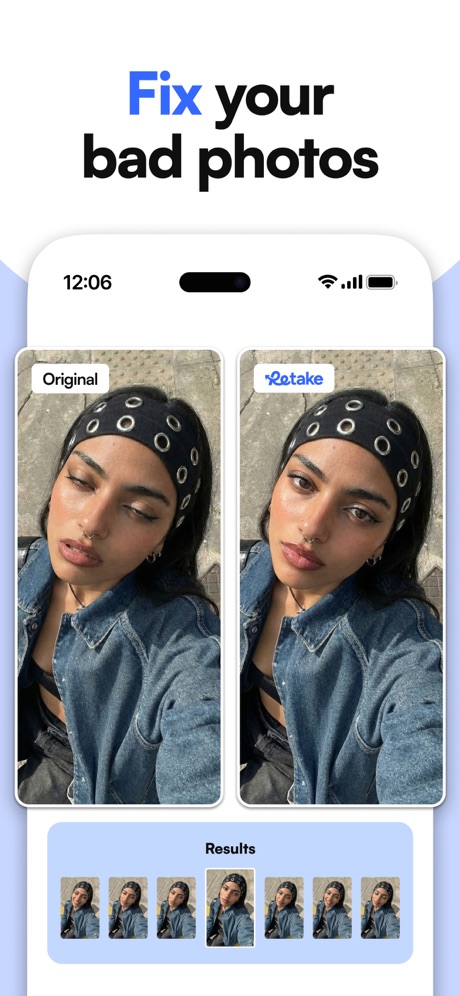
“Fix your bad photos”
What these screenshots say, word for word.
The words on 40 of the 41 that carry any, as each app wrote them.
“Timeless”
soldier lookShots: Photo & Video Generator · #4 · screenshot 4“Design anything”
Canva AI Photo & Video Editor · #6 · screenshot 1“Remove & replace with AI”
Picsart AI Photo Editor, Video · #15 · screenshot 6“AI Video GENERATOR #1”
“Best in AI Videos”AI Video Generator - Vixel · #16 · screenshot 1“The best app for generating images and videos.”
Create anything you can imagine with AI-powered image, video and audio. No learning curve required.Runway: AI Image & Video · #19 · screenshot 1“Keep it in the Circle”
Share PrivatelyPhotoCircle · #22 · screenshot 1“The pro-quality photo app for everyone.”
Lightroom: AI Photo Editor · #23 · screenshot 1“Rediscover your best moments”
Amazon Photos: Photo & Video · #25 · screenshot 3“Always Connected”
Spend less time scheduling and more time together with technology built for families.Skylight App · #34 · screenshot 1“D3D”
Samples by @Alissa boothDazz Cam - Vintage Camera · #35 · screenshot 3“Edit videos instantly with AI Edit”
Captions: AI Edits Your Video · #39 · screenshot 1“Fix your bad photos”
Retake AI Face & Selfie Editor · #48 · screenshot 4“Layouts For All Occasions”
PicCollage: Magic Photo Editor · #51 · screenshot 1“New aesthetic: relight effects”
Prequel: Photo & Video Editor · #52 · screenshot 3“The full experience”
Frameo · #54 · screenshot 1“QUESTS”
Follow new quests and get new rewardsMedal - Game Clipping · #59 · screenshot 4“Auto Video”
in One ClickAI Catch: AI Video Generator · #60 · screenshot 4“AI edits like your favorite creators”
AI Avatar Generator - HeyGen · #61 · screenshot 2“CATCHY FX AND FILTERS”
Trendy Effects 🔥Vids AI - Reels Video Editor · #62 · screenshot 3“DANCE CHALLENGE”
Toonapp: AI Video & Toon Photo · #69 · screenshot 2“AI Photo Editor Smart & Precise”
AI Photo Generator: ARTA · #73 · screenshot 3“Flight Interface”
Effortless Aerial PhotographyDJI Fly · #79 · screenshot 1“SCREEN SHARE”
SO THEY SEE WHAT YOU SEEKICK - Go Live · #80 · screenshot 4“Bring Out Your Natural Best”
AI Mirror: AI Photo Editor · #81 · screenshot 4“CAPTURE FOOTAGE AND VIEW IT LATER”
Tactacam REVEAL · #87 · screenshot 3“Retouch photos instantly.”
Adobe Photoshop: Photo Editor · #89 · screenshot 1“Tabs”
MultitaskingVideo Lite · #91 · screenshot 5“Secure media-sharing for family, education, nonprofits, businesses”
PhotoCircle · #22 · screenshot 2“Your photos in every room”
"Alexa, show my photos."Amazon Photos: Photo & Video · #25 · screenshot 4“None ProRAW Sharpness Removal RAW Sharpness Removal HDR Removal Original”
Dazz Cam - Vintage Camera · #35 · screenshot 6“Make videos like your favorite creators”
Captions: AI Edits Your Video · #39 · screenshot 6“From phone to frame”
Frameo · #54 · screenshot 2“Speak to your audience in any location”
AI Avatar Generator - HeyGen · #61 · screenshot 3“3D MINI FIGURE”
Toonapp: AI Video & Toon Photo · #69 · screenshot 5“QuickTransfer”
Wireless Content Transferred Swiftly to Your PhoneDJI Fly · #79 · screenshot 2“Make new edits instantly blend in.”
Adobe Photoshop: Photo Editor · #89 · screenshot 4“CREATE AND SHARE YOUR CIRCLE”
Set up a private circle. Invite via link or QR code.PhotoCircle · #22 · screenshot 3“Your photos everywhere”
Amazon Photos: Photo & Video · #25 · screenshot 5“Designed to protect your privacy”
Frameo secures your memories with industry-leading protection and complianceFrameo · #54 · screenshot 6“KEEP YOUR PHOTOS PRIVATE”
Only invited members can join your Circles.PhotoCircle · #22 · screenshot 4
Top ten Photo & Video apps that do it.
- #4Shots: Photo & Video Generator1 of its 6 screenshots
- #6Canva AI Photo & Video Editor1 of its 6 screenshots
The same tactic in other categories.
| Category | Apps that do it | Screenshots | Top ten |
|---|---|---|---|
| Graphics & Design | 55% 54 of 99 | 15% 87 of 564 | 6 of 10 |
| Entertainment | 40% 40 of 100 | 11% 60 of 544 | 2 of 10 |
| Utilities | 31% 31 of 100 | 10% 54 of 549 | 3 of 10 |
| Education | 27% 27 of 100 | 9% 50 of 555 | 2 of 10 |
| Photo & Video | 27% 27 of 100 | 7% 41 of 566 | 2 of 10 |
| Social Networking | 27% 27 of 100 | 7% 40 of 554 | 2 of 10 |
| Music | 26% 26 of 100 | 7% 38 of 550 | 1 of 10 |
| Food & Drink | 25% 25 of 100 | 7% 39 of 540 | 2 of 10 |
| Health & Fitness | 24% 24 of 100 | 6% 37 of 574 | 2 of 10 |
| Lifestyle | 23% 23 of 100 | 6% 31 of 556 | 4 of 10 |
| Business | 22% 22 of 100 | 5% 30 of 554 | 1 of 10 |
| News | 21% 21 of 98 | 6% 29 of 517 | 2 of 10 |
| Reference | 21% 21 of 100 | 5% 30 of 566 | 1 of 10 |
| Sports | 21% 21 of 100 | 6% 33 of 558 | 1 of 10 |
| Productivity | 20% 20 of 99 | 4% 24 of 551 | 1 of 10 |
| Finance | 20% 20 of 100 | 5% 31 of 581 | 1 of 10 |
| Games | 18% 18 of 100 | 4% 23 of 567 | 1 of 10 |
| Developer Tools | 17% 17 of 100 | 5% 26 of 507 | 3 of 10 |
| Travel | 17% 17 of 100 | 4% 23 of 561 | 4 of 10 |
| Navigation | 15% 15 of 99 | 4% 21 of 566 | 2 of 10 |
| Weather | 13% 13 of 100 | 5% 28 of 555 | 2 of 10 |
| Medical | 12% 12 of 100 | 4% 21 of 548 | 3 of 10 |
| Shopping | 8% 8 of 100 | 2% 11 of 562 | 1 of 10 |
Related tactics.
Often on the same screenshot
- Watch, iPad or Mac beside it22% of these screenshots, against 2% of all Photo & Video screenshots
- Arrows or callouts44% of these screenshots, against 25% of all Photo & Video screenshots
- States a benefit56% of these screenshots, against 39% of all Photo & Video screenshots
- Has a subline39% of these screenshots, against 25% of all Photo & Video screenshots
- Says “you” or “your”34% of these screenshots, against 20% of all Photo & Video screenshots
- A word in a different colour32% of these screenshots, against 21% of all Photo & Video screenshots
More in layout
- Screen fills the picture100%
- A photograph99%
- Words at the top94%
- A person in the picture90%
- Phone drawn89%
- Whole phone shown86%
- Headline readable at thumbnail size64%
- Arrows or callouts58%
- Headline too small to read53%
- Illustration or mascot48%
- Zoomed detail of the UI46%
- No phone, bare screen42%
- A hand holds the phone39%
- Phone cut off at the foot28%
- App icon shown24%
- Words aligned left22%
- Phone cut off at the head12%
- No app screen at all10%
- Watch, iPad or Mac beside it9%
- Words at the bottom8%
- Phone at an angle6%
- Screen is small5%
- Words over the screen3%
- Continues into the next screenshot1%
Questions, answered from the chart.
How many top Photo & Video apps have App Store screenshots with two or more phones?
Which Photo & Video apps have App Store screenshots with two or more phones?
Should my Photo & Video app have App Store screenshots with two or more phones?
See your own app against this.
Pagefully reads your screenshots the same way, and makes a custom product page for each search people type, from your real screens.
Preview your pages