Photo & Video app screenshots with a zoomed-in detail
One part of the screen is enlarged and shown on its own. Enlarging one part of the interface makes a single feature readable at thumbnail size.
From the top 100 free Photo & Video apps on the US App Store, read on October 9, 2026. Screenshots are the developers’ own, shown from Apple’s servers with a link to each app.
The numbers
76 of the 566 Photo & Video screenshots read (13%) do this, across 46 of the top 100 apps (46%). 3 of the top ten do it (30%), against 43 of the other 90 (48%): the top ten do it less than the rest. Of the 23 categories read so far, Photo & Video is 2nd for this. It is most common in Graphics & Design (47% of apps) and least common in Weather (11%).
12 examples from the chart.
12 of the 76 Photo & Video app screenshots with a zoomed-in detail, one from each app, the highest on the chart first.

“Animate”

“Go viral everywhere”

“Various dance styles”

“Viral Video Maker”

“Explore your styles with AI try on”
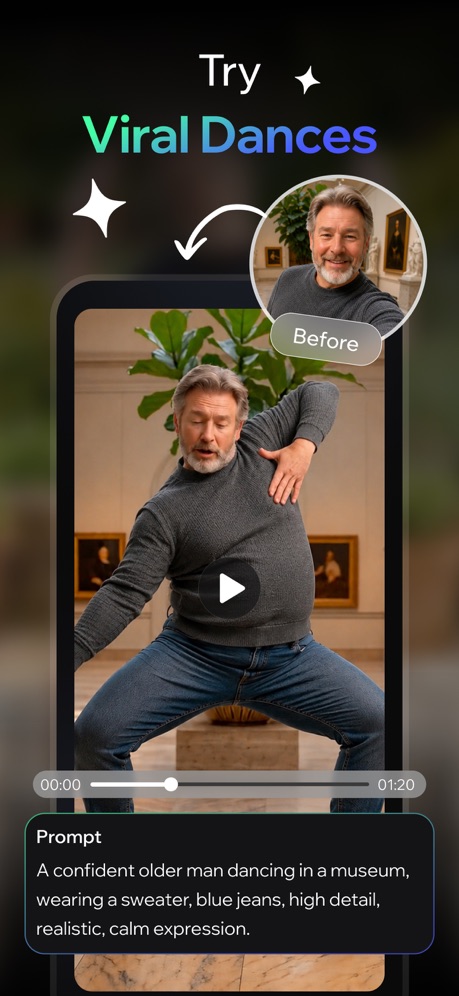
“Try Viral Dances”

“Generate cinematic stories in minutes.”
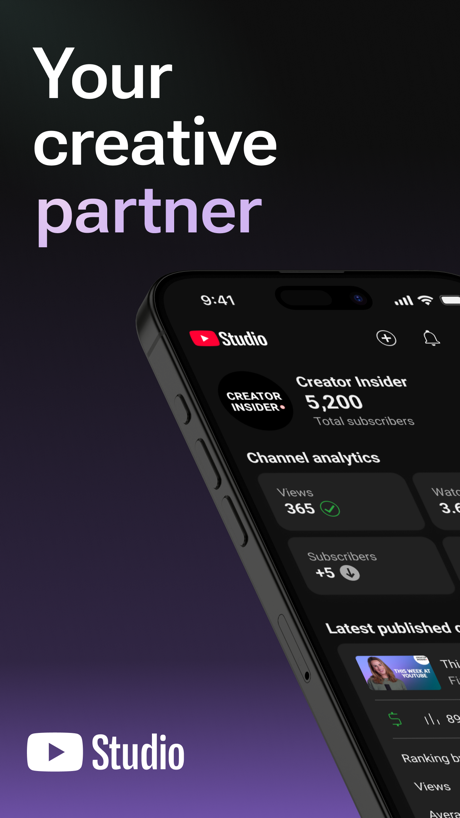
“Your creative partner”

“Extend your photo to fit any size.”

“Find any moment instantly”

“Photo Retouch”

“AI Music Video hotel lobby”
What these screenshots say, word for word.
The words on 40 of the 76 that carry any, as each app wrote them.
“Animate”
any photoShots: Photo & Video Generator · #4 · screenshot 3“Go viral everywhere”
Cantina: AI Video & Characters · #9 · screenshot 5“Various dance styles”
Dance AI - Video Generator · #10 · screenshot 2“Viral Video Maker”
Momo: AI Photo & Video Maker · #14 · screenshot 2“Explore your styles with AI try on”
Picsart AI Photo Editor, Video · #15 · screenshot 1“Try Viral Dances”
AI Video Generator - Vixel · #16 · screenshot 2“Generate cinematic stories in minutes.”
Runway: AI Image & Video · #19 · screenshot 5“Your creative partner”
YouTube Studio · #20 · screenshot 1“Extend your photo to fit any size.”
Lightroom: AI Photo Editor · #23 · screenshot 2“Find any moment instantly”
Amazon Photos: Photo & Video · #25 · screenshot 6“Photo Retouch”
Facetune: Photo & Video Editor · #27 · screenshot 2“AI Music Video hotel lobby”
FaceLab: Face Age, Hair Filter · #28 · screenshot 1“Put on trending makeup with 1 tap”
Hypic - Photo Editor & AI Art · #31 · screenshot 2“Saved From The Drafts”
WayShot:Aesthetic Photo Editor · #33 · screenshot 4“Learn from top- performing creators”
TikTok Studio · #36 · screenshot 4“UNCOMPROMISING CREATIVE CONTROL.”
Snapseed: Photo Editor · #37 · screenshot 6“Access 100+ viral styles”
Captions: AI Edits Your Video · #39 · screenshot 3“One-tap AI Retouch”
Airbrush: Face Photo Editor · #41 · screenshot 1“AI Flash”
Meitu AI Photo & Video Editor · #45 · screenshot 1“A LITTLE DANCE A LOT OF JOY”
ReelMe: AI Photo & Video · #46 · screenshot 1“AI Video Video Generator”
SorAI - AI Video Generator · #47 · screenshot 1“Retake your photos with AI”
Retake AI Face & Selfie Editor · #48 · screenshot 2“Make It HD”
Wink: Video Enhancer & Editor · #49 · screenshot 1“Add Filters And Edit Photos”
PicCollage: Magic Photo Editor · #51 · screenshot 6“Send Greetings on special occations”
Frameo · #54 · screenshot 5“TRENDY MAKEUP”
BeautyPlus-Selfie Photo Editor · #55 · screenshot 4“QUESTS”
Follow new quests and get new rewardsMedal - Game Clipping · #59 · screenshot 4“Birthday Photoshoots”
AI Catch: AI Video Generator · #60 · screenshot 2“90s anime version of yourself.”
Remini - AI Photo Enhancer · #63 · screenshot 2“Text, Tweet, & Share”
GIFs EverywhereGIPHY: The GIF Search Engine · #64 · screenshot 4“Enhance Photo Quality”
AI Photo Video Editor, Enhance · #65 · screenshot 1“Hairstyles by Face Shape”
Glowify - AI Hairstyle Try On · #68 · screenshot 3“TOP TRENDS”
Toonapp: AI Video & Toon Photo · #69 · screenshot 1“Make Edits in a Tap”
AI Photo Generator: ARTA · #73 · screenshot 2“fontmaker”
Now you can use your own HandwhittingFontmaker - Font Keyboard App · #74 · screenshot 1- EDITING TOOLS
“Fine-tune photos and video with professional control”
VSCO: Photo & Video Editor · #77 · screenshot 3 “Natural HD Clarity in 1 Tap”
“20 MILLION EDITS PER MONTH”Citrus 1 Tap Photo Enhancer AI · #78 · screenshot 1“Next-Gen Photo Restoration”
AI Mirror: AI Photo Editor · #81 · screenshot 5“Face Editor”
Fine-tune facial featuresYouCam Makeup: Face Editor · #84 · screenshot 2“Sculpt”
Face fine tuningPeachy - AI Face & Body Editor · #85 · screenshot 3
Top ten Photo & Video apps that do it.
- #4Shots: Photo & Video Generator1 of its 6 screenshots
- #9Cantina: AI Video & Characters1 of its 5 screenshots
- #10Dance AI - Video Generator2 of its 5 screenshots
The same tactic in other categories.
| Category | Apps that do it | Screenshots | Top ten |
|---|---|---|---|
| Graphics & Design | 47% 47 of 99 | 17% 94 of 564 | 4 of 10 |
| Photo & Video | 46% 46 of 100 | 13% 76 of 566 | 3 of 10 |
| Health & Fitness | 32% 32 of 100 | 9% 54 of 574 | 2 of 10 |
| Finance | 29% 29 of 100 | 6% 34 of 581 | 1 of 10 |
| Reference | 26% 26 of 100 | 7% 41 of 566 | 2 of 10 |
| Entertainment | 23% 23 of 100 | 6% 32 of 544 | 1 of 10 |
| Utilities | 23% 23 of 100 | 7% 37 of 549 | 1 of 10 |
| Business | 22% 22 of 100 | 5% 26 of 554 | 1 of 10 |
| Medical | 22% 22 of 100 | 5% 30 of 548 | 1 of 10 |
| Music | 22% 22 of 100 | 5% 30 of 550 | 2 of 10 |
| Shopping | 22% 22 of 100 | 5% 26 of 562 | 3 of 10 |
| Social Networking | 20% 20 of 100 | 4% 23 of 554 | 2 of 10 |
| Lifestyle | 19% 19 of 100 | 5% 26 of 556 | 0 of 10 |
| Travel | 18% 18 of 100 | 5% 28 of 561 | 2 of 10 |
| Productivity | 17% 17 of 99 | 4% 20 of 551 | 0 of 10 |
| Food & Drink | 17% 17 of 100 | 4% 21 of 540 | 2 of 10 |
| Sports | 17% 17 of 100 | 5% 28 of 558 | 2 of 10 |
| Navigation | 15% 15 of 99 | 5% 27 of 566 | 3 of 10 |
| Education | 15% 15 of 100 | 3% 17 of 555 | 1 of 10 |
| News | 13% 13 of 98 | 3% 16 of 517 | 1 of 10 |
| Developer Tools | 13% 13 of 100 | 4% 20 of 507 | 0 of 10 |
| Games | 13% 13 of 100 | 2% 14 of 567 | 0 of 10 |
| Weather | 11% 11 of 100 | 3% 17 of 555 | 1 of 10 |
Related tactics.
Often on the same screenshot
- Arrows or callouts64% of these screenshots, against 25% of all Photo & Video screenshots
- Orange58% of these screenshots, against 33% of all Photo & Video screenshots
- Gradient background62% of these screenshots, against 42% of all Photo & Video screenshots
- Words aligned left25% of these screenshots, against 13% of all Photo & Video screenshots
- A person in the picture83% of these screenshots, against 72% of all Photo & Video screenshots
- Low contrast words28% of these screenshots, against 18% of all Photo & Video screenshots
More in layout
- Screen fills the picture100%
- A photograph99%
- Words at the top94%
- A person in the picture90%
- Phone drawn89%
- Whole phone shown86%
- Headline readable at thumbnail size64%
- Arrows or callouts58%
- Headline too small to read53%
- Illustration or mascot48%
- No phone, bare screen42%
- A hand holds the phone39%
- Phone cut off at the foot28%
- Two or more screens27%
- App icon shown24%
- Words aligned left22%
- Phone cut off at the head12%
- No app screen at all10%
- Watch, iPad or Mac beside it9%
- Words at the bottom8%
- Phone at an angle6%
- Screen is small5%
- Words over the screen3%
- Continues into the next screenshot1%
Questions, answered from the chart.
How many top Photo & Video apps have App Store screenshots with a zoomed-in detail?
Which Photo & Video apps have App Store screenshots with a zoomed-in detail?
Should my Photo & Video app have App Store screenshots with a zoomed-in detail?
See your own app against this.
Pagefully reads your screenshots the same way, and makes a custom product page for each search people type, from your real screens.
Preview your pages