Travel app screenshots with arrows or callouts
Arrows, circles or notes drawn to point at something. A callout points the eye at the one control or number the headline is about.
From the top 100 free Travel apps on the US App Store, read on October 9, 2026. Screenshots are the developers’ own, shown from Apple’s servers with a link to each app.
The numbers
69 of the 561 Travel screenshots read (12%) do this, across 39 of the top 100 apps (39%). 2 of the top ten do it (20%), against 37 of the other 90 (41%): the top ten do it less than the rest. Of the 23 categories read so far, Travel is 12th for this. It is most common in Graphics & Design (70% of apps) and least common in Developer Tools (21%).
12 examples from the chart.
12 of the 69 Travel app screenshots with arrows or callouts, one from each app, the highest on the chart first.

“Confirm your pickup spot”

“Upgrade with Priority Boarding.*”

“Bundle & Save on flights and hotels*”

“Turn your phone into your key”

“Become a host and start your car sharing business”
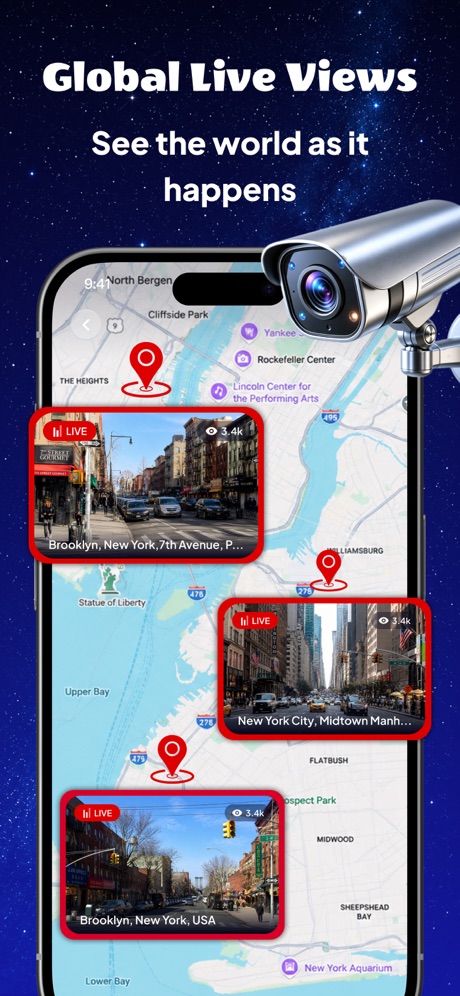
“Global Live Views”

“Price Drop Alerts”

“City for everyone”

“Enjoy free cancellation options”
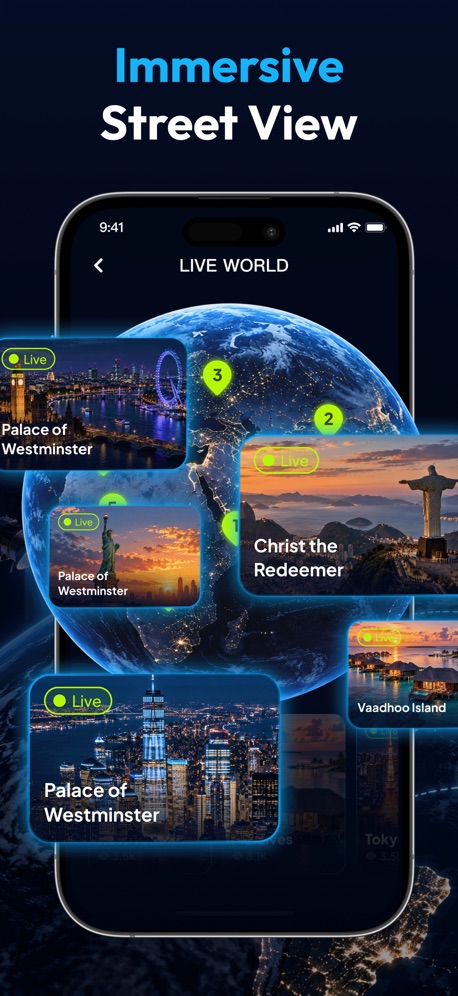
“Immersive Street View”

“Select the best options for your road trip”

“One-stop travel platform.”
What these screenshots say, word for word.
The words on 40 of the 68 that carry any, as each app wrote them.
“Confirm your pickup spot”
Uber - Rides, Eats, Hotels · #1 · screenshot 6“Upgrade with Priority Boarding.*”
Southwest Airlines: Travel App · #6 · screenshot 5“Bundle & Save on flights and hotels*”
Expedia: Hotels, Flights, Cars · #12 · screenshot 2“Turn your phone into your key”
Marriott Bonvoy: Book Hotels · #14 · screenshot 4“Become a host and start your car sharing business”
Turo — Better car rental · #15 · screenshot 6“Global Live Views”
See the world as it happensLocaris – GPS World Map · #19 · screenshot 1“Price Drop Alerts”
Never miss a flight dealPriceline - Hotel, Car, Flight · #21 · screenshot 3“City for everyone”
Lime - #RideGreen · #22 · screenshot 5“Enjoy free cancellation options”
Free cancellation until Jun 5Vrbo: Vacation Rentals · #23 · screenshot 6“Immersive Street View”
OrbiScope · #29 · screenshot 3“Select the best options for your road trip”
Hertz Rental Car, SUV, Van · #34 · screenshot 6“One-stop travel platform.”
By your side 24/7Trip.com: Book Flights, Hotels · #35 · screenshot 1“It's your journey”
Zoox · #38 · screenshot 5- STATUS UPDATES
“Track your trip with real-time updates”
Capital One Travel · #41 · screenshot 2 “Deal Alert: Save up to 43¢ per gallon”
Tap into stations to activate the dealGasBuddy: Find & Pay for Gas · #45 · screenshot 2“Found a hotel? Tap.”
Click ⤴︎ Share on the listing page, then tap TravelArrow Hotel Unlocker shortcutTravelArrow · #46 · screenshot 2“Book Travel”
Amex Travel · #47 · screenshot 3“NAVIGATE OUR UNIVERSE”
Find attraction wait times and more on our dynamic digital park map.Universal Studios Hollywood™ · #52 · screenshot 3“Change of plan? No problem!”
Free cancellation up to 24 hours before your activity.Viator Tours & Attractions · #56 · screenshot 4“Have a Seriously Nice flight with”
Breeze Airways · #57 · screenshot 4“Book hotels, earn rewards”
Hotels.com: Book Hotel Deals · #59 · screenshot 1“Millions of pet parents agree, Rover is trusted worldwide”
“I was nervous to leave Sam with strangers, but my worries quickly faded. Going forward Rover will be my first choice for pet sitting. – Molly S.”Rover – Pet Sitters · #61 · screenshot 2“Check In for a Shower”
Love's Rewards · #64 · screenshot 1“Shared mobility for every need.”
SIXT rent, share, ride & plus · #67 · screenshot 4“Skip the Line”
Paperless e-ticketsKlook: Travel & Activities · #69 · screenshot 3“Get alerts when flight prices change”
Skyscanner Flights & Travel · #70 · screenshot 5“Live Activities Dynamic Island”
Track your flight status on your lock and home screenFlighty – Live Flight Tracker · #71 · screenshot 3“Your next flight at your fingertips”
British Airways · #74 · screenshot 6“Easily import your flight and hotel reservations”
Wanderlog - Travel Planner · #79 · screenshot 3“Transit info straight from the source”
The Official MTA App · #83 · screenshot 1“Verify DMV Issued Card”
Take out your DMV issued Driver's License or Identity Card to capture a picture of the front and back of the card using your phone camera.CA DMV Wallet · #84 · screenshot 2“One eSIM for all your trips”
Truly Unlimited DataHolafly eSIM: Unlimited Data · #86 · screenshot 2- Powered by ✨ AI
“Instant Alerts”
Fuel Leak "We went through a pretty large flock of birds at 10,000 feet"“We went through a pretty large flock of birds at 10,000 feet”ATC - Live Air Traffic Radio · #88 · screenshot 2 “Most Taxis Available”
throughout Japan* (Tokyo / Osaka / Nagoya...etc)GO / Taxi app for Japan visit · #91 · screenshot 2“Unlimited Plans,”
endless mobile dataSaily: eSIM Data for Travel · #95 · screenshot 2“Choose travel dates”
trivago: Compare hotel prices · #96 · screenshot 2- AI Translator
“Speak Any Language, Anywhere”
AI Translator:Voice&Talk · #97 · screenshot 1 “First App Booking? Get up to 17% OFF”
*Valid for hotel and property bookings onlyAgoda: Cheap Flights & Hotels · #99 · screenshot 1“Earn rewards on your trip”
Expedia: Hotels, Flights, Cars · #12 · screenshot 3“Flight Tickets. Choose from 680+ airlines”
Trip.com: Book Flights, Hotels · #35 · screenshot 2
Top ten Travel apps that do it.
- #1Uber - Rides, Eats, Hotels1 of its 6 screenshots
- #6Southwest Airlines: Travel App1 of its 6 screenshots
The same tactic in other categories.
| Category | Apps that do it | Screenshots | Top ten |
|---|---|---|---|
| Graphics & Design | 70% 69 of 99 | 33% 186 of 564 | 5 of 10 |
| Photo & Video | 58% 58 of 100 | 25% 140 of 566 | 6 of 10 |
| Reference | 53% 53 of 100 | 22% 122 of 566 | 7 of 10 |
| Health & Fitness | 52% 52 of 100 | 19% 108 of 574 | 8 of 10 |
| Education | 50% 50 of 100 | 18% 98 of 555 | 5 of 10 |
| Social Networking | 49% 49 of 100 | 17% 96 of 554 | 5 of 10 |
| Utilities | 48% 48 of 100 | 18% 100 of 549 | 3 of 10 |
| Finance | 47% 47 of 100 | 14% 80 of 581 | 7 of 10 |
| Lifestyle | 46% 46 of 100 | 15% 86 of 556 | 5 of 10 |
| Navigation | 45% 45 of 99 | 17% 96 of 566 | 4 of 10 |
| Productivity | 45% 45 of 99 | 15% 82 of 551 | 2 of 10 |
| Entertainment | 39% 39 of 100 | 11% 61 of 544 | 4 of 10 |
| Travel | 39% 39 of 100 | 12% 69 of 561 | 2 of 10 |
| Music | 38% 38 of 100 | 14% 75 of 550 | 2 of 10 |
| Shopping | 38% 38 of 100 | 15% 85 of 562 | 6 of 10 |
| Food & Drink | 37% 37 of 100 | 12% 67 of 540 | 5 of 10 |
| Sports | 36% 36 of 100 | 11% 63 of 558 | 3 of 10 |
| Business | 35% 35 of 100 | 12% 69 of 554 | 2 of 10 |
| Games | 35% 35 of 100 | 8% 48 of 567 | 2 of 10 |
| Weather | 35% 35 of 100 | 12% 67 of 555 | 3 of 10 |
| Medical | 30% 30 of 100 | 9% 47 of 548 | 2 of 10 |
| News | 23% 23 of 98 | 7% 38 of 517 | 2 of 10 |
| Developer Tools | 21% 21 of 100 | 7% 35 of 507 | 2 of 10 |
Related tactics.
Often on the same screenshot
- Badge30% of these screenshots, against 12% of all Travel screenshots
- Star rating shown25% of these screenshots, against 11% of all Travel screenshots
- Headline under five words57% of these screenshots, against 43% of all Travel screenshots
- Leads with a feature64% of these screenshots, against 50% of all Travel screenshots
- Headline readable at thumbnail size49% of these screenshots, against 37% of all Travel screenshots
- Has a subline38% of these screenshots, against 25% of all Travel screenshots
More in layout
- Phone drawn99%
- Screen fills the picture97%
- Words at the top95%
- A photograph94%
- Whole phone shown92%
- Headline readable at thumbnail size79%
- Illustration or mascot69%
- A person in the picture55%
- Headline too small to read48%
- Phone cut off at the foot47%
- Words aligned left41%
- App icon shown40%
- No phone, bare screen32%
- Phone cut off at the head24%
- Words at the bottom22%
- Phone at an angle21%
- Screen is small21%
- Zoomed detail of the UI18%
- Two or more screens17%
- A hand holds the phone15%
- No app screen at all15%
- Words over the screen13%
- Watch, iPad or Mac beside it6%
- Continues into the next screenshot2%
Questions, answered from the chart.
How many top Travel apps have App Store screenshots with arrows or callouts?
Which Travel apps have App Store screenshots with arrows or callouts?
Should my Travel app have App Store screenshots with arrows or callouts?
See your own app against this.
Pagefully reads your screenshots the same way, and makes a custom product page for each search people type, from your real screens.
Preview your pages