Pagefully has three plans: Free, the Pack and Pro. A plan belongs to one app. If you have three apps, each has its own plan and its own payment. Prices are in US dollars. The pricing page has the same numbers; Plan limits has how each limit shows in the app.
Free
For seeing what one focused page does for your app.
| Price | $0, no card |
|---|---|
| Pages | 1, made from your app and sent to App Store Connect |
| Revisions | 1 for the page |
| Refresh | None by itself. You can read your listing again by hand. |
| Competitors | Follow up to 20. No automatic checks. |
| Languages | Your page in one language |
| After | The page is yours to keep. It stays live. |
Pack
For a launch or a campaign. Pay once, no subscription.
| Price | $49 once, for one app |
|---|---|
| Pages | 10 in total for the app, ever. The free page is one of the 10, and a deleted page still counts. |
| Revisions | 2 for each page |
| Refresh | None by itself. Pages stay as they were made. |
| Competitors | Follow up to 20. No automatic checks. |
| Languages | Each page in one language |
| After | Nothing renews. Your pages stay live. A second Pack is not sold for the same app. |
Pro
For apps on Apple Ads or relying on search, with every page kept current.
| Price | $29 a month billed yearly ($348), or $59 a month billed monthly |
|---|---|
| Pages | Up to 70 for the app, Apple’s limit. Pro counts the pages you hold, so a deleted page makes room. |
| New pages | No monthly count on yearly billing. On monthly billing, 15 new pages in each billing month; unused ones do not carry over. |
| Revisions | As many as you like |
| Refresh | Your listing and reviews are read again every week, and your pages are redrawn from the new screens when your app changes. |
| Competitors | Follow up to 20. The first 5 are checked every 3 days, and you get an email when one changes its page. |
| Languages | Every page in each language of your listing |
| After | Renews until you cancel. Your pages stay live after it ends. |
Side by side
| Free | Pack | Pro | |
|---|---|---|---|
| Price | $0 | $49 once | $29 a month billed yearly ($348), or $59 monthly |
| Live pages | 1 | 10 (includes the free one) | Up to 70, Apple’s limit |
| New pages | 1 | 10 in total, ever | No count on yearly; 15 a month on monthly |
| Revisions per page | 1 | 2 | As many as you like |
| Redrawn when your app changes | No | No | Yes, read again every week |
| Competitors you can follow | 20 | 20 | 20 |
| Competitors checked for changes | No | No | 5, every 3 days |
| Languages | One | One | Each language of your listing |
| Pages after you stop paying | Stay live | Stay live | Stay live |
Per app, always
- The Plan screen opens under one app. Its header says Each app has its own plan, in US dollars, and the plan cards say Prices are for one app.
- Buying the Pack for one app does not give another app any pages. Starting Pro for one app does not change another.
- On Settings, under Apps, each app shows its plan beside its name, with See plans, Move to Pro or Plan.
- If you manage several apps, write to hello@pagefully.com about team pricing.
What the Plan screen shows
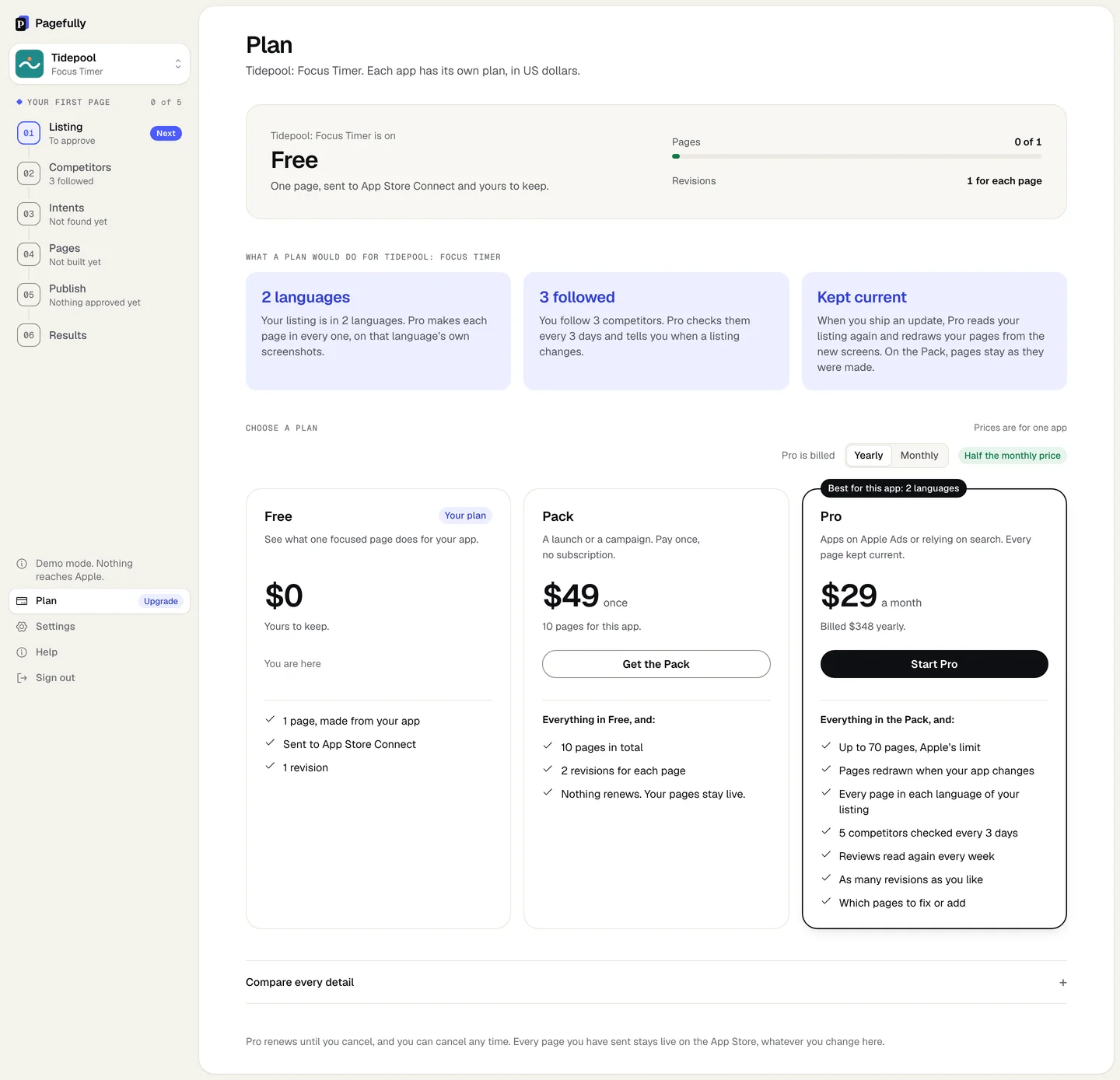
Click Plan at the foot of the sidebar, or See plans on the Free plan card. The screen reads from top to bottom:
| The plan | {app} is on followed by Free, Pack, Pro, billed yearly or Pro, billed monthly, with one line under it: when it was bought, when it renews, or when it ends. |
|---|---|
| The meters | Pages as made of allowed, such as Pages 0 of 1; on Pro billed monthly, New pages this month of 15 and the date the count starts again; Revisions as 1 for each page, 2 for each page or As many as you like. |
| What a plan would do | Under What a plan would do for {app}: how many of the app’s planned pages each plan makes, its languages, the competitors you follow, and what happens when you ship an update. Only lines true of this app are shown. |
| The cards | Under Choose a plan: the Yearly / Monthly choice for how Pro is billed, then Free, Pack with Get the Pack, and Pro with Start Pro. A Your plan pill marks the one the app is on, and a tab such as Best for this app marks the one that suits the app’s own numbers. |
| The detail | Compare every detail opens the full table, with your column marked Yours. |
| Billing | On a paid Pro, Manage billing opens the billing portal. See Invoices, receipts and your payment method. |
| Billing off | Where plans cannot be bought on this deployment, the screen says Plans cannot be bought here yet. Write to hello@pagefully.com and we will set yours. and the cards have no buttons. |
Notes
- A page counts when it is made. On Free and the Pack, deleting a page does not give the slot back.
- A revision is any send of a page Apple already holds. Editing before the first send is free.
- A plan we give an app by hand says Given to this app by us. There is nothing to pay. It has no billing portal.
- A Pack bought in the last 30 days comes off a first Pro payment: see Putting a Pack towards Pro.
- How to buy or switch: Upgrade or change your plan. What ending Pro changes: Cancel Pro.