The link is usually in spam or a promotions tab, or the address was typed with a slip. The email comes from pagefully.com with the subject “Your Pagefully sign-in link”, or “Confirm your email to start with Pagefully” the first time. It works once and expires in an hour.
What you’re seeing
- The notice “Check your inbox.” with “We sent a link to you@studio.com. It expires in an hour.”, and nothing arrives.
- “That link did not work. Request a new one.” after opening a link.
- “Could not send the link. Try again in a minute.”
- On sign-up only: “That address is from a throwaway inbox, which we cannot make an account for. Use the email you work from.” or “A few accounts have been made from here today, which is as many as we allow in a day. Try again tomorrow, or write to hello@pagefully.com.”
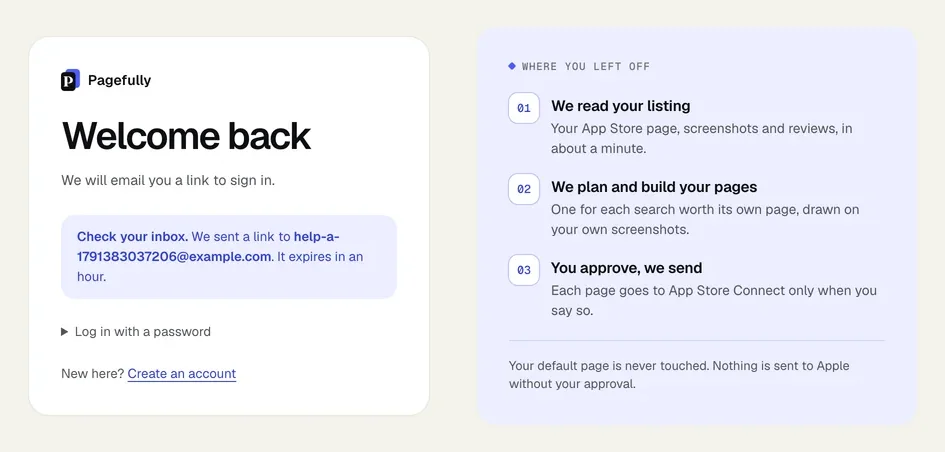
Why it happens
The notice looks the same for every address, so a slip in the address is not pointed out. A link is for one use and one hour: one opened by a mail program’s link check, or opened twice, reads “That link did not work.” Corporate mail filters sometimes hold mail from a new sender. A form filled and sent by a browser tool in under two seconds is treated as automated, and nothing is sent.
How to fix it
- Look in spam, junk and any promotions or updates tab.Search your mail for “Pagefully”. The sender is at pagefully.com.
- Check the address in the notice, letter by letter.If it is wrong, click Log in and type it again.
- Ask for a new link.On Log in, enter your email and click Email me a link. Use the newest email: a link works once and only for an hour.
- Type the address and press the button yourself.A form submitted by a tool as soon as it opens sends nothing.
- Wait a few minutes before asking again.At busy times a link can take a few minutes to arrive. “Could not send the link. Try again in a minute.” means the email could not be sent at all; wait and try again.
- On a work address, ask whoever runs your mail to allow pagefully.com.Mail from a new sender is sometimes held or quarantined before it reaches you.
- Signing up? Use the email you work from.Addresses from throwaway inboxes cannot open an account.
There is no password to reset: the link is the way in. Sign in with a link has the normal path, and Change your email address what to do if you no longer have the address.
Still not working?
Write to hello@pagefully.com from another address you can read, and include:
- the address you tried to sign in with
- the time you asked for the link
- whether it is a work address with its own mail filtering
- the sentence on the screen, if there was one